zokku dj beta
DJ app for Windows, macOS and Linux
Know what fits next. Play B2B with up to eight DJs.
$29 instead of $99, until 1 DecemberOut now
zokku dj is in beta: it is not the final product yet, and it will be updated until the final version.
Overview
A DJ app made by ZOKKU. Play B2B with up to eight DJs, see how every track fits what's playing, get a score for every transition, plug into your live stream and bring your library from the software you already use.
- B2B Up to 8 DJs on the same network
- Fits next Every track scored from 0 to 100
- Coach A score for every transition, and what to fix
- Live stream Twitch and Kick chat, an overlay for OBS
- Requests From phones in the room and from the chat
- Library Traktor Cues, loops, grids and playlists, in and back out again
B2B
Eight DJs.
One beat. One room.
Open a room on your network and up to seven friends join with their own zokku dj. Everyone plays the same set on the same beat, hands the decks around and talks while they play.
An example room · point at a seat
- Host opens the room
- DJ plays and takes a part
- Guest watches and listens
-
1 of 4
Same beat everywhere.
Play, cues, loops and jumps land on the next shared beat, on every computer. No audio travels: each computer plays the set on its own engine.
-
2 of 4
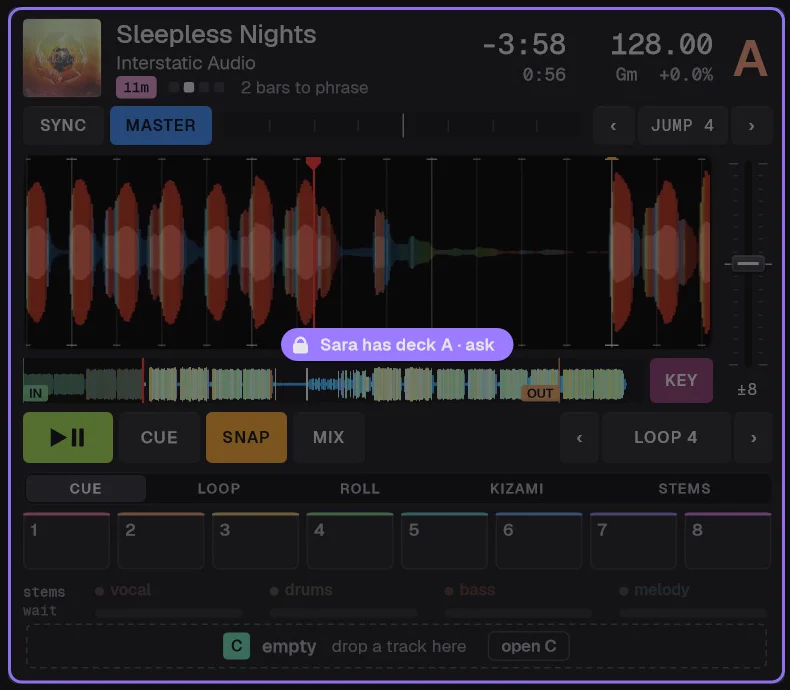
See who touches what.
Initials on every control a DJ moves. Lock a deck, a mixer channel, the crossfader, an effects unit or the master, and the others see whose it is, and ask.
-
3 of 4
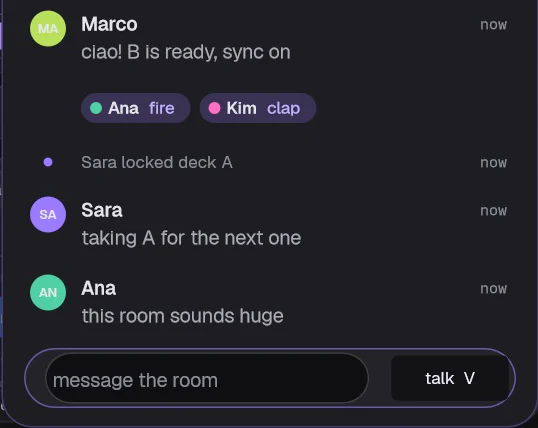
A room with a chat.
Who is in, who has which deck, messages, reactions and the next track proposed. Voice goes to your headphones, never to the master.
-


4 of 4
Your set folder travels.
Pick a playlist: the tracks the others don't have reach them, encrypted, with their grid, cues and analysis, and are deleted when the set ends.
Fits next
Know what fits next.
Every track in your library is scored against what's playing, from 0 to 100, with the reason in words. Stop guessing your next track.
-
One number, three reasons
Point at a reason to see what it checks.
+KeyThe same key, or one that sits next to it.+TempoClose to what's playing: a few percent.= 92same key · +0.0% · energy upEnergyThe same level, or one step up.- Sort
- Sort the whole library by the score: the best fit on top.
- Filters
- Switch on key match and bpm ±3% to keep only what fits.
- The reason
- Every row says why it fits, in words: relative · +1.6% tempo · energy up.
Coach
A score for every mix.
Mix by hand and the coach listens to every transition. It starts when a second deck can be heard, ends when only one is left, and tells you what to fix.
-
100, minus the penalties
Five checks, one tip for each that fails. Here the phrases were 2 bars apart.
- Beatsin time
- Temposame BPM
- Phrasesoff by 2 bars
- Bassone at a time
- Levelslimiter at rest
80/100
- Beats
- How far apart the two decks are, in milliseconds.
- Tempo
- The gap between the two BPMs.
- Phrases
- How many beats the 8-bar phrases are off.
- Bass
- How long both basslines play together.
- Levels
- How hard the master limiter has to work.
Live stream
Plug in your stream.
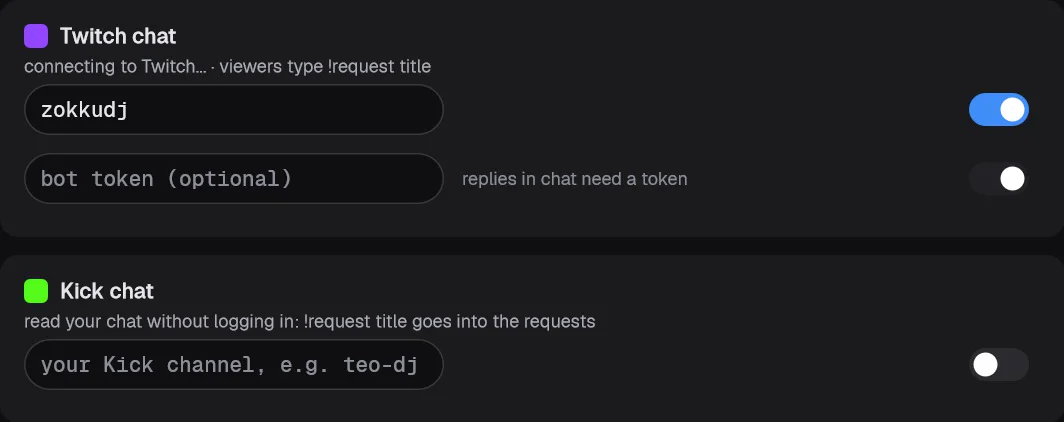
Twitch and Kick chat inside zokku dj, a bot that answers your viewers, and an overlay for OBS that shows what's playing.
- ChatTwitch and Kick, in the app
- Botanswers your viewers
- Overlaya browser source for OBS
- Chat
- Your Twitch and Kick chat, right in the app. Reading it needs no login.
- Commands
- Viewers type !request and a title (!req and !sr work too). It joins your requests, highlighted in the chat and in the bar at the bottom.
- Bot
- It answers in your Twitch chat and tells viewers when their request is coming up next.
- Overlay
- The !request box shows on the stream while requests are open.
Requests
Requests, without the yelling.
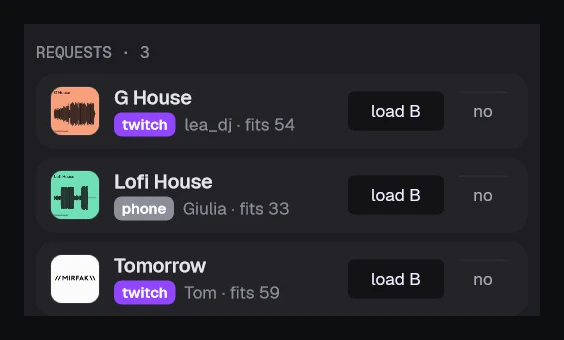
Songs come from phones in the room and from your stream chat, in one list. Each shows who asked, where from and how well it fits what's playing.
-
From a phone to the free deck
- Phone or chatQR or !request
- One listwho, where, the fit
- One clickonto the free deck
- Phones
- Guests on your Wi-Fi scan the QR on a tablet or a projector and type a song and their name. Nothing to install.
- Chat
- !request from Twitch and Kick lands in the same list.
- Fair
- One request every 20 seconds per phone, so nobody floods the list. no takes one off.
- Your phone
- A second screen with the decks, the time left and the requests, each with a done button.
Library
Bring your whole library.
From rekordbox, Serato, Traktor, VirtualDJ and Engine DJ, with cues, loops, grids and playlists, and back out again. The originals are never touched.
It reads
- rekordboxIts library database, read and decrypted in memory, with the beat grid from the analysis files. Or the rekordbox XML export.
- Serato DJThe _Serato_ folder, with its database and crates, and the cues, loops and grid stored in the tags of the audio files.
- Traktorcollection.nml, from every Traktor version found in Documents.
- VirtualDJdatabase.xml, with its folders and playlists.
- Engine DJThe Engine Library database, with grids, cues and loops. Engine Prime 1.x too.
- M3U, M3U8 and PLSA list, or a folder of lists: subfolders become playlist folders.
- iTunes and MusicThe iTunes Music Library.xml file.
zokku dj library
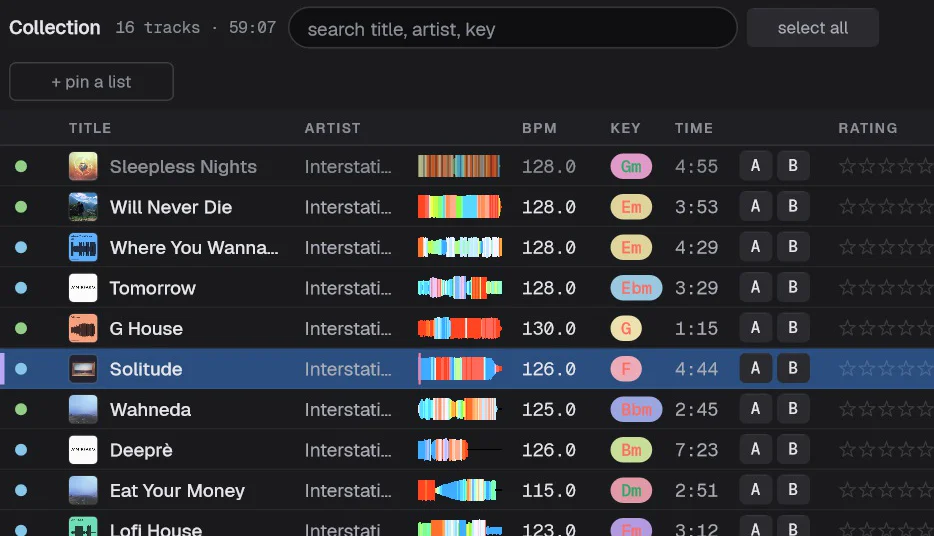
Cues and loops, grids, playlists and tags, with rating and colour.
It writes
- rekordbox XMLOpen it in rekordbox with File > Import. Engine DJ reads it too.
- Serato DJThe database and the crates in the _Serato_ folder you choose; cues, loops and grid can go into the files' tags too.
- Traktorzokku dj.nml, to open with Import Another Collection. Or straight into collection.nml, after a backup.
- VirtualDJdatabase.xml and the playlists as folders.
- M3U8 and PLSOne list per playlist, with relative paths when the tracks sit under it.
- zokku open formatEverything zokku dj knows about your library, without losses.
rekordbox's own database and Engine DJ's are not written: rekordbox imports the XML, and Engine DJ reads rekordbox, Serato and Traktor libraries by itself.
-
See it before it comes in
zokku dj finds your other libraries by itself and shows what arrives before anything changes: new tracks, ones already here, missing files, doubles, cues, grids and playlists.
- fill what is emptyWhat you prepared here stays; only empty fields, cues on free pads and a grid never fixed by hand come in.
- keep oursThe track stays as it is, but joins the imported playlists.
- take theirsTags, rating, colour, grid and cues of the other program replace ours.
-
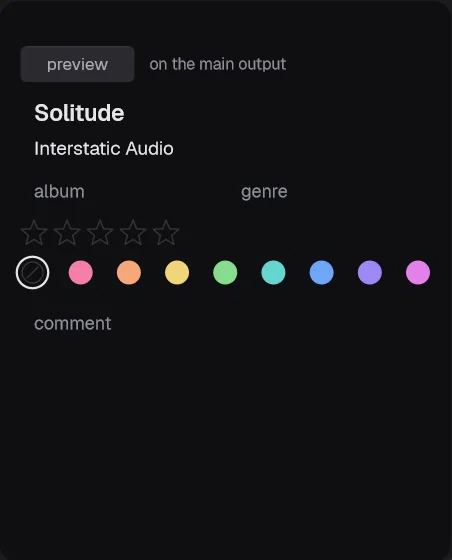
Analysed, sorted, and lists that fill themselves
BPM, grid, key, energy, phrases and cover art for every track. Smart lists keep themselves up to date with rules for BPM, energy, key, tempo near the track on air, words, stars, colour, not played for and added in the last.
-
Prep, right in the library
Hot cues 1 to 16, memory cues, saved loops, mix in and mix out with names and colours; BPM, the first downbeat, half or double, fine nudges and tap. Every change can be undone with ctrl+Z, and goes to the decks, the export and the sync.
- Sync
- Tasks that keep your other programs in step, by hand or every 15 min, 30 min, 1 h or 4 h. An import also runs as soon as the other program saves.
- Safe
- The originals are only read. Before writing over a library, zokku dj makes a copy of it, and keeps the tracks and lists that are not its own.
- Two computers
- Keep a home PC and a laptop in step through a shared folder: Google Drive, OneDrive, Dropbox or a USB stick.
- Preview
- Listen to a track in your headphones before you load it.
And everything a set needs
Decks, effects, pads, stems and the stage view, and transitions you can try in your headphones first.
-
Decks and mixer
Two decks when you want it simple, four when you want more. At four, every deck is the same deck as at two, just smaller.
- Tempo
- Ranges of 6, 8, 10, 16 and 50 %, key lock, and pitch ±12 semitones on its own.
- Sync
- Tempo and phase follow the master deck, with a phase meter on every deck.
- Cues and loops
- 16 hot cues, loops from 1/32 to 32 bars, rolls with slip, beat jumps, quantize.
- Phrases
- Every track split into intro, build, drop, break and outro. The deck tells you drop in 8 bars.
- Mixer
- Gain, 3-band EQ with kill, filter, cue and fader on every channel; a crossfader with 3 curves; a limiter on the master.
- Auto gain
- Every track starts at the same perceived loudness, measured in LUFS.
-
Effects and sampler
Three effects units in time with the decks, one knob each, and a sampler next to them.
- ZOKKU
- vela (echo), ikipump (pump), fuzzo (drive), ascent (riser), kizami (slicer) and tammo, the ZOKKU plugins, built in.
- Built in
- Gate, phaser, flanger, crush, noise, brake, spin and echo out.
- Timing
- From 1/8 to 1 bar, on deck A, deck B or the master.
- Sampler
- tatakit and kitto: 8 sounds per bank, quantized to the master's 16th notes.
-
Pads
Sixteen pads per deck, with the mode on top of each grid.
- Modes
- Hot cues, loops, rolls, kizami slices, stems and the sampler.
- Hot cues
- Set on the fly, each in its own colour, on screen and on your controller's pads.
- Loops
- From 1/4 to 32 bars, one press each.
- Slices
- kizami plays slices of a 2-bar window, with slip: let go and the track carries on where it would have been.
-
Stage view
The palco puts the pair of decks big, for playing rather than browsing. Key 4 opens it.
- Pads
- Big pads in 6 modes on both decks, with the tempo fader beside them.
- Stems
- The stem crossfader, with glide and moves: bass swap, vocal over, drums swap, reset.
- Effects
- As pads: hold to play, shift to latch, on the left deck, the master or the right deck.
- Colour
- The background is the pair's colour field, livelier with the music.
-
Stems
Vocal, drums, bass and melody on every deck, split on your computer. Nothing is uploaded.
- Split
- It starts by itself when a track loads, in the background, and is kept on disk for next time.
- Lanes
- Each stem in its own lane, to mute, solo or turn down.
- Crossfader
- The stem crossfader moves each stem from deck A to deck B on its own.
-
Transitions
Let zokku dj plan the mix with you, and try it in your headphones before the room hears it.
- Mix points
- Mix in and mix out on every track, set by you or found from the outro and the phrases.
- Assistant
- Brings the next track in on the phrase, over 4 to 32 bars, and keeps it to 8 when the keys clash.
- Rehearsal
- Plays that transition in your headphones only, while the room keeps hearing the track on air. Touch a fader and it follows your hand.
- Automix
- Plays a playlist on its own, one transition after another.
Specs
Controllers
- Factory maps
- 164: plug in and play, no learning step. See every controller
- Brands
- Pioneer DJ, Denon DJ, Numark, Hercules, Rane, Reloop, Roland, Allen & Heath, Behringer and more
- Traktor Kontrol
- Z1, X1 MK2, F1, S2, S3, S4 MK3 and MX2 over USB, with their lights
- Screens
- zokku dj on Traktor Kontrol D2, Akai Fire, Novation Launchkey MK4 and SL MkIII, and Ableton Push 2
- Plug in
- The app opens by itself when you plug a controller in
- MIDI learn
- For everything else: 14-bit, soft takeover, relative encoders, shift layers and lights
Sound card and DVS
- Drivers
- Any sound card, with WASAPI or ASIO: master, headphones and booth
- Routing
- Deck outputs for an external mixer, an external effect on insert, live inputs on the decks; every card remembers its own
- Timecode
- ZOKKU timecode: the deck follows a record or a CD. 17 min 28 s per side, and zokku dj writes the audio for you to press or burn
Clock and lights
- MIDI clock
- Out at 24 pulses per beat, start and stop with play, on time with the sound
- DMX
- One universe over Art-Net, sACN, Enttec DMX USB Pro or Open DMX
- Shows
- Lights that follow the phrases: soft intros, a build that rises to a strobe in its last 2 bars, a flash on the drop, colours from the track
Recording
- Files
- Your mix in WAV 24-bit or FLAC, in Music/zokku dj, and an MP3 at the end, made in the background
- Tracklist
- For Mixcloud, mm:ss Artist - Title, and a .cue file, written as you play
- Safe
- The files are kept even if the app closes badly
Phone
- Second screen
- Decks, time left, what's next, and the requests with a done button
- The room
- Guests scan the QR and send a song with their name
- Private
- Only you open the DJ page: its key changes at every start
Looks, keys and system
- Looks
- Five: pro, indaco, paper, night and dusk
- Views
- Perform, prep and library; waves, pads, stems and palco on keys 1 to 4
- Shortcuts
- For the whole app: H shows them
- System
- Windows 10 and 11, 64-bit; macOS 11 or later on Apple silicon; Linux x86_64 with glibc 2.35 or newer (Ubuntu 22.04, Debian 12, Fedora 36 or later)
Supported controllers
Plug it in and play: zokku dj comes with its own mapping for each of these.
Pioneer DJ / AlphaTheta 54
- DDJ-200
- DDJ-400
- DDJ-800
- DDJ-1000
- DDJ-1000SRT
- DDJ-FLX2
- DDJ-FLX4
- DDJ-FLX6
- DDJ-FLX10
- DDJ-GRV6
- DDJ-RB
- DDJ-REV1
- DDJ-REV5
- DDJ-REV7
- DDJ-RR
- DDJ-RX
- DDJ-RZ
- DDJ-RZX
- DDJ-S1
- DDJ-SB
- DDJ-SB2
- DDJ-SB3
- DDJ-SP1
- DDJ-SR
- DDJ-SR2
- DDJ-SX
- DDJ-SX2
- DDJ-SX3
- DDJ-SZ
- DDJ-SZ2
- DDJ-WeGO3
- DDJ-WeGO4
- DDJ-XP1
- DDJ-XP2
- DJM-250MK2mixer
- DJM-450mixer
- DJM-750MK2mixer
- DJM-900NXS2mixer
- DJM-A9mixer
- DJM-S3mixer
- DJM-S5mixer
- DJM-S7mixer
- DJM-S9mixer
- DJM-S11mixer
- DJM-TOUR1mixer
- euphoniamixer
- OMNIS-DUO
- OPUS-QUAD
- PLX-CRSS12player
- XDJ-AZ
- XDJ-RR
- XDJ-RX2
- XDJ-RX3
- XDJ-XZ
Hercules 19
- DJ Console 4-Mx
- DJ Console Mk4
- DJ Console RMX2
- DJControl AIR
- DJControl AIR+
- DJControl Compact
- DJControl Inpulse 200
- DJControl Inpulse 300
- DJControl Inpulse 300 MK2
- DJControl Inpulse 500
- DJControl Inpulse T7
- DJControl Instinct
- DJControl Instinct P8
- DJControl Jogvision
- DJControl MIX
- DJControl MP3 e2 / MP3 LE / Glow
- DJControl Starlight
- P32 DJ
- Universal DJ
Numark 18
- DJ2GO
- DJ2GO2 Touch
- iDJ Live II
- Mixstream Pro
- Mixtrack
- Mixtrack (Pro) 3
- Mixtrack (Pro) II
- Mixtrack Platinum
- Mixtrack Platinum FX
- Mixtrack Pro
- Mixtrack Pro FX
- N4
- NS4FX
- NS6II
- NS7
- Omni Control
- Party Mix
- Total Control
Denon DJ 14
- DN-HC4500player
- DN-HD2500player
- DN-HS5500player
- DN-S1200player
- DN-S3700player
- DN-SC2000player
- LC6000 PRIMEplayer
- MC3000
- MC4000
- MC6000MK2
- MC7000
- MCX8000
- Prime 4
- Prime GO
Rane 12
- FOURWindows
- MP2014mixer
- MP2015mixer
- ONEWindows
- ONE MKIIWindows
- Sixty-EightmixerWindows
- Sixty-Fourmixer
- Sixty-Onemixer
- Sixty-Two / Sixty-Two Zmixer
- TTM57mkIImixer
- TwelveplayerWindows
- Twelve MKIIplayerWindows
Reloop 12
- Beatmix 2/4
- Beatpad
- Buddy
- Digital Jockey 2
- Jockey 3 ME
- Mixage
- Mixon 4
- Mixtour
- NEON
- Ready
- Terminal Mix 2/4
- Terminal Mix 8
Native Instruments 11
- Traktor Kontrol D2screen
- Traktor Kontrol F1
- Traktor Kontrol S2 MK2
- Traktor Kontrol S2 MK3
- Traktor Kontrol S3
- Traktor Kontrol S4 MK3
- Traktor Kontrol X1 MK2
- Traktor Kontrol Z1
- Traktor MX2
- Traktor X1 MK3Windows
- Traktor Z1 MK2mixerWindows
Behringer 8
- BCD2000
- BCD3000
- CMD Micro
- CMD MM-1
- CMD PL-1
- CMD Studio 4a
- X-Touch
- X-Touch Extender
Vestax 5
- Spin
- Typhoon
- VCI-100
- VCI-100MKII
- VCI-400
Novation 4
- Launch Control XL 3screen
- Launchkey Mini MK4
- Launchkey MK4screen
- SL MkIIIscreen
Roland 4
- DJ-202
- DJ-505
- DJ-707M
- DJ-808
Allen & Heath 3
- Xone:96mixer
- Xone:DXWindows
- Xone:K1 / K2 / K3
Akai Professional 2
- AMX
- Firescreen
American Audio 2
- VMS2
- VMS4
DJ-Tech 2
- i-Mix Reload
- Mix-101
Gemini 2
- FirstMix
- PMX-10mixerWindows
ION 2
- Discover DJ
- Discover DJ Pro
Mixvibes 2
- U-Mix Control 2
- U-Mix Control Pro 2
Ableton 1
- Push 2screen
Kontrol DJ 1
- KDJ500
Korg 1
- KAOSS DJ
Mixars 1
- PrimoWindows
Stanton 1
- DJC.4
Not in the list yet. Any controller with MIDI can be mapped by hand in zokku dj, and you can ask us about your model at [email protected].
Each one works as soon as you plug it in, with our own mapping: no setup and no learning step. A few need one setting on the controller the first time, and zokku dj tells you which when you plug it in.
mixer and player mark DJ mixers and players (media players and turntables) that send MIDI. screen shows zokku dj on the controller’s own screen. Windows works on Windows only, for now.
Not on the list? Any controller with MIDI can be mapped by hand in the app: open Settings, then midi controllers, and use learn. And tell us the model at [email protected]: we keep adding controllers with our updates.
Play it tonight.
- Buy it once, for $29. The licence goes to your ZOKKU account.
- Download it for your computer and install it.
- Activate: open zokku dj, choose activate, sign in with the same email on the page that opens, and play. Newer versions: press Sign in with the email you used to buy. No password yet? Choose Forgot password on that page.
zokku dj runs on a Windows PC, a Mac or a Linux PC. On a phone you can buy it now, then download it on your computer from this page.
Downloading on Windows: if Edge says the file isn’t commonly downloaded, open its … menu and choose Keep, then Show more and Keep anyway; if Chrome blocks it as suspicious, open its downloads and choose Download suspicious file. First start on Windows: if it says “Windows protected your PC”, choose More info, then Run anyway. On a Mac: if it says it can’t check the app, open System Settings, Privacy & Security, and choose Open Anyway. You do it once.
On Linux: make the AppImage executable once (right-click, Properties, Permissions, or chmod +x), then open it. If it does not start, install FUSE (sudo apt install fuse3) or start it with --appimage-extract-and-run. Prefer a folder? Get the zip and run zokku-dj inside it. Linux is the newest version of zokku dj: tell us how it runs on your machine.
Windows only, for now: the Xone:DX driver and the helper that opens zokku dj when you plug in a controller.
To update, download the new version from this page and install it over the one you have. Your library, playlists and settings stay as they are.
Questions or problems: [email protected]
$29instead of $99, until 1 December
Pay once, no subscription. Two computers per licence. In the EU the same number in euros, VAT included.
zokku dj is in beta: it is not the final product yet, and it will be updated until the final version.
rekordbox, Serato, Traktor, VirtualDJ, Engine DJ, iTunes, Twitch, Kick and OBS Studio, and their logos, belong to their owners. They appear only to say what zokku dj works with, and none of them endorses it.