What it does
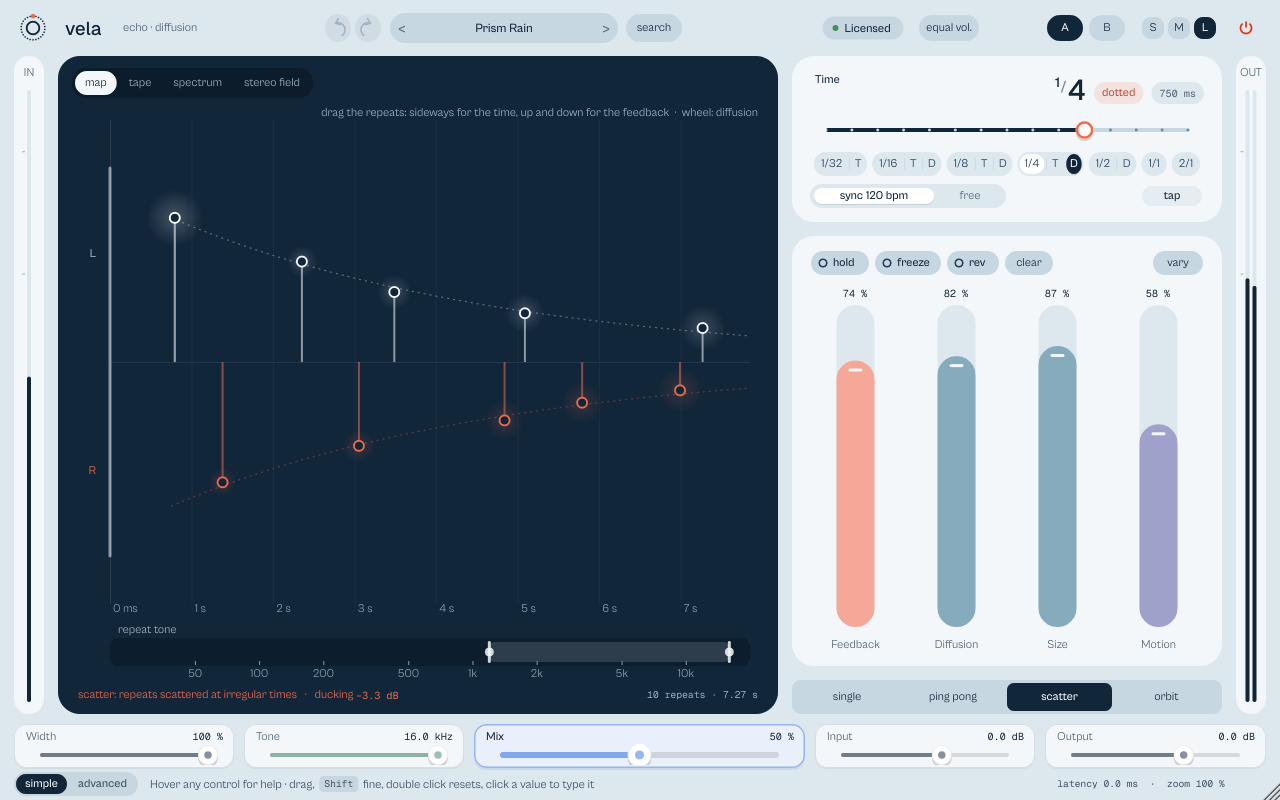
vela is a tempo-synced stereo delay with diffusion, motion and ducking. The echoes step aside while the track plays (or on the kicks of ikipump, kitto and tatakit) and come back in the gaps. Four characters, Clean, Tape, BBD and Lo-fi, and four patterns, Single, Ping pong, Scatter and Orbit.
Stereo delay with diffusion, modulation and ducking. The echoes go down while the track plays (or while a kick arrives over ZOKKU Link) and come back in the gaps.
- Every echo is a stem: drag sideways for time, up and down for feedback.
- Ducking listens to the track, the sidechain, or a kick from ikipump, kitto or tatakit.
- Clean, Tape, BBD and Lo-fi characters. Hold, freeze and reverse.
Quick start
- Pick a division on the time ruler (or switch to free for milliseconds).
- Set Feedback for the number of repeats and Mix for how much you hear.
- Add Diffusion to melt the echoes into a space and Duck to keep them out of the vocal.
The display
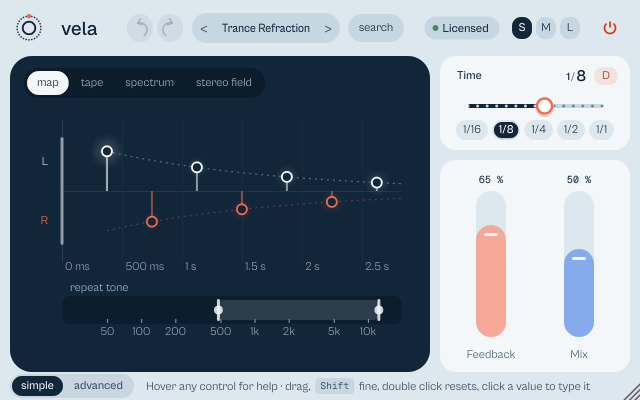
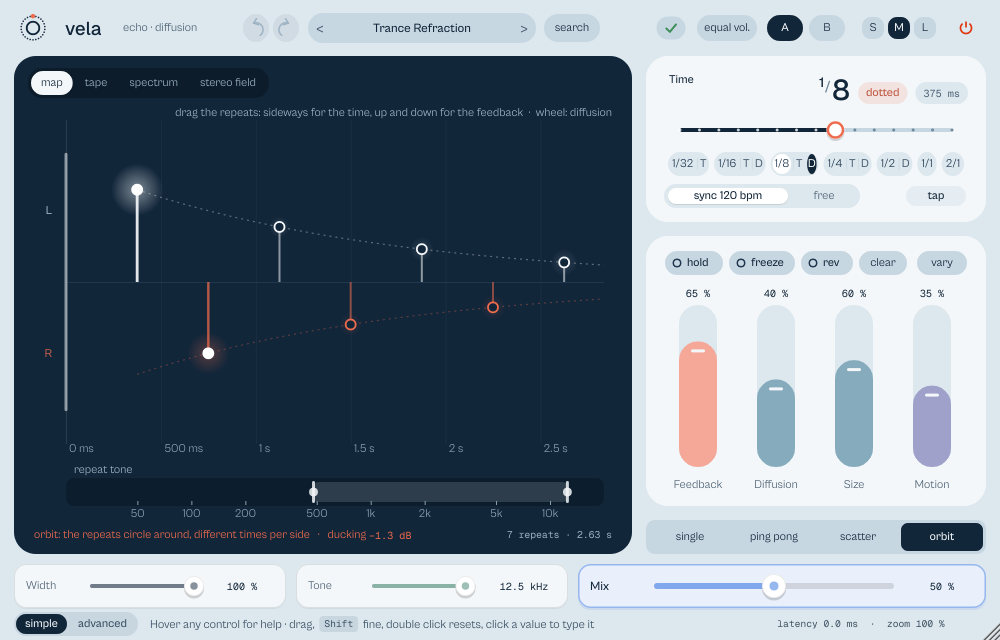
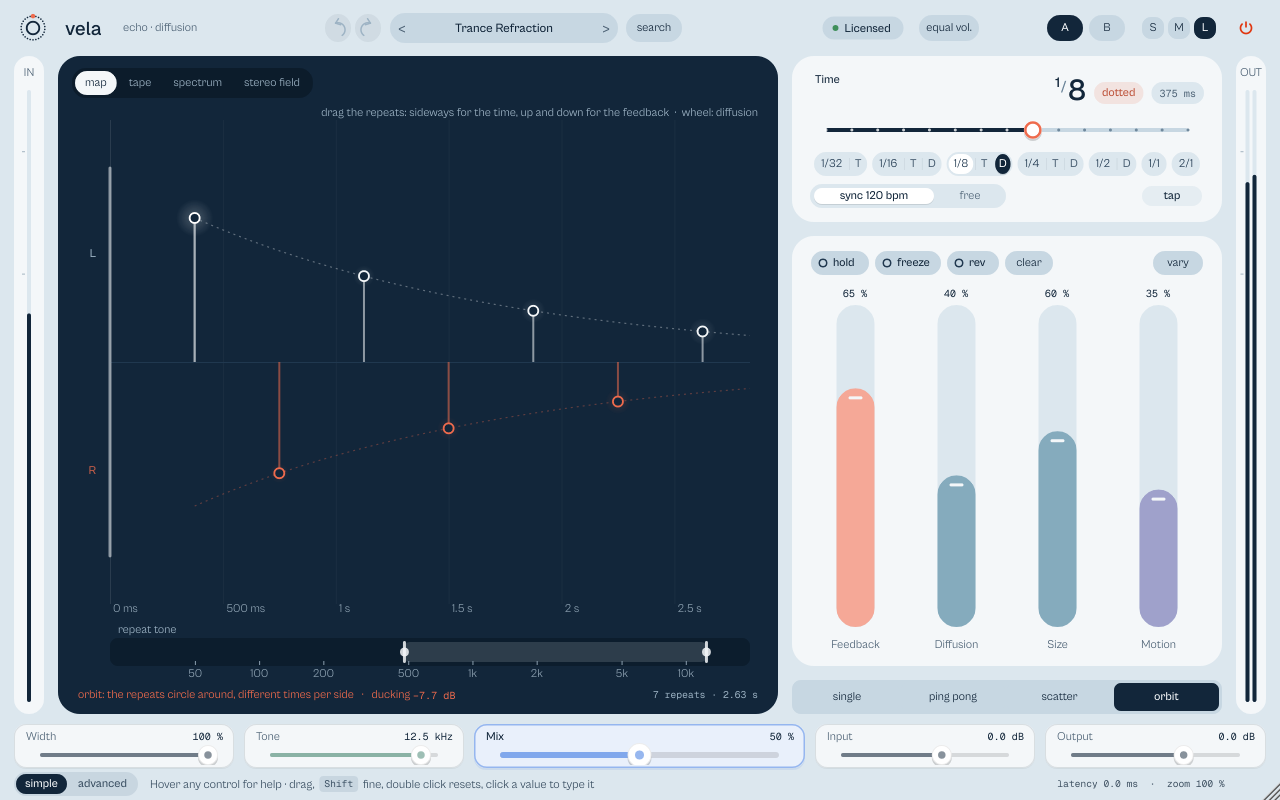
The map shows the real repeats on a time axis: each repeat is a stem with a cap, and it lights up as it sounds. With both sides in use, left sits above and right below; the dotted curve is the decay; the number of repeats and the length of the tail sit bottom right. Drag a cap sideways for time (it snaps to musical values in sync), up and down for feedback (the first cap sets mix); the wheel sets diffusion. Two handles under the map set the low cut and tone of the echoes. The tabs tape, spectrum and stereo field are read-only views. With the display focused (Tab): ↑ ↓ feedback, ← → time, + − diffusion, 1 to 4 the view.
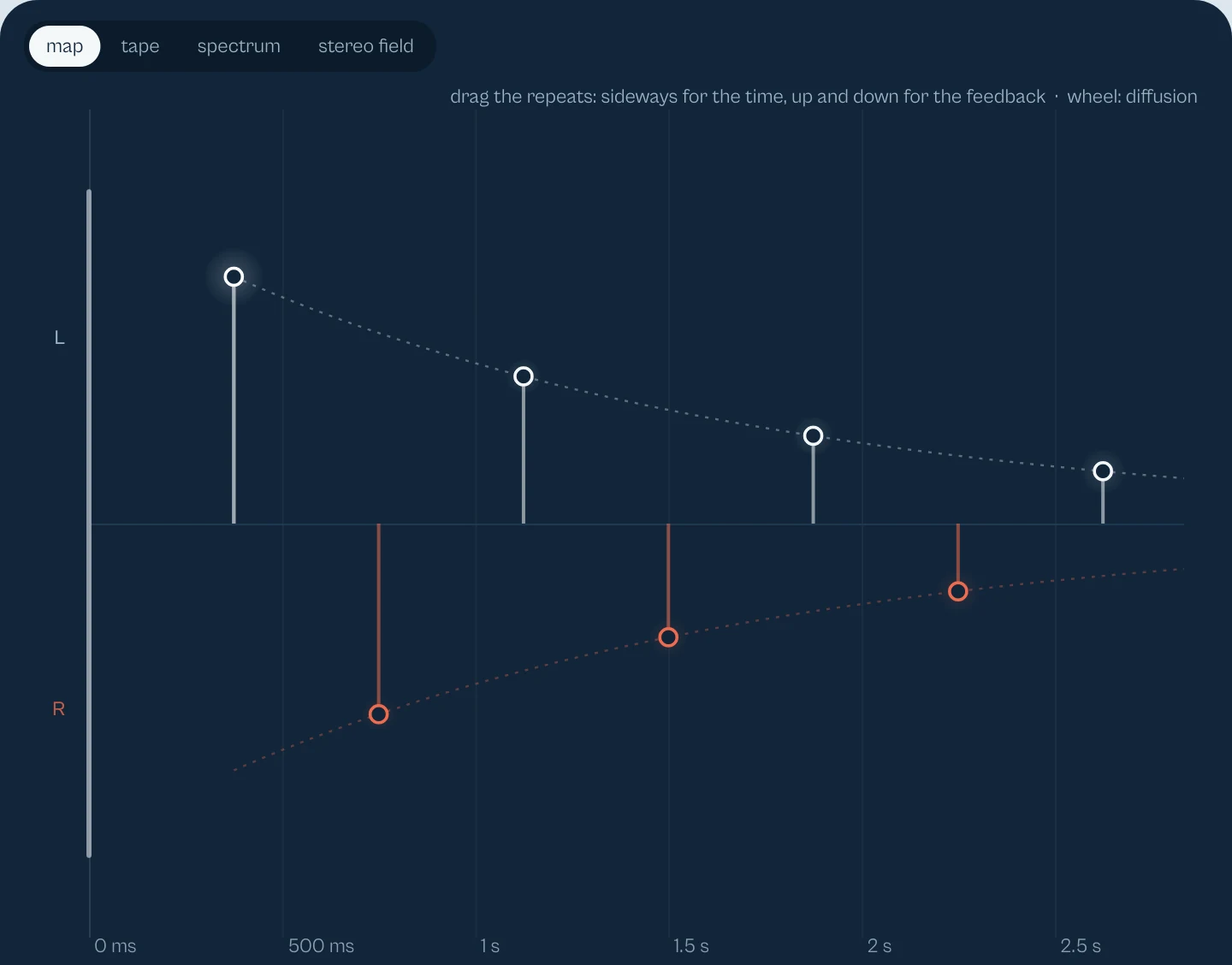

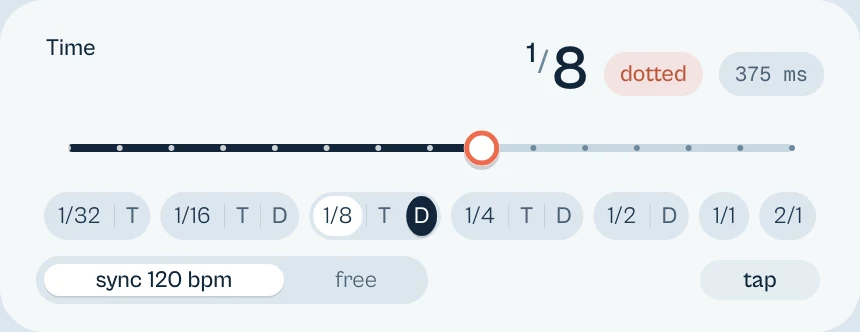
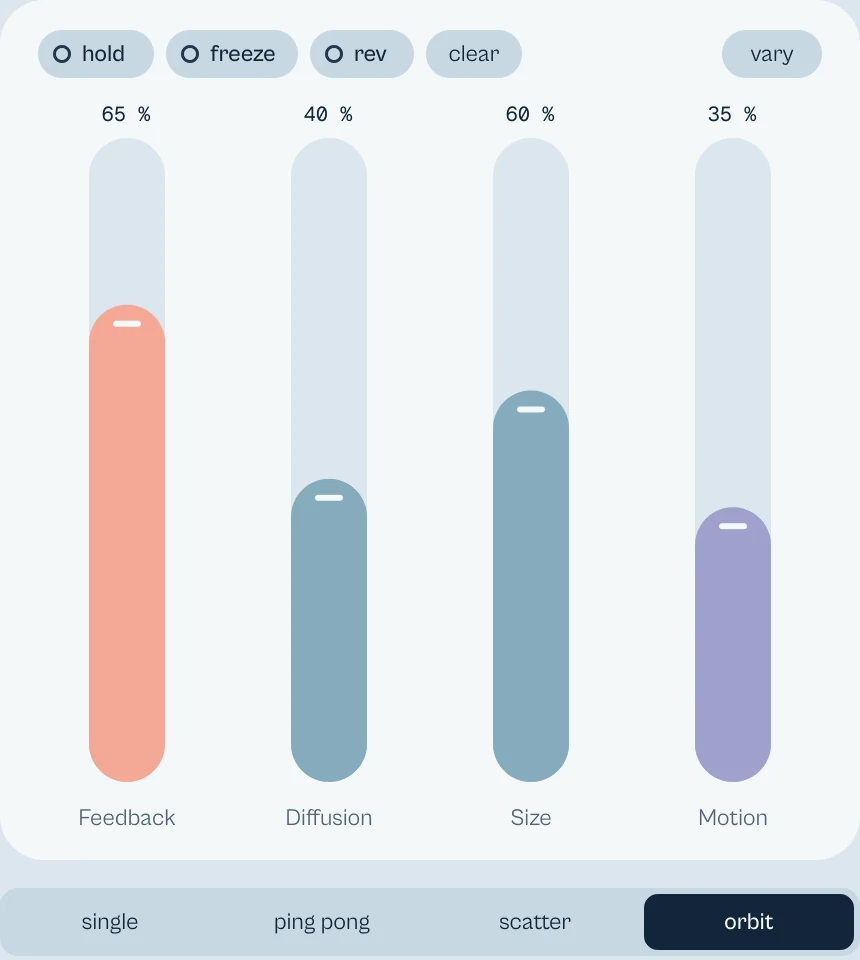

Every picture on this page is a capture of the real interface, from the current build.
Controls
The names are the ones your DAW shows for automation, read from the plugin itself; ranges and defaults are the plugin's own. Every knob: drag (Shift for fine), wheel for small steps, double-click for the default, Enter or a click on the value to type it with units (6k3, 250ms, -3 dB).
Main controls
| Control | Range | Default | What it does |
|---|---|---|---|
| Division | 1/32 · 1/16 · 1/8 T · 1/8 · 1/8 D · 1/4 · 1/4 D · 1/2 · 1/2 D · 1 bar · 1/32 T · 1/16 T · 1/16 D · 1/4 T · 2 bars | 1/4 | The tempo-synced time, from 1/32 triplet to 2 bars, with dotted and triplet values. |
| Tempo sync | Off · On | On | On: Division sets the time. Off: Time in milliseconds. |
| Time | 20 ms to 2000 ms | 500 ms | The free time in milliseconds (with Tempo sync off). |
| Feedback | 0 % to 92 % | 57 % | How many repeats, up to 92 %. |
| Diffusion | 0 % to 100 % | 32 % | How much the echoes melt into a space. |
| Space size | 10 % to 100 % | 56 % | How big that space is. |
| Motion | 0 % to 100 % | 61 % | Stereo movement and modulation of the delay heads. |
| Motion rate | 0.05 Hz to 4.00 Hz | 0.75 Hz | Speed of the motion. |
| Low cut | 20 Hz to 2.00 kHz | 380 Hz | Low cut of the echoes only. Up to 2 kHz, so kick and snare can stay dry while the hats echo. |
| High cut | 800 Hz to 16.0 kHz | 7.80 kHz | Tone of the echoes (high cut). |
| Duck | 0 % to 100 % | 58 % | How far the echoes drop while the track (or the sidechain) plays. |
| Duck recovery | 40 ms to 1200 ms | 220 ms | How fast they come back. After a sharp attack the duck stays full for about five times this value. |
| Duck attack | 0.5 ms to 200 ms | 0.5 ms | How fast the echoes drop when the track comes in. |
| Duck source | Track · Sidechain | Track | Track (the input) or Sidechain. |
| Duck from IKIPUMP | Off · On | Off | Ducks the echoes on the kicks received on ZOKKU Link. |
| IKIPUMP channel | 1 to 16 | 1 | The ZOKKU Link channel to listen to. |
| Pattern | Single · Ping pong · Scatter · Orbit | Orbit | Single, Ping pong, Scatter or Orbit. |
| Character | Clean · Tape · BBD · Lo-fi | Clean | Clean, Tape (wow and flutter, loses highs on each pass), BBD (dark and grainy), Lo-fi (10 bit, 11 kHz). |
| Drive | 0 % to 100 % | 0 % | Saturation inside the loop: clean at low levels, warmer as echoes pile up. |
| Hold | Off · On | Off | The tail sustains for a long time and takes no new audio. |
| Freeze | Off · On | Off | The tail loops forever without loss until you switch it off; play over it. |
| Reverse | Off · On | Off | The echoes play backwards. |
| Feedback pitch | −12.0 st to 12.0 st | 0.0 st | Each pass rises or falls by semitones; repeats stay on the grid. |
| Stereo detune | 0 ct to 50 ct | 0 ct | Pitch offset between the sides, in cents: wider, chorus-like echoes. |
| Swing | 0 % to 75 % | 0 % | Every second repeat comes later. |
| Repeats | Off · On | Off | Replaces the pattern with four taps, each with its own level, pan and nudge. |
| Width | 0 % to 100 % | 100 % | Stereo width of the echoes. |
| Mix | 0 % to 100 % | 50 % | Dry and wet balance. |
Every parameter (50)
Numbered parameters are grouped in one row (for example Band 1–8), with the number of copies.
| Parameter | Range | Default |
|---|---|---|
| Time | 20 ms to 2000 ms | 500 ms |
| Tempo sync | Off · On | On |
| Division | 1/32 · 1/16 · 1/8 T · 1/8 · 1/8 D · 1/4 · 1/4 D · 1/2 · 1/2 D · 1 bar · 1/32 T · 1/16 T · 1/16 D · 1/4 T · 2 bars | 1/4 |
| Feedback | 0 % to 92 % | 57 % |
| Diffusion | 0 % to 100 % | 32 % |
| Space size | 10 % to 100 % | 56 % |
| Motion | 0 % to 100 % | 61 % |
| Motion rate | 0.05 Hz to 4.00 Hz | 0.75 Hz |
| Low cut | 20 Hz to 2.00 kHz | 380 Hz |
| High cut | 800 Hz to 16.0 kHz | 7.80 kHz |
| Duck | 0 % to 100 % | 58 % |
| Duck recovery | 40 ms to 1200 ms | 220 ms |
| Width | 0 % to 100 % | 100 % |
| Mix | 0 % to 100 % | 50 % |
| Input | −18.0 dB to 12.0 dB | 0.0 dB |
| Output | −12.0 dB to 6.0 dB | 0.0 dB |
| Pattern | Single · Ping pong · Scatter · Orbit | Orbit |
| Hold | Off · On | Off |
| Bypass | Off · On | Off |
| Air | 0 to 10 | 0 |
| Air frequency | 2.5 kHz · 5 kHz · 10 kHz · 20 kHz · 40 kHz | 10 kHz |
| Phaser | 0 % to 100 % | 0 % |
| Phaser center | 100 Hz to 5.00 kHz | 1.00 kHz |
| Stereo spread | −50 % to 50 % | 0 % |
| Filter motion | 0 % to 100 % | 0 % |
| Duck source | Track · Sidechain | Track |
| Feedback pitch | −12.0 st to 12.0 st | 0.0 st |
| Repeats | Off · On | Off |
| Repeat 1–4 level ×4 | 0 % to 100 % | Repeat 1: 100 %, Repeat 2: 75 %, Repeat 3: 55 %, Repeat 4: 40 % |
| Repeat 1–4 pan ×4 | −100 % to 100 % | Repeat 1: 0 %, Repeat 2: −60 %, Repeat 3: 60 %, Repeat 4: 0 % |
| Repeat 1–4 nudge ×4 | −50 % to 50 % | 0 % |
| Duck from IKIPUMP | Off · On | Off |
| IKIPUMP channel | 1 to 16 | 1 |
| Swing | 0 % to 75 % | 0 % |
| Character | Clean · Tape · BBD · Lo-fi | Clean |
| Drive | 0 % to 100 % | 0 % |
| Reverse | Off · On | Off |
| Freeze | Off · On | Off |
| Duck attack | 0.5 ms to 200 ms | 0.5 ms |
| Tone resonance | 0 % to 100 % | 0 % |
| Stereo detune | 0 ct to 50 ct | 0 ct |
Presets
75 presets in 9 categories. Each one states its division and how many repeats you hear.
- Vocals 12Classic Slapback, Phrase Throw
- Drums 9Ghost Sixteenths, Half-Time Halo
- Bass 5Mono Rubber, Riddim Ricochet
- Guitar 5Rockabilly Slap, Analog Lead Echo
- Synth 12Neon Answer, Trance Refraction
- Dub 8Copper Chamber, Tape Dub Throw
- Ambient 9Polar Veil, Shimmer Octave
- Lo-fi 5Cassette Wobble, Broken Walkman
- Experimental 10Reverse Swell, Freeze Pad
Click the preset capsule in the top bar to open the preset sheet: search (every word must appear in the name, category or description), categories with their counts, ★ Favourites, tags on every row, and in B, which loads a preset into the slot that is not playing so you can compare. A click loads a preset and leaves the sheet open; ↑ ↓ move, Enter loads and closes, Esc closes. The arrows ‹ › beside the capsule step through the list; a dot says the sound was changed.
All 75 programs, as the DAW lists them
- Drums / Ghost Sixteenths
- Drums / Broken Warehouse
- Drums / Chrome Slap
- Drums / Half-Time Halo
- Bass / Mono Rubber
- Bass / Offbeat Shadow
- Bass / Reese Satellites
- Bass / Riddim Ricochet
- Synth / Neon Answer
- Synth / Laser Triplets
- Synth / Velvet Horizon
- Synth / Orbit Arpeggio
- Voice / Intimate Double
- Voice / Tape Balcony
- Voice / Last Word
- Voice / Air Choir
- Synth / House Glass
- Synth / Garage Shuffle
- Synth / Analog Bloom
- Synth / Trance Refraction
- Dub / Copper Chamber
- Dub / Skank Spiral
- Dub / Springless Smoke
- Dub / One Bar Return
- Ambient / Polar Veil
- Ambient / Prism Rain
- Ambient / Low Tide
- Ambient / Distant Cities
- Experimental / Clockwork Dust
- Experimental / Slow Corrosion
- Experimental / Orbital Sparks
- Experimental / Fractured Cathedral
- Drums / Pocket Percussion
- Bass / Riddim Backtalk
- Synth / Chord Carousel
- Synth / Lead Split Answer
- Ambient / Mist Chamber
- Dub / Tape Dub Throw
- Ambient / Glass Afterimage
- Experimental / Metal Microscope
- Voice / Classic Slapback
- Voice / Wide Double
- Voice / Pop Quarter
- Voice / Pop Dotted Eighth
- Voice / Trap Dotted Eighth
- Voice / Trap Triplet Hook
- Voice / Phrase Throw
- Voice / Long Fade Throw
- Drums / Snare Dotted Splash
- Drums / Hi-Hat Sixteenth Spray
- Drums / Trap Hat Triplets
- Drums / Swung Rim Echo
- Guitar / Rockabilly Slap
- Guitar / Dotted Eighth Arpeggio
- Guitar / Analog Lead Echo
- Guitar / Wide Clean Stereo
- Guitar / Ambient Swell Wash
- Synth / Ultra-Wide Ping Pong
- Synth / Arp Sixteenth Lock
- Dub / Tape Siren Runaway
- Dub / Melodica Echo
- Dub / BBD Rumble
- Ambient / Near Reverb Hall
- Ambient / Shimmer Octave
- Ambient / Detuned Cloud
- Lo-fi / Cassette Wobble
- Lo-fi / Dusty Keys Echo
- Lo-fi / Broken Walkman
- Lo-fi / BBD Memory
- Lo-fi / Phone Echo Voice
- Experimental / Reverse Swell
- Experimental / Reverse Octave Ghost
- Experimental / Freeze Pad
- Experimental / Freeze Stutter
- Experimental / Pitch Staircase
A/B and undo
A and B hold two complete settings. equal vol. plays B at the loudness of A, so louder never fools you. in B in the preset sheet loads a preset straight into the other slot. Undo and redo (the curved arrows, Ctrl+Z and Ctrl+Shift+Z) are kept separately for A and B; switching slot is not a step.
Listen modes
vela has no delta mode: the echoes are the effect. To hear only the echoes, set Mix to 100 %. clear empties the tail at once.
Simple, advanced and sizes
simple keeps the map, the time ruler and the four capsules (Feedback, Diffusion, Size, Motion) with hold, freeze, rev, clear and vary. advanced opens a drawer with four tabs: repeats (four taps, swing, spread, pitch, detune), colour (character, drive, rate, low cut, tone, resonance, tone motion, air, phaser), duck (duck, attack, recovery, source, ZOKKU Link) and levels (input, output, width, save, open, A > B). At S the drawer also holds the map controls.
Pick a size with S, M and L in the top bar, or drag the window corner. A click on the status line zooms the contents from 75 to 200 %. The help strip in the footer describes the control under the pointer.
More features
Duck from ikipump (ZOKKU Link)
Switch on duck from IKIPUMP and pick the channel of an ikipump set to Send / Kick, or of kitto or tatakit (their ZOKKU Link item in the status line): the echoes drop on every kick, from any track of the project, in proportion to its velocity. The button says who is sending (TATAKIT linked). The link works between plugins in the same process: with FL Studio Make bridged, the Bitwig sandbox or a dedicated Reaper process, use Duck source: Sidechain instead.
Hold, freeze, rev, vary
hold sustains the tail (−60 dB in one minute), freeze loops it forever, rev plays the echoes backwards, clear empties the tail, vary proposes a random but musical variation.
Tips by genre
- Pop and trap vocals
- Pop Dotted Eighth or Trap Dotted Eighth: dotted 1/8 with duck, so the words stay clear.
- End-of-phrase throws
- Phrase Throw or Tape Dub Throw, and automate Mix.
- Hi-hats
- Low cut at 2 kHz: kick and snare stay dry while the hats echo (Hi-Hat Sixteenth Spray).
- Dub
- Tape or BBD, high feedback, Freeze for the build. Feedback is held below runaway.
- Ambient
- Diffusion and Size high, Motion on: the echoes become a reverb-like cloud (Polar Veil).
CPU and latency
- Latency
- 0 samples.
- Quality
- Characters Clean, Tape, BBD and Lo-fi, with drive in the loop. No separate quality switch.
- CPU
- About 1.2 % of one core while the echoes play; about 0.2 % at rest, once they have died out.
- ZOKKU Link
- Receives: the echoes duck on the kicks of ikipump, kitto or tatakit on the same channel.
CPU: one stereo instance at 48 kHz, 512-sample blocks, on a test signal, as a percent of one core of a recent desktop CPU. Indicative only: your system will differ.
Version and changes
This manual describes vela 0.8.4. Updates never change how a saved session sounds: when the sound changes, it arrives as a new option or only in new instances.
Latest builds
- 0.8.4 2026-10-24 ["Its own product now: its licence, the Beat Kit's (KIZAMI, KITTO, TATAKIT, FUZZO, ASCENT) or ZOKKU All's unlocks it; old beta trials keep working. Sound and saved sessions unchanged."]
- 0.8.3 2026-10-24 ['Activate online and Activate offline in the licence sheet activate ZOKKU All; a saved session stays byte for byte the same after it is reopened.']
- 0.8.2 2026-10-24 ['A ZOKKU All licence unlocks it too; the free trial is the ZOKKU All one: 7 days, one trial for all eleven.']
Before
- 0.8 Revisited interface: echoes light up as they sound, simple/advanced, help strip, preset sheet with in B.
- 0.7 Maker ZOKKU; Duck from IKIPUMP on ZOKKU Link.
Common to every plugin: windows, presets, keyboard and typed values.