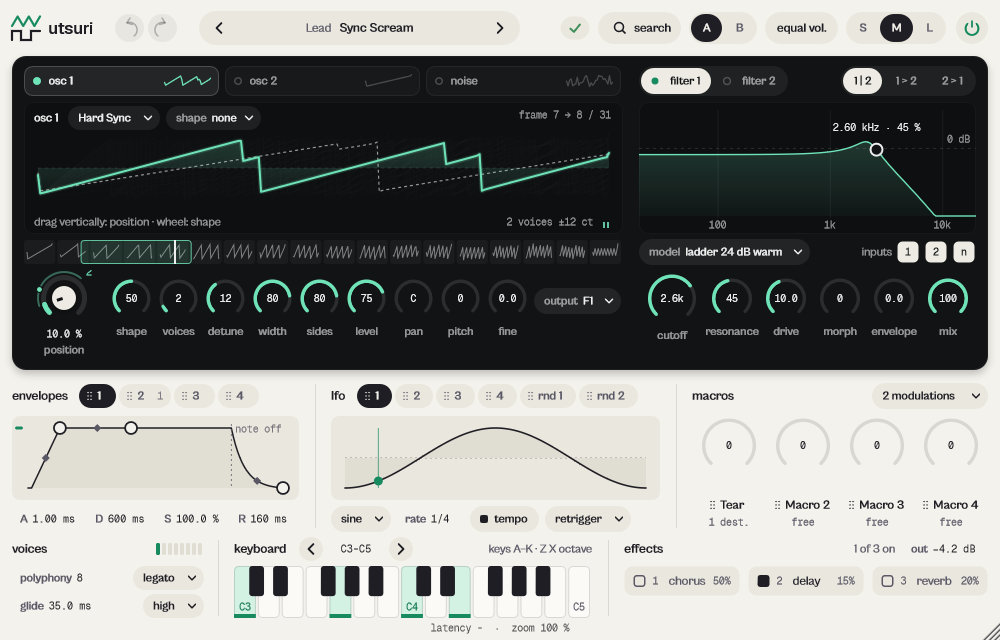
What it does
utsuri is a wavetable synth: two band-limited wavetable oscillators, noise, two filters with four models, four envelopes, four LFOs and two random sources, a 32-connection modulation matrix with four macros, and three effects (chorus, delay, reverb).
Two band-limited wavetable oscillators, noise, two filters with four models, a 32-connection modulation matrix, and chorus, delay and reverb. Zero latency. Before 19 October 2026 it was called ORIGIN; sessions and presets made with the old name open as before.
- Drag on the table display to scan the position; the wheel shapes the spectrum.
- Drag an envelope, LFO or macro tab onto any knob to modulate it.
- 35 factory tables in 9 families, or load your own WAV.
Quick start
- Pick a preset from the capsule at the top.
- Drag up and down on the wavetable display: the position moves through the table and the timbre changes. The wheel sets the spectral shape.
- Drag a tab of envelopes or lfo, or a macro name, onto a knob: the knob now moves by itself. Hold Alt for bipolar.
The display
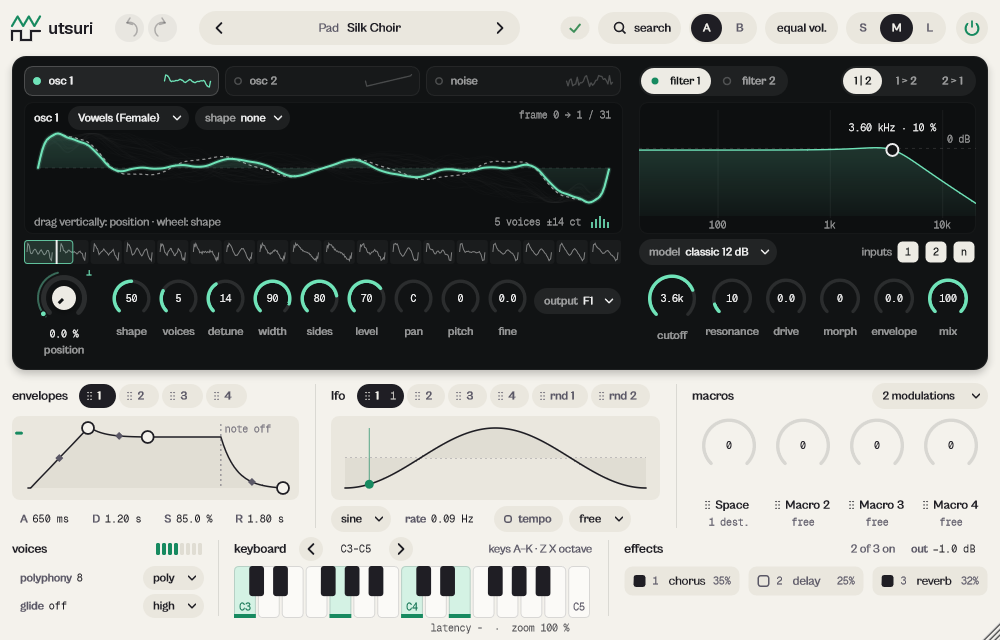
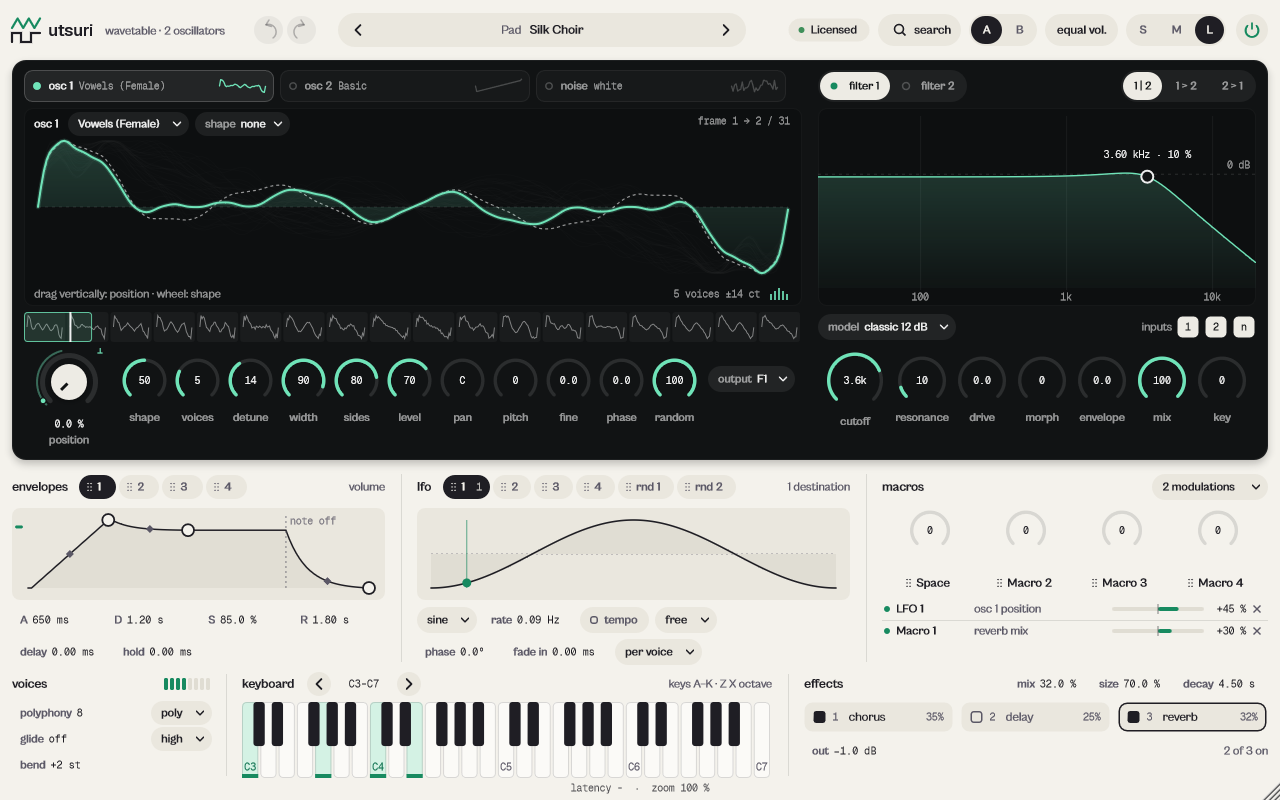
The wavetable display shows the frames of the table; drag vertically for position (Shift fine), the wheel for shape amount, click a frame in the strip to jump to it. The filter display: drag sideways for cutoff, up and down for resonance. The envelope display: drag the points; drag the middle of a segment to curve it. A modulated knob shows an arc per connection and, while it plays, where it really is.
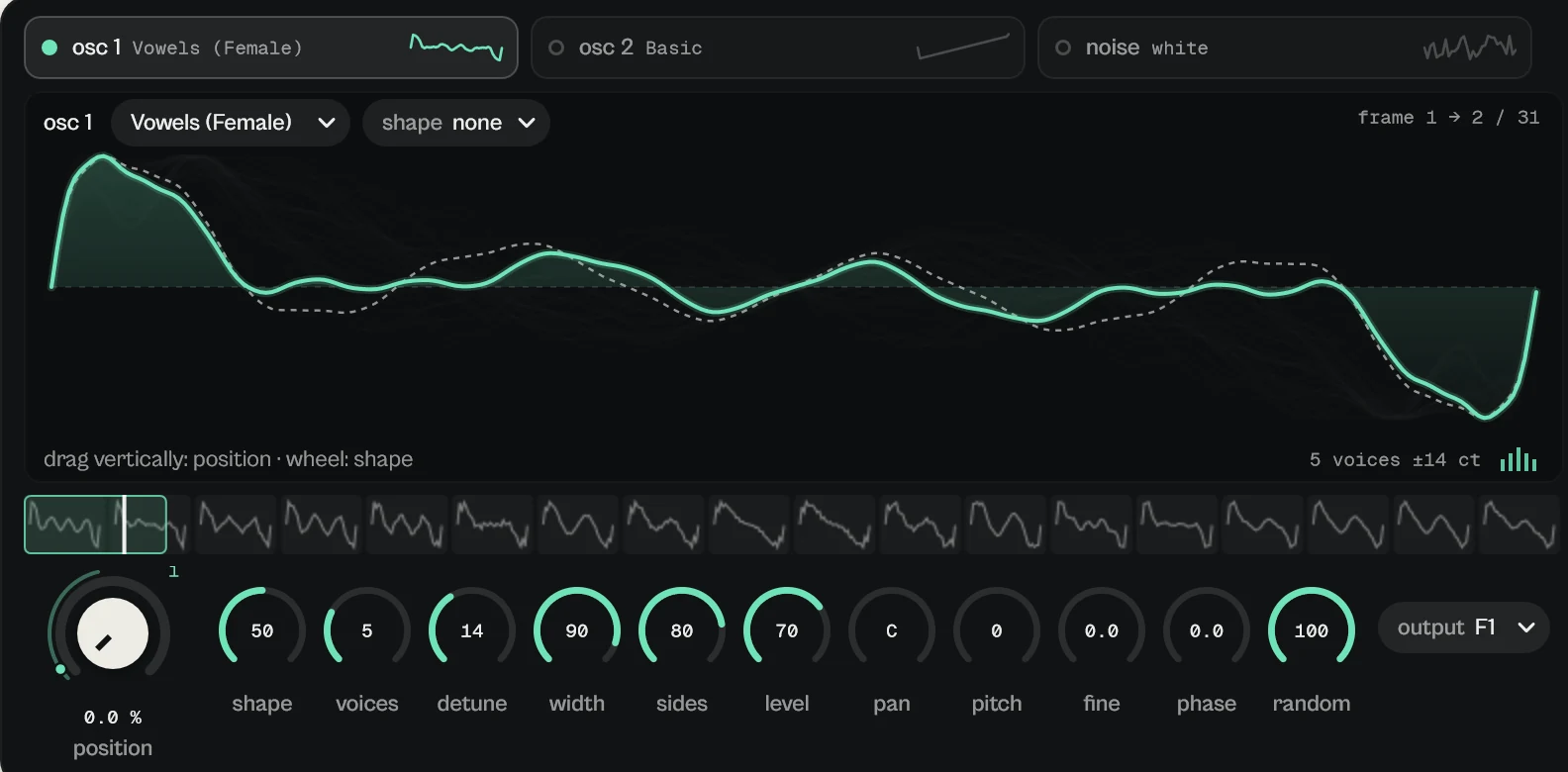
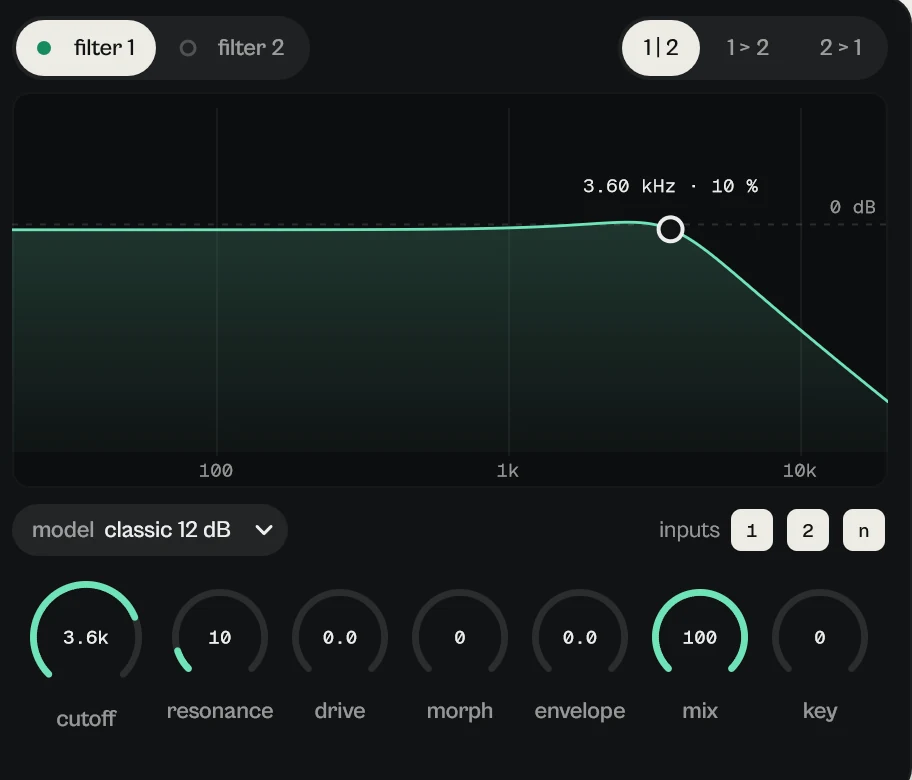
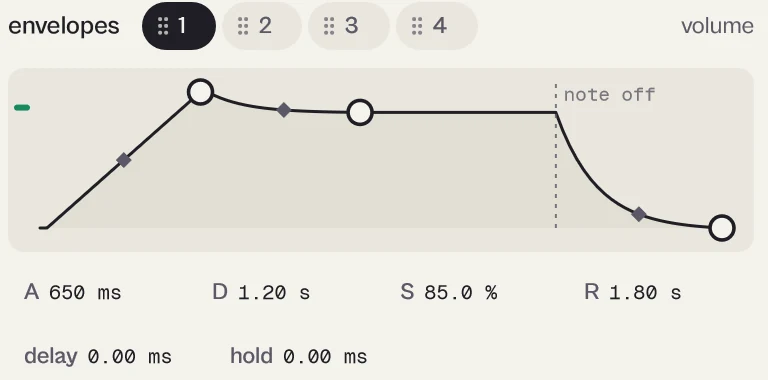
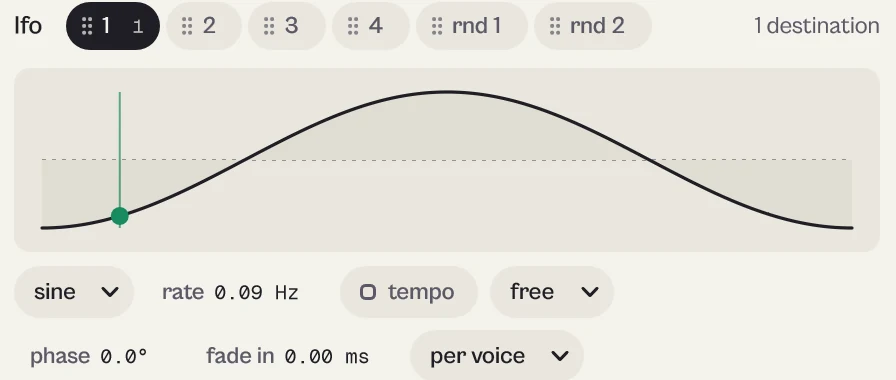
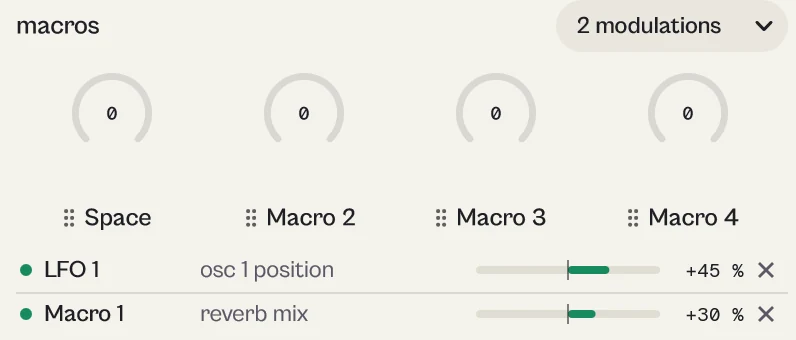

Every picture on this page is a capture of the real interface, from the current build.
Controls
The names are the ones your DAW shows for automation, read from the plugin itself; ranges and defaults are the plugin's own. Every knob: drag (Shift for fine), wheel for small steps, double-click for the default, Enter or a click on the value to type it with units (6k3, 250ms, -3 dB).
Main controls
| Control | Range | Default | What it does |
|---|---|---|---|
| Osc A and B Position ×2 | 0.0 % to 100.0 % | 0.0 % | Point in the wavetable (Osc A and Osc B). |
| Osc A and B Level ×2 | 0.0 % to 100.0 % | 70.0 % | Oscillator level. |
| Osc A and B Transpose ×2 | −48 st to +48 st | 0 st | Semitones. |
| Osc A and B Unison ×2 | 1 to 16 | 1 | 1 to 16 copies of the oscillator. |
| Osc A and B Detune ×2 | 0.0 cent to +1200.0 cent | +20.0 cent | How far the copies spread, up to 1200 cents. |
| Osc A and B Shape Type ×2 | None · Tilt · Low-pass · High-pass · Even/Odd · Formant | None | Spectral shape: Tilt, Low-pass, High-pass, Even/Odd, Formant. |
| Osc A and B Route ×2 | Filter 1 · Filter 2 · Filters 1+2 · Effects | Filter 1 | Where the source goes: Filter 1, Filter 2, Filters 1+2 or straight to Effects. |
| Noise Type | White · Pink · Brown | White | White, Pink or Brown. |
| Filter Routing | Parallel · Serial 1>2 · Serial 2>1 | Parallel | Parallel, Serial 1>2 or Serial 2>1. |
| Filter 1–2 Model ×2 | Classic · Ladder · Comb · Formant | Classic | Classic (SVF), Ladder, Comb or Formant, each with four variants. |
| Filter 1–2 Cutoff ×2 | 20.0 Hz to 20.0 kHz | 2.00 kHz | Cutoff frequency. |
| Filter 1–2 Morph ×2 | 0.0 % to 100.0 % | 0.0 % | Classic and Ladder: low-pass to band-pass (or notch) to high-pass. Formant: the vowels. |
| Filter 1–2 Env Amount ×2 | −96.0 st to +96.0 st | 0.0 st | How much Env 2, 3 or 4 moves the cutoff, in semitones. |
| Env 1–4 Attack ×4 | 0.00 ms to 20.00 s | 1.00 ms | Env 1 is the volume of each note; Env 2 to 4 are free to connect. DAHDSR with curves. |
| LFO 1–4 Mode ×4 | Free · Retrigger · Sync · One shot · Hold · Loop | Retrigger | Free, Retrigger, Sync, One shot, Hold or Loop. |
| LFO 1–4 Sync ×4 | Hz · Tempo · Dotted · Triplet · Keyboard | Tempo | Rate in Hz, Tempo, Dotted, Triplet or Keyboard. |
| Macro 1–4 ×4 | 0.0 % to 100.0 % | 0.0 % | Four macros: connect them to one or more controls and move everything with one hand. |
| Voice Mode | Poly · Mono · Legato | Poly | Poly, Mono or Legato. |
| Polyphony | 1 to 32 | 8 | Up to 32 notes. |
| Glide Time | 0.00 ms to 10.00 s | 0.00 ms | Portamento time. |
| Quality | Eco (1x) · High (2x) · Studio (4x) | High (2x) | Eco (1x), High (2x) or Studio (4x). |
| Delay Pattern | Single · Ping pong · Scatter · Orbit | Ping pong | The delay is vela's engine: Single, Ping pong, Scatter, Orbit. |
| Reverb Decay | 0.10 s to 30.0 s | 2.00 s | Time for the tail to drop 60 dB at 1 kHz. |
| Master Volume | -inf dB to 6.0 dB | −6.0 dB | Final level. |
Every parameter (250)
Numbered parameters are grouped in one row (for example Band 1–8), with the number of copies.
| Parameter | Range | Default |
|---|---|---|
| Master Volume | -inf dB to 6.0 dB | −6.0 dB |
| Polyphony | 1 to 32 | 8 |
| Voice Mode | Poly · Mono · Legato | Poly |
| Note Priority | Last · Lowest · Highest | Last |
| Glide Time | 0.00 ms to 10.00 s | 0.00 ms |
| Glide Mode | Always · Legato only | Legato only |
| Glide Per Octave | Off · On | Off |
| Glide Curve | −100.0 % to 100.0 % | 0.0 % |
| Bend Up | 0 st to 48 st | 2 st |
| Bend Down | 0 st to 48 st | 2 st |
| Velocity Curve | −100.0 % to 100.0 % | 0.0 % |
| Amp Velocity | 0.0 % to 100.0 % | 50.0 % |
| Quality | Eco (1x) · High (2x) · Studio (4x) | High (2x) |
| Master Tune | −100.0 cent to +100.0 cent | 0.0 cent |
| Transpose | −24 st to +24 st | 0 st |
| Stereo Width | 0.0 % to 200.0 % | 100.0 % |
| Macro 1–4 ×4 | 0.0 % to 100.0 % | 0.0 % |
| Bypass | Off · On | Off |
| Osc A and B On ×2 | Off · On | Osc A: On, Osc B: Off |
| Osc A and B Position ×2 | 0.0 % to 100.0 % | 0.0 % |
| Osc A and B Frame Mode ×2 | Smooth · Stepped | Smooth |
| Osc A and B Level ×2 | 0.0 % to 100.0 % | 70.0 % |
| Osc A and B Pan ×2 | −100.0 % to 100.0 % | 0.0 % |
| Osc A and B Transpose ×2 | −48 st to +48 st | 0 st |
| Osc A and B Fine ×2 | −100.0 cent to +100.0 cent | 0.0 cent |
| Osc A and B Keytrack ×2 | Off · On | On |
| Osc A and B Phase ×2 | 0.0° to 360.0° | 0.0° |
| Osc A and B Phase Random ×2 | 0.0 % to 100.0 % | 100.0 % |
| Osc A and B Unison ×2 | 1 to 16 | 1 |
| Osc A and B Detune ×2 | 0.0 cent to +1200.0 cent | +20.0 cent |
| Osc A and B Detune Curve ×2 | −100.0 % to 100.0 % | 0.0 % |
| Osc A and B Blend ×2 | 0.0 % to 100.0 % | 80.0 % |
| Osc A and B Spread ×2 | 0.0 % to 100.0 % | 80.0 % |
| Osc A and B Shape Type ×2 | None · Tilt · Low-pass · High-pass · Even/Odd · Formant | None |
| Osc A and B Shape ×2 | 0.0 % to 100.0 % | 50.0 % |
| Osc A and B Route ×2 | Filter 1 · Filter 2 · Filters 1+2 · Effects | Filter 1 |
| Noise On | Off · On | Off |
| Noise Type | White · Pink · Brown | White |
| Noise Level | 0.0 % to 100.0 % | 50.0 % |
| Noise Pan | −100.0 % to 100.0 % | 0.0 % |
| Noise Stereo | 0.0 % to 100.0 % | 100.0 % |
| Noise Route | Filter 1 · Filter 2 · Filters 1+2 · Effects | Filter 1 |
| Filter Routing | Parallel · Serial 1>2 · Serial 2>1 | Parallel |
| Filter 1–2 On ×2 | Off · On | Off |
| Filter 1–2 Model ×2 | Classic · Ladder · Comb · Formant | Classic |
| Filter 1–2 Variant ×2 | 1 · 2 · 3 · 4 | 1 |
| Filter 1–2 Cutoff ×2 | 20.0 Hz to 20.0 kHz | 2.00 kHz |
| Filter 1–2 Resonance ×2 | 0.0 % to 100.0 % | 15.0 % |
| Filter 1–2 Drive ×2 | 0.0 dB to 24.0 dB | 0.0 dB |
| Filter 1–2 Morph ×2 | 0.0 % to 100.0 % | 0.0 % |
| Filter 1–2 Keytrack ×2 | −100.0 % to 100.0 % | 0.0 % |
| Filter 1–2 Env Amount ×2 | −96.0 st to +96.0 st | 0.0 st |
| Filter 1–2 Env Source ×2 | Env 2 · Env 3 · Env 4 | Filter 1: Env 2, Filter 2: Env 3 |
| Filter 1–2 Mix ×2 | 0.0 % to 100.0 % | 100.0 % |
| Env 1–4 Delay ×4 | 0.00 ms to 4.00 s | 0.00 ms |
| Env 1–4 Attack ×4 | 0.00 ms to 20.00 s | 1.00 ms |
| Env 1–4 Hold ×4 | 0.00 ms to 4.00 s | 0.00 ms |
| Env 1–4 Decay ×4 | 0.00 ms to 20.00 s | Env 1: 600 ms, Env 2: 400 ms, Env 3: 400 ms, Env 4: 400 ms |
| Env 1–4 Sustain ×4 | 0.0 % to 100.0 % | Env 1: 100.0 %, Env 2: 0.0 %, Env 3: 0.0 %, Env 4: 0.0 % |
| Env 1–4 Release ×4 | 0.00 ms to 20.00 s | Env 1: 150 ms, Env 2: 300 ms, Env 3: 300 ms, Env 4: 300 ms |
| Env 1–4 Attack Curve ×4 | −100.0 % to 100.0 % | 0.0 % |
| Env 1–4 Decay Curve ×4 | −100.0 % to 100.0 % | −50.0 % |
| Env 1–4 Release Curve ×4 | −100.0 % to 100.0 % | −50.0 % |
| LFO 1–4 Mode ×4 | Free · Retrigger · Sync · One shot · Hold · Loop | Retrigger |
| LFO 1–4 Sync ×4 | Hz · Tempo · Dotted · Triplet · Keyboard | Tempo |
| LFO 1–4 Rate ×4 | 0.01 Hz to 200 Hz | 2.00 Hz |
| LFO 1–4 Division ×4 | 8/1 · 4/1 · 2/1 · 1/1 · 1/2 · 1/4 · 1/8 · 1/16 · 1/32 · 1/64 | 1/4 |
| LFO 1–4 Key Transpose ×4 | −48 st to +48 st | 0 st |
| LFO 1–4 Phase ×4 | 0.0° to 360.0° | 0.0° |
| LFO 1–4 Fade In ×4 | 0.00 ms to 8.00 s | 0.00 ms |
| LFO 1–4 Delay ×4 | 0.00 ms to 4.00 s | 0.00 ms |
| LFO 1–4 Smooth ×4 | 0.00 ms to 1.00 s | 0.00 ms |
| LFO 1–4 Stereo ×4 | −180.0° to 180.0° | 0.0° |
| LFO 1–4 Loop Point ×4 | 0.0 % to 100.0 % | 50.0 % |
| LFO 1–4 Voice ×4 | Per voice · Global | Per voice |
| Random 1–2 Style ×2 | Smooth · Sample & hold · Interpolated · Chaotic | Smooth |
| Random 1–2 Sync ×2 | Hz · Tempo · Dotted · Triplet · Keyboard | Tempo |
| Random 1–2 Rate ×2 | 0.01 Hz to 200 Hz | 2.00 Hz |
| Random 1–2 Division ×2 | 8/1 · 4/1 · 2/1 · 1/1 · 1/2 · 1/4 · 1/8 · 1/16 · 1/32 · 1/64 | 1/8 |
| Random 1–2 Retrigger ×2 | Off · On | Off |
| Random 1–2 Stereo ×2 | Off · On | Off |
| Random 1–2 Voice ×2 | Per voice · Global | Per voice |
| Mod 01–32 Amount ×32 | −100.0 % to 100.0 % | 0.0 % |
| Chorus On | Off · On | Off |
| Chorus Mix | 0.0 % to 100.0 % | 50.0 % |
| Chorus Rate | 0.01 Hz to 10.0 Hz | 0.50 Hz |
| Chorus Depth | 0.0 % to 100.0 % | 50.0 % |
| Chorus Delay | 1.00 ms to 30.0 ms | 7.00 ms |
| Chorus Voices | 2 · 4 · 6 · 8 | 4 |
| Chorus Feedback | −90.0 % to 90.0 % | 0.0 % |
| Chorus Width | 0.0 % to 100.0 % | 100.0 % |
| Chorus Low Cut | 20.0 Hz to 1.00 kHz | 150 Hz |
| Chorus High Cut | 1.00 kHz to 20.0 kHz | 12.0 kHz |
| Delay On | Off · On | Off |
| Delay Mix | 0.0 % to 100.0 % | 25.0 % |
| Delay Pattern | Single · Ping pong · Scatter · Orbit | Ping pong |
| Delay Sync | Free · Tempo | Tempo |
| Delay Time | 20.0 ms to 2.00 s | 375 ms |
| Delay Division | 1/32 T · 1/32 · 1/16 T · 1/16 · 1/8 T · 1/16 D · 1/8 · 1/4 T · 1/8 D · 1/4 · 1/4 D · 1/2 · 1/2 D · 1 bar · 2 bars | 1/8 D |
| Delay Feedback | 0.0 % to 92.0 % | 40.0 % |
| Delay Low Cut | 20.0 Hz to 2.00 kHz | 120 Hz |
| Delay High Cut | 800 Hz to 16.0 kHz | 8.50 kHz |
| Delay Character | Clean · Tape · BBD · Lo-fi | Clean |
| Delay Drive | 0.0 % to 100.0 % | 0.0 % |
| Delay Diffusion | 0.0 % to 100.0 % | 0.0 % |
| Delay Width | 0.0 % to 100.0 % | 100.0 % |
| Delay Duck | 0.0 % to 100.0 % | 0.0 % |
| Reverb On | Off · On | Off |
| Reverb Mix | 0.0 % to 100.0 % | 20.0 % |
| Reverb Size | 0.0 % to 100.0 % | 50.0 % |
| Reverb Decay | 0.10 s to 30.0 s | 2.00 s |
| Reverb Predelay | 0.00 ms to 250 ms | 10.0 ms |
| Reverb High Cut | 1.00 kHz to 20.0 kHz | 7.00 kHz |
| Reverb Low Cut | 20.0 Hz to 1.00 kHz | 120 Hz |
| Reverb Diffusion | 0.0 % to 100.0 % | 80.0 % |
| Reverb Modulation | 0.0 % to 100.0 % | 25.0 % |
| Reverb Width | 0.0 % to 100.0 % | 100.0 % |
Presets
Init plus 14 presets in 8 categories, all at a similar volume (−16 LUFS).
- Bass 3Round Sub, Acid Line, Wide Reese
- Lead 2Glass Lead, Sync Scream
- Pad 2Silk Choir, Warm Strings
- Keys 2Soft Organ, FM Bell
- Pluck 1Bright Pluck
- Sequence 1Pulse Step
- Texture 2Dust Field, Talking Growl
- FX 1Riser Sweep
Click the preset capsule in the top bar to open the preset sheet: search (every word must appear in the name, category or description), categories with their counts, ★ Favourites, tags on every row, and in B, which loads a preset into the slot that is not playing so you can compare. A click loads a preset and leaves the sheet open; ↑ ↓ move, Enter loads and closes, Esc closes. The arrows ‹ › beside the capsule step through the list; a dot says the sound was changed.
All 15 programs, as the DAW lists them
- Init
- Bass / Round Sub
- Bass / Acid Line
- Bass / Wide Reese
- Lead / Glass Lead
- Lead / Sync Scream
- Pad / Silk Choir
- Pad / Warm Strings
- Keys / Soft Organ
- Keys / FM Bell
- Pluck / Bright Pluck
- Sequence / Pulse Step
- Texture / Dust Field
- Texture / Talking Growl
- FX / Riser Sweep
A/B and undo
A and B hold two complete settings. equal vol. plays B at the loudness of A, so louder never fools you. in B in the preset sheet loads a preset straight into the other slot. Undo and redo (the curved arrows, Ctrl+Z and Ctrl+Shift+Z) are kept separately for A and B; switching slot is not a step.
Listen modes
utsuri has no delta mode. Each effect has its own on switch and mix; with an effect off utsuri spends no CPU on it.
Simple, advanced and sizes
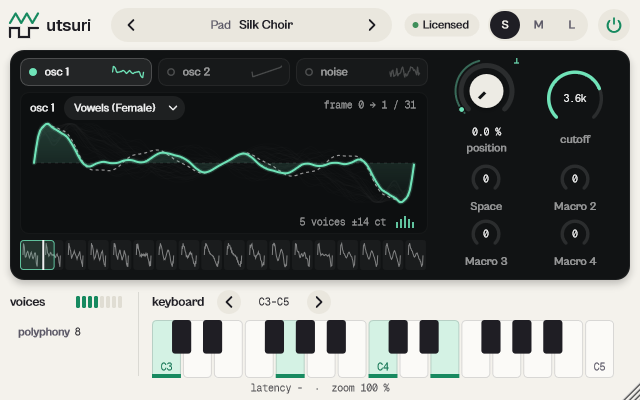
utsuri has the three sizes but no simple/advanced drawer. S (640 × 400): wavetable display, position, filter cutoff, the four macros and the keyboard. M (1000 × 640): everything. L (1280 × 800): also phase and random phase per oscillator, the modulation list always open, every parameter of the chosen effect, bend up and down.
Pick a size with S, M and L in the top bar, or drag the window corner. A click on the status line zooms the contents from 75 to 200 %. The help strip in the footer describes the control under the pointer.
More features
Wavetables
35 factory tables in 9 families (Basic, Pulse, Harmonic, Vocal, FM, Organ, Metallic, Digital, Noise). Load WAV… imports your own (a single cycle, or 2048-sample frames up to 256); it is saved in the session. Export WAV… saves it.
Modulation
24 sources: Env 1 to 4, LFO 1 to 4, Random 1 and 2, Macro 1 to 4, Velocity, Release velocity, Note, Note in octave, Aftertouch, Mod wheel, Pitch bend, Sustain pedal, Soft pedal, Random per note. Right-click a knob for Modulate with…, bipolar, stereo, bypass, curve and remove. The N modulations list edits every amount.
Keyboard
The on-screen keyboard plays with the mouse (lower on a key is louder). With it focused, A W S E D F T G Y H U J K play an octave, Z and X shift the octave.
Tips by genre
- Bass
- Round Sub (mono with glide), Acid Line (resonant Ladder), Wide Reese (unison).
- Lead
- Glass Lead with delayed vibrato, Sync Scream.
- Pads
- Silk Choir: vowels that move; add Reverb mix.
- Keys
- FM Bell, Soft Organ (opens with the mod wheel).
- CPU
- Quality Eco and fewer unison voices when you stack many instances.
CPU and latency
- Latency
- 0 samples.
- Quality
- Eco (1x), High (2x, default) or Studio (4x). Tables are band-limited at every quality; filter drive uses second-order anti-aliasing.
- CPU
- Typical patch: about 1 to 1.4 % of one core with one voice, 6 to 9 % with eight.
- MIDI
- Sustain, sostenuto and soft pedals, aftertouch, mod wheel. MIDI learn from the status line.
CPU: one stereo instance at 48 kHz, 512-sample blocks, on a test signal, as a percent of one core of a recent desktop CPU. Indicative only: your system will differ.
Version and changes
This manual describes utsuri 0.6.7. Updates never change how a saved session sounds: when the sound changes, it arrives as a new option or only in new instances.
Latest builds
- 0.6.7 2026-10-24 ["Its own product now: its licence, the Beat Kit's (KIZAMI, KITTO, TATAKIT, FUZZO, ASCENT) or ZOKKU All's unlocks it; old beta trials keep working. Sound and saved sessions unchanged."]
- 0.6.6 2026-10-24 ['Activate online and Activate offline in the licence sheet activate ZOKKU All; a saved session stays byte for byte the same after it is reopened.']
- 0.6.5 2026-10-24 ['A ZOKKU All licence unlocks it too; the free trial is the ZOKKU All one: 7 days, one trial for all eleven.']
Before
- 0.6 New name, utsuri (before: ORIGIN). Interface fully in English.
Common to every plugin: windows, presets, keyboard and typed values.