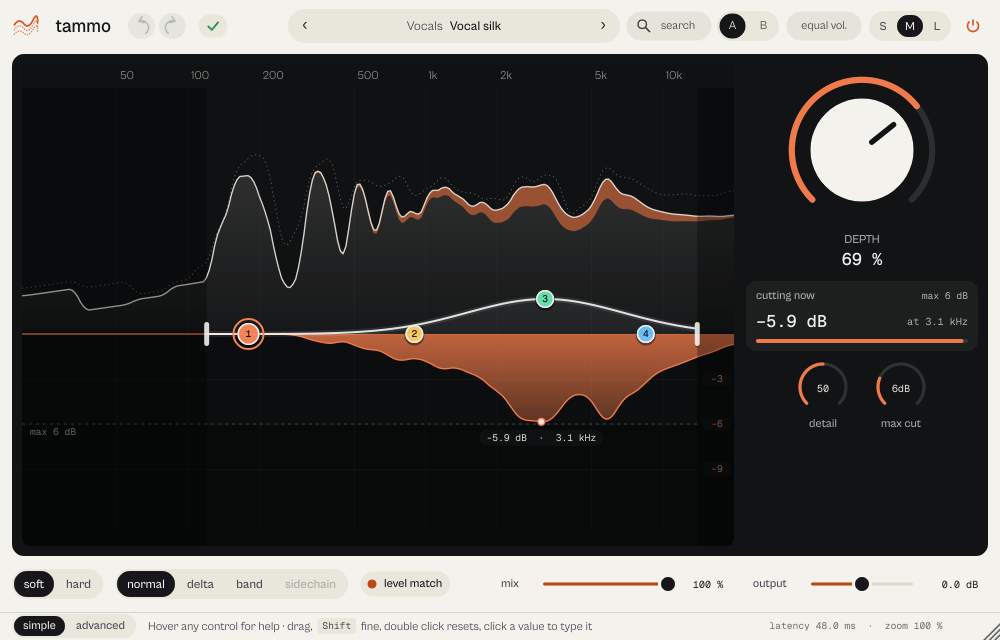
What it does
tammo finds the resonances that stick out of the spectrum (whistles, nasal tones, sibilance, boom) and turns them down only at the moment and at the frequency where they appear. Everything else passes untouched. Use it on vocals, guitars, drum buses, synths and, gently, on the master.
tammo finds the resonances that stick out of the spectrum (whistles, nasal tones, sibilance, boom) and turns them down only at the moment and frequency they appear. The rest of the sound is left alone. Before 19 October 2026 it was called RESONANCE; sessions and presets made with the old name open as before.
- Spectrum and reduction in one display: you see what is taken out, and where.
- Up to eight sensitivity points, with Low and High range flags.
- Delta plays only what is removed. A zero-latency mode for tracking.
Quick start
- Put tammo on the track. Pick a preset from its category (for example Vocals, Vocal silk) or start from the default state.
- Raise Depth until the harshness calms down. Switch the listen selector to delta to hear only what is being taken out.
- If it works too low or too high, drag the Low and High flags on the display to narrow the range.
The display
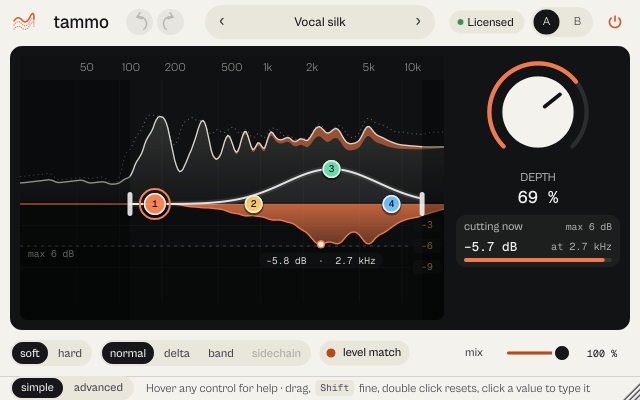
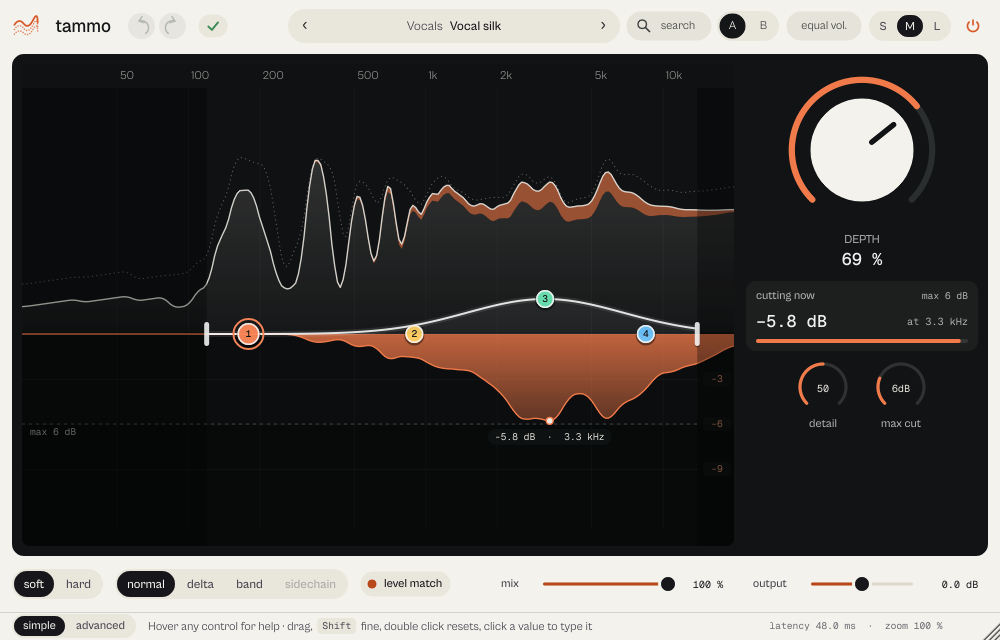
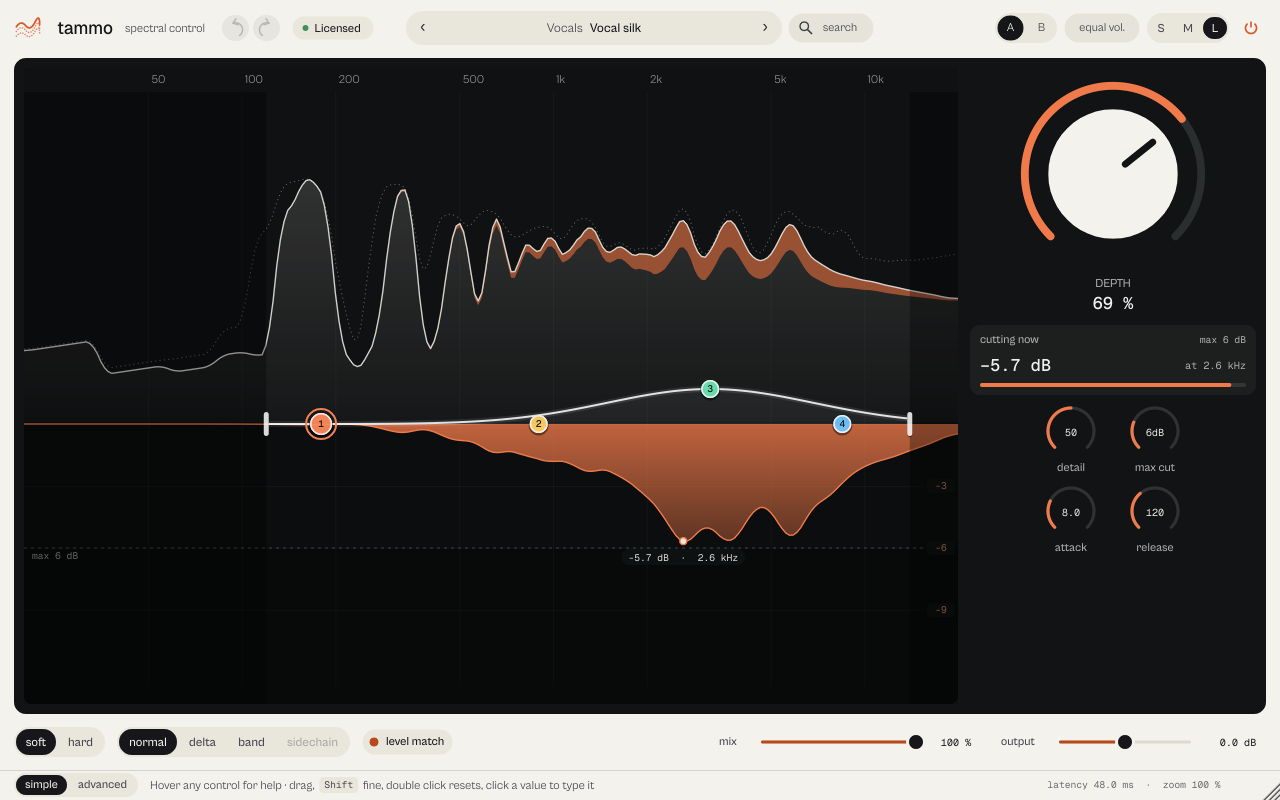
The top half is the measured spectrum, tilted +3 dB per octave the way you hear it; the dotted line holds recent peaks and orange shows what is removed. The bottom half is the reduction, hanging from the 0 dB line, never deeper than Max cut. The cut scale picks itself (3, 6, 12, 24 or 36 dB); click the scale to fix it. Under the pointer a caption gives frequency and cut at that point. The numbered points 1 to 8 are sensitivity bands: drag sideways for frequency, up and down for sensitivity (−12 to +12 dB on the display, ±18 dB on the band knob), Ctrl+drag for Q, double-click a point to switch it on or off, double-click the line to add one, right-click for its shape.
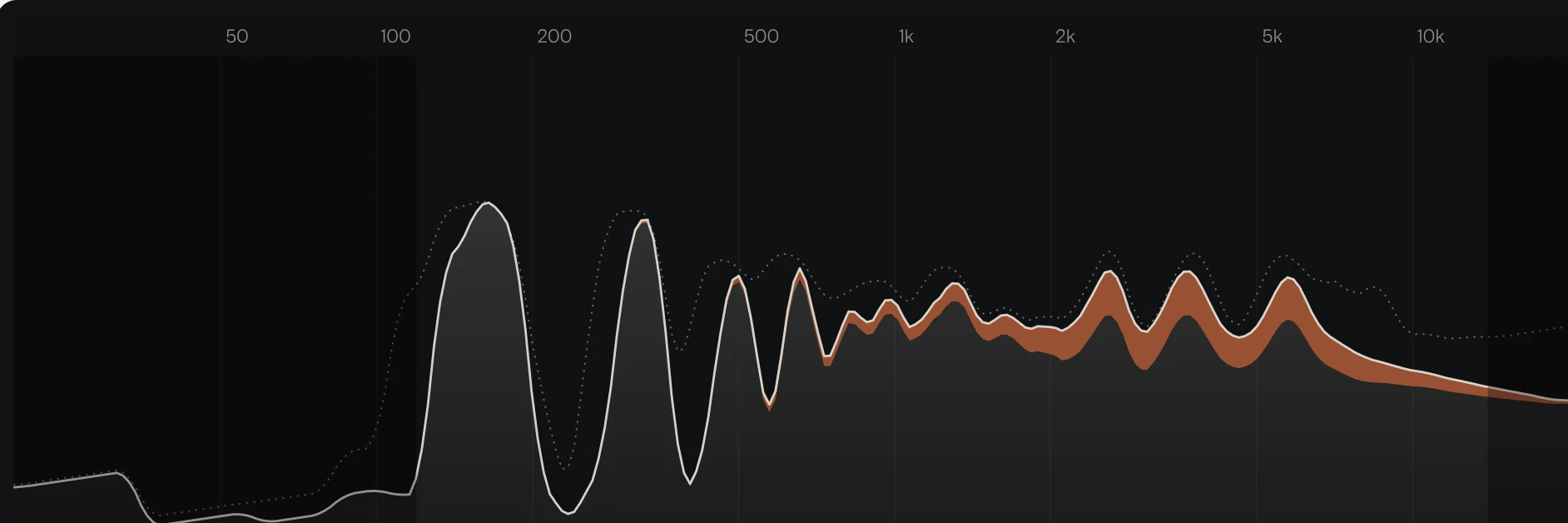
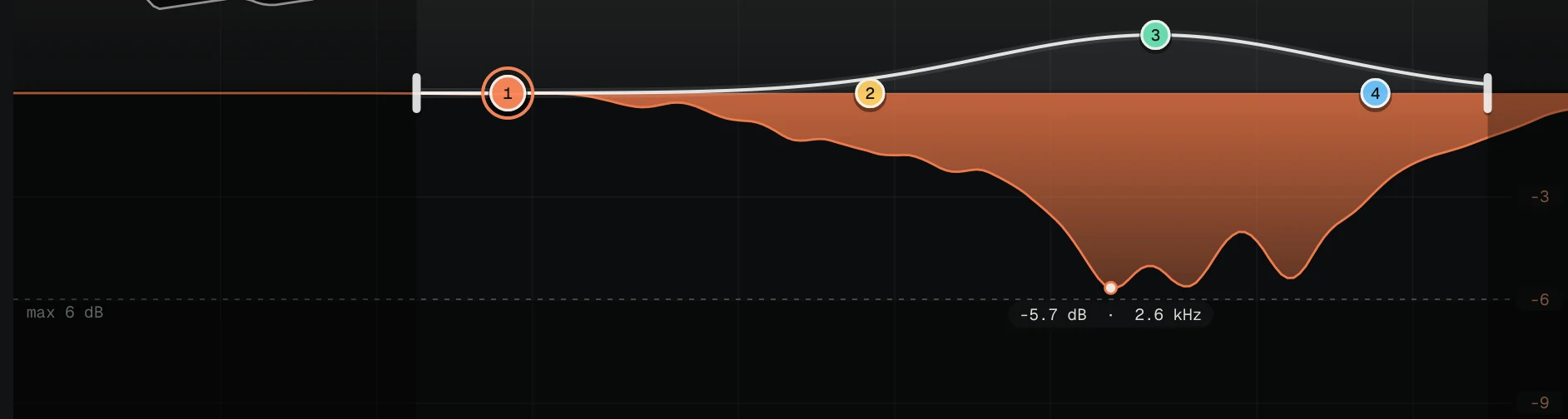
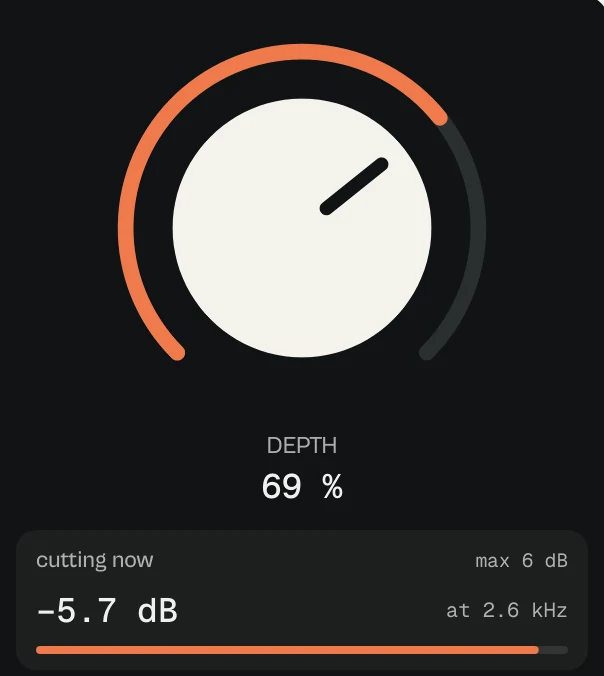
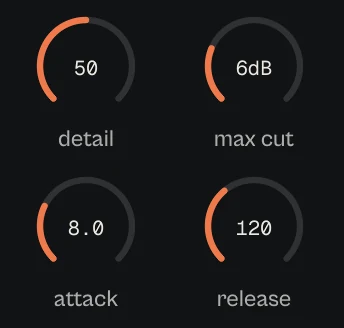


Every picture on this page is a capture of the real interface, from the current build.
Controls
The names are the ones your DAW shows for automation, read from the plugin itself; ranges and defaults are the plugin's own. Every knob: drag (Shift for fine), wheel for small steps, double-click for the default, Enter or a click on the value to type it with units (6k3, 250ms, -3 dB).
Main controls
| Control | Range | Default | What it does |
|---|---|---|---|
| Depth | 0 % to 100 % | 51 % | How much is taken out. The hero control. |
| Detail | 0 % to 100 % | 50 % | One control for Sharpness and Selectivity together: left, wide and soft cuts; right, narrow and decisive ones. |
| Detail tilt | −100 % to 100 % | 0 % | Tilts Detail between lows and highs. |
| Sharpness | 0 % to 100 % | 50 % | Width of each cut (also inside Detail). |
| Selectivity | 0 % to 100 % | 60 % | How far a resonance must stick out before it is treated (also inside Detail). |
| Max cut | 0 dB to 24 dB | 6 dB | The deepest cut allowed. At 0 dB tammo cuts nothing: the output is the input, only delayed by the latency. |
| Attack | 1 ms to 200 ms | 10 ms | How fast a cut starts. |
| Release | 20 ms to 2000 ms | 150 ms | How fast a cut lets go. Raise it for a steadier cut in the lows. |
| Timing tilt | −100 % to 100 % | 0 % | Makes attack and release faster in the highs or in the lows. |
| Mode | Soft · Hard | Soft | Soft follows the programme; Hard is firmer, for sibilance and fixed resonances. |
| Mix | 0 % to 100 % | 100 % | Blend with the dry signal. At 0 % the output equals the input. |
| Wet trim | −12 dB to 12 dB | 0 dB | Level of the treated signal. |
| Level match | Off · On | On | Slowly makes up the level that was removed, for honest comparisons. |
| Domain | L / R · M / S | L / R | Work on left/right or on mid/side. |
| Stereo link | 0 % to 100 % | 100 % | How much the two channels decide together. |
| Low limit | 20 Hz to 20 kHz | 450 Hz | Bottom of the working range (the Low flag). |
| High limit | 20 Hz to 20 kHz | 16 kHz | Top of the working range (the High flag). |
| Low limit slope | Soft · 6 dB/oct · 12 dB/oct · 24 dB/oct · 48 dB/oct | 12 dB/oct | How steep the low edge is; Soft is a one-octave fade. |
| High limit slope | Soft · 6 dB/oct · 12 dB/oct · 24 dB/oct · 48 dB/oct | 12 dB/oct | How steep the high edge is. |
| Listen | Normal · Delta · Band isolated · Sidechain | Normal | What you hear: Normal, Delta (only what is removed), Band isolated (one band alone) or Sidechain. |
| Latency | Linear phase · Low latency · Minimum phase | Minimum phase | Minimum phase (default), Linear phase or Low latency (0 samples, for recording and live). |
| Quality | Eco · Standard · High | Standard | Eco, Standard or High: a shorter analysis step for slightly cleaner transients, at about twice the processing. |
| Offline quality | Follow live · Eco · Standard · High | Follow live | The quality used when you render or bounce. |
| Detector | v0.7 · v0.8 | v0.8 | v0.8 for new instances; v0.7 keeps the sound of presets and sessions made before. |
| External sidechain | Off · On | Off | Lets the DAW's sidechain input drive the detector. |
| Output gain | −18 dB to 18 dB | 0 dB | Final level. |
Every parameter (96)
Numbered parameters are grouped in one row (for example Band 1–8), with the number of copies.
| Parameter | Range | Default |
|---|---|---|
| Depth | 0 % to 100 % | 51 % |
| Sharpness | 0 % to 100 % | 50 % |
| Selectivity | 0 % to 100 % | 60 % |
| Attack | 1 ms to 200 ms | 10 ms |
| Release | 20 ms to 2000 ms | 150 ms |
| Mix | 0 % to 100 % | 100 % |
| Wet trim | −12 dB to 12 dB | 0 dB |
| Input gain | −18 dB to 18 dB | 0 dB |
| Stereo link | 0 % to 100 % | 100 % |
| Treatment balance | −100 to 100 | 0 |
| Max cut | 0 dB to 24 dB | 6 dB |
| Low limit | 20 Hz to 20 kHz | 450 Hz |
| High limit | 20 Hz to 20 kHz | 16 kHz |
| Mode | Soft · Hard | Soft |
| Domain | L / R · M / S | L / R |
| External sidechain | Off · On | Off |
| Bypass | Off · On | Off |
| Quality | Eco · Standard · High | Standard |
| Offline quality | Follow live · Eco · Standard · High | Follow live |
| Listen | Normal · Delta · Band isolated · Sidechain | Normal |
| Selected band | 1 to 8 | 1 |
| Show spectra | Off · On | On |
| Band 1–8 frequency ×8 | 20 Hz to 20 kHz | Band 1: 180 Hz, Band 2: 900 Hz, Band 3: 5 kHz, Band 4: 8.5 kHz, Band 5: 120 Hz, Band 6: 600 Hz, Band 7: 2 kHz, Band 8: 6 kHz |
| Band 1–8 sensitivity ×8 | −18 dB to 18 dB | Band 1: 0 dB, Band 2: 0 dB, Band 3: 6 dB, Band 4: 0 dB, Band 5: 0 dB, Band 6: 0 dB, Band 7: 0 dB, Band 8: 0 dB |
| Band 1–8 Q ×8 | 0.2 to 12 | Band 1: 1, Band 2: 1, Band 3: 1, Band 4: 1, Band 5: 2, Band 6: 2, Band 7: 2, Band 8: 2 |
| Band 1–8 type ×8 | Bell · Low shelf · High shelf · Tilt · Band reject | Bell |
| Band 1–8 enabled ×8 | Off · On | Band 1: On, Band 2: On, Band 3: On, Band 4: On, Band 5: Off, Band 6: Off, Band 7: Off, Band 8: Off |
| Band 1–8 balance ×8 | −100 to 100 | 0 |
| Output gain | −18 dB to 18 dB | 0 dB |
| DC cleanup | Off · On | Off |
| Engine core | Current · Research v0.7 | Research v0.7 |
| Core correction | 0 % to 100 % | 100 % |
| Core cutoff | 0 % to 100 % | 0 % |
| Level match | Off · On | On |
| Detail | 0 % to 100 % | 50 % |
| Detail tilt | −100 % to 100 % | 0 % |
| Low limit slope | Soft · 6 dB/oct · 12 dB/oct · 24 dB/oct · 48 dB/oct | 12 dB/oct |
| High limit slope | Soft · 6 dB/oct · 12 dB/oct · 24 dB/oct · 48 dB/oct | 12 dB/oct |
| Timing tilt | −100 % to 100 % | 0 % |
| Latency | Linear phase · Low latency · Minimum phase | Minimum phase |
| Release tilt | −100 % to 100 % | 0 % |
| Detector | v0.7 · v0.8 | v0.8 |
| Band 1–8 band shelf ×8 | Off · On | Off |
| Low limit Q | 0.3 to 6 | 0.71 |
| High limit Q | 0.3 to 6 | 0.71 |
| Low limit balance | −100 to 100 | 0 |
| High limit balance | −100 to 100 | 0 |
Presets
63 presets in 8 categories. Each one works in a range, with a band raised on the problem, and none raises the volume.
- General 4Clean start
- Vocals 15Vocal silk, De-esser
- Drums 8Cymbal air, Drum punch
- Bass & 808 7Low-end tight, Bass control
- Guitar & Instruments 12Acoustic wood, Electric edge, Piano clarity
- Synth 3
- Mix & Master 8Bus restraint, Master glue
- Creative 5External carve
Click the preset capsule in the top bar to open the preset sheet: search (every word must appear in the name, category or description), categories with their counts, ★ Favourites, tags on every row, and in B, which loads a preset into the slot that is not playing so you can compare. A click loads a preset and leaves the sheet open; ↑ ↓ move, Enter loads and closes, Esc closes. The arrows ‹ › beside the capsule step through the list; a dot says the sound was changed.
All 63 programs, as the DAW lists them
- Clean start
- Vocal silk
- Sibilant focus
- Acoustic wood
- Electric edge
- Cymbal air
- Low resonance
- Bus restraint
- External carve
- Vocal focus
- De-esser
- Drum attack
- Piano clarity
- Low-end tight
- Master glue
- Bass control
- Vocal detail
- Master polish
- Vocal brilliance
- Bass authority
- Drum punch
- Electric focus
- Velvet Vocal
- Soft Sibilance
- Clear Cymbals
- Soft Guitar
- Even Bass
- Low-Mid Cleanup
- Gentle Bus
- Selective Resonances
- Stereo Ambience
- Natural Vocal
- Harsh Vocal
- Nasal Vocal
- Podcast Speech
- Upfront Rap
- Live Vocal Zero Latency
- Acoustic No Boom
- Distorted No Fizz
- Piano No Harshness
- Silky Strings
- Soft Brass
- Acoustic Soft Pick
- Snare No Ring
- Dry Kick
- Shrill Cymbals
- Open Overheads
- 808 No Boom
- Tamed Saturated 808
- Harsh Lead
- Soft Pad
- Resonant Synth
- Vocal & Choir Bus
- Drum Bus
- Master Harsh Highs
- Clean Low-Mid Mix
- Soft Sides
- Resonance Hunt
- Vocal Space (sidechain)
- Reverb De-ess (sidechain)
- Extreme Flattening
- Wide and Soft
- Firm Treatment
A/B and undo
A and B hold two complete settings. equal vol. plays B at the loudness of A, so louder never fools you. in B in the preset sheet loads a preset straight into the other slot. Undo and redo (the curved arrows, Ctrl+Z and Ctrl+Shift+Z) are kept separately for A and B; switching slot is not a step.
Listen modes
The listen selector has normal, delta (only what tammo removes), band (the selected band alone) and sidechain (the signal driving the detector). level match sits beside it and keeps the loudness equal while you compare.
Simple, advanced and sizes
simple shows the display, Depth with cutting now, detail, max cut, soft/hard, the listen selector and level match. advanced opens a drawer from the footer with five tabs: detection (sharpness, selectivity, tilts, attack, release), range (low and high with their Q, slope and balance), band (the eight bands one by one), stereo & engine (link, L/R or M/S, sidechain, latency, quality, detector) and core & learn (Learn, offline quality, files, quality lock). The display stays visible above it; Esc closes it.
Pick a size with S, M and L in the top bar, or drag the window corner. A click on the status line zooms the contents from 75 to 200 %. The help strip in the footer describes the control under the pointer.
More features
Learn
Press Learn while the track plays: tammo listens, draws a resonance map and proposes up to four bands on what it found. apply to B puts the proposal in slot B so you can compare.
Latency and quality
Minimum phase: 2304 samples (48 ms at 48 kHz, Standard). Linear phase: 3328 samples (69 ms). Low latency: 0 samples, slightly less precise. Eco 53 ms, Standard 48 ms, High 45 ms in Minimum phase. The quality lock keeps quality and latency when you change preset.
Tips by genre
- Vocals
- Depth 30 to 50, Soft, Detail 50 to 60, range about 200 Hz to 12 kHz.
- De-essing
- Hard, range 4 to 11 kHz, Detail high. Or the preset De-esser.
- Trap and drill
- 808 No Boom and Tamed Saturated 808 calm a distorted 808 without touching its fundamental.
- Mix bus and master
- Depth low (15 to 30), Detail 40, Level match on. Compare against Max cut 0 dB, which is the untouched sound.
- Recording and live
- Latency Low latency (0 samples), or the preset Live Vocal Zero Latency.
CPU and latency
- Latency
- Minimum phase (default): 2304 samples, 48 ms at 48 kHz. Linear phase: 3328 samples, 69 ms. Low latency: 0 samples, for recording and live.
- Quality
- Eco, Standard (default) or High, from 53 to 45 ms in Minimum phase; High costs about twice the processing of Standard. A separate Offline quality applies to the render.
- CPU
- About 10 % of one core (Minimum phase, Standard).
CPU: one stereo instance at 48 kHz, 512-sample blocks, on a test signal, as a percent of one core of a recent desktop CPU. Indicative only: your system will differ.
Version and changes
This manual describes tammo 0.14.6. Updates never change how a saved session sounds: when the sound changes, it arrives as a new option or only in new instances.
Latest builds
- 0.14.6 2026-10-24 ["Its own product now: its licence, the Beat Kit's (KIZAMI, KITTO, TATAKIT, FUZZO, ASCENT) or ZOKKU All's unlocks it; old beta trials keep working. Sound and saved sessions unchanged."]
- 0.14.5 2026-10-24 ['Activate online and Activate offline in the licence sheet activate ZOKKU All; a saved session stays byte for byte the same after it is reopened.']
- 0.14.4 2026-10-24 ['A ZOKKU All licence unlocks it too; the free trial is the ZOKKU All one: 7 days, one trial for all eleven.']
Before
- 0.14 Revisited interface: simple/advanced drawer, help strip, preset sheet with categories, favourites, tags and in B.
- 0.13 New name, tammo (before: RESONANCE). Sessions and presets open as before.
Common to every plugin: windows, presets, keyboard and typed values.