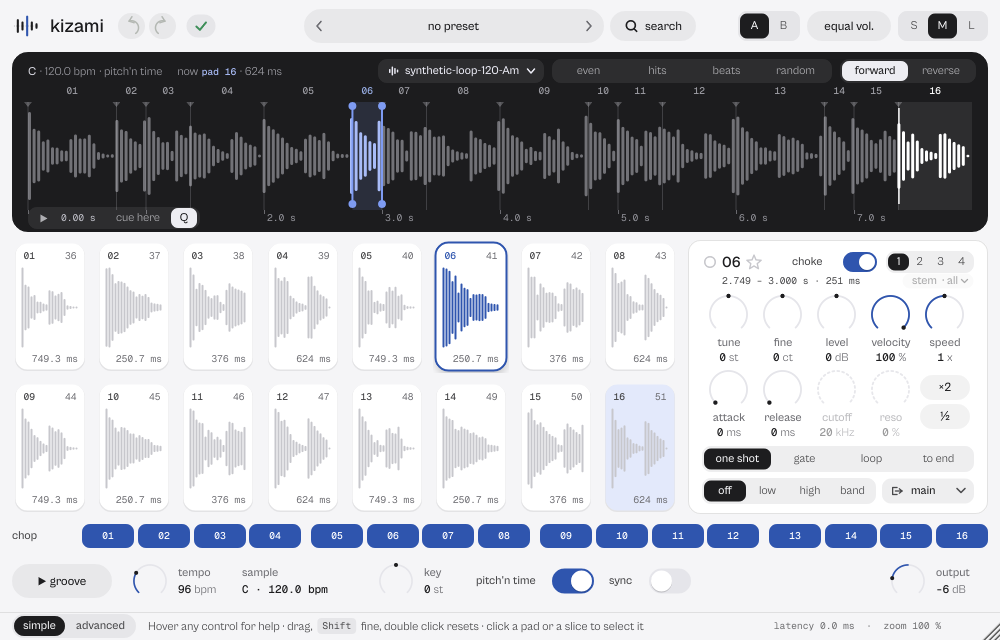
What it does
kizami cuts a sample into 16 or 32 cues and plays them from pads, keys or its own sequencer, with detected key and tempo and pitch'n time without waiting. Drop in a loop or a whole song (WAV, AIFF, FLAC, Ogg, MP3, up to 10 minutes).
kizami cuts a sample, or a whole song, into 16 or 32 cues and plays them from pads, keyboard or the built-in sequencer. Key and tempo are detected, and pitch'n time works without waiting. Before 19 October 2026 it was called CUTLINE; sessions and presets made with the old name open as before.
- Detects BPM and key. Cuts evenly, on transients or on beats.
- 16 or 32 cues, each with its own mode, envelope, filter and choke group.
- Drag a slice into the DAW as WAV, the pattern as MIDI.
Quick start
- Drag a sample onto the window, or pick a factory loop from the sample chip on the display.
- kizami detects tempo and key and proposes the cuts: change them with even, hits, beats or random, or choose a preset.
- Play the pads (notes 36 to 51; 36 to 67 with 32 cues) or switch on groove for the 16-step sequencer.
The display
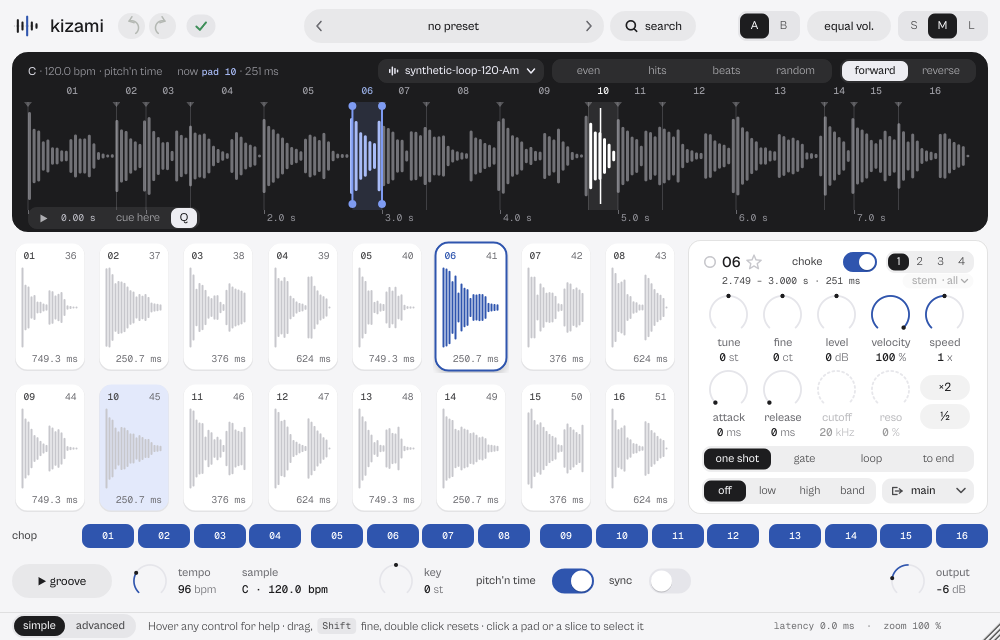
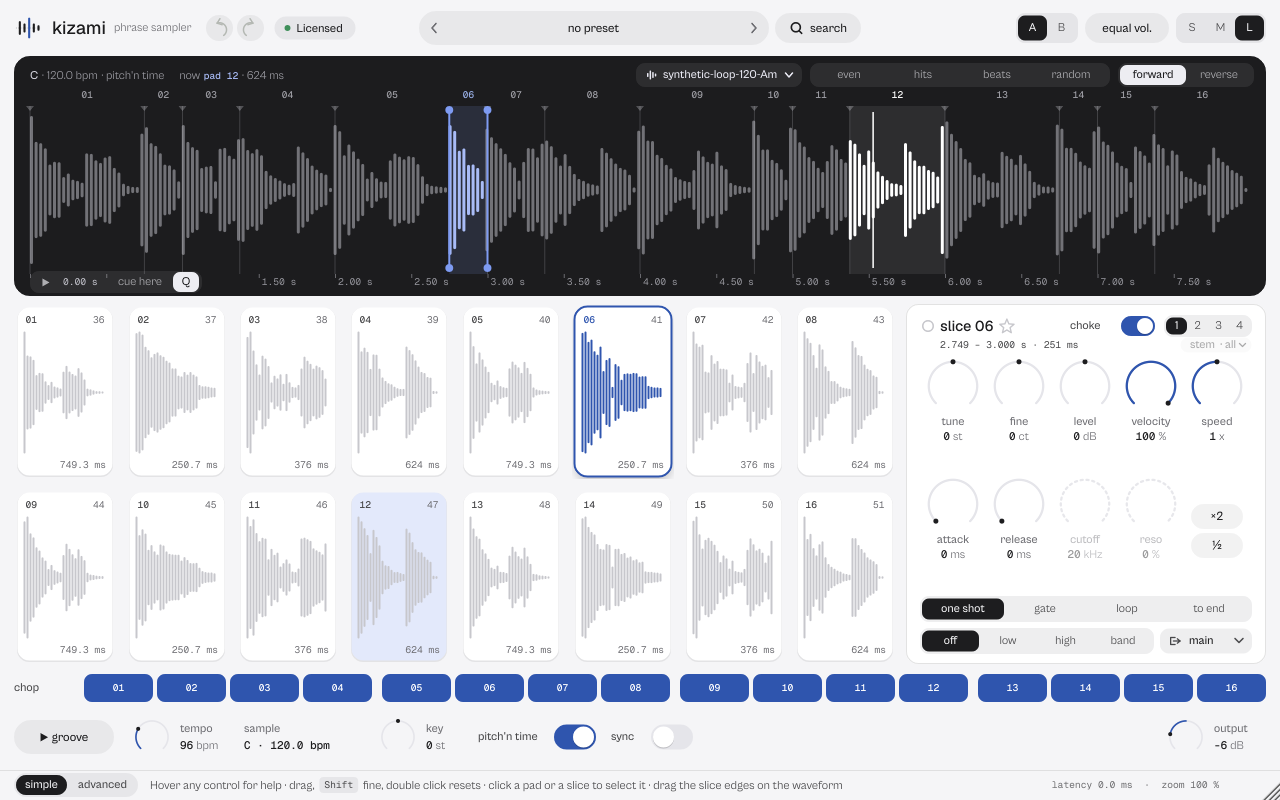
The waveform with the cuts: drag any line to move a cut (Alt detaches the two slices, Shift is fine, Esc cancels). The slice playing lights up on the waveform, on its pad and on the chop step, and the strip reads now pad 10 · step 10 · 251 ms. The wheel zooms around the pointer; Shift+wheel scrolls; double-click the ruler for the whole sample. Bottom left the source player: play the whole sample from the playhead, cue here starts the chosen cue at the playhead, Q snaps it to the nearest beat.


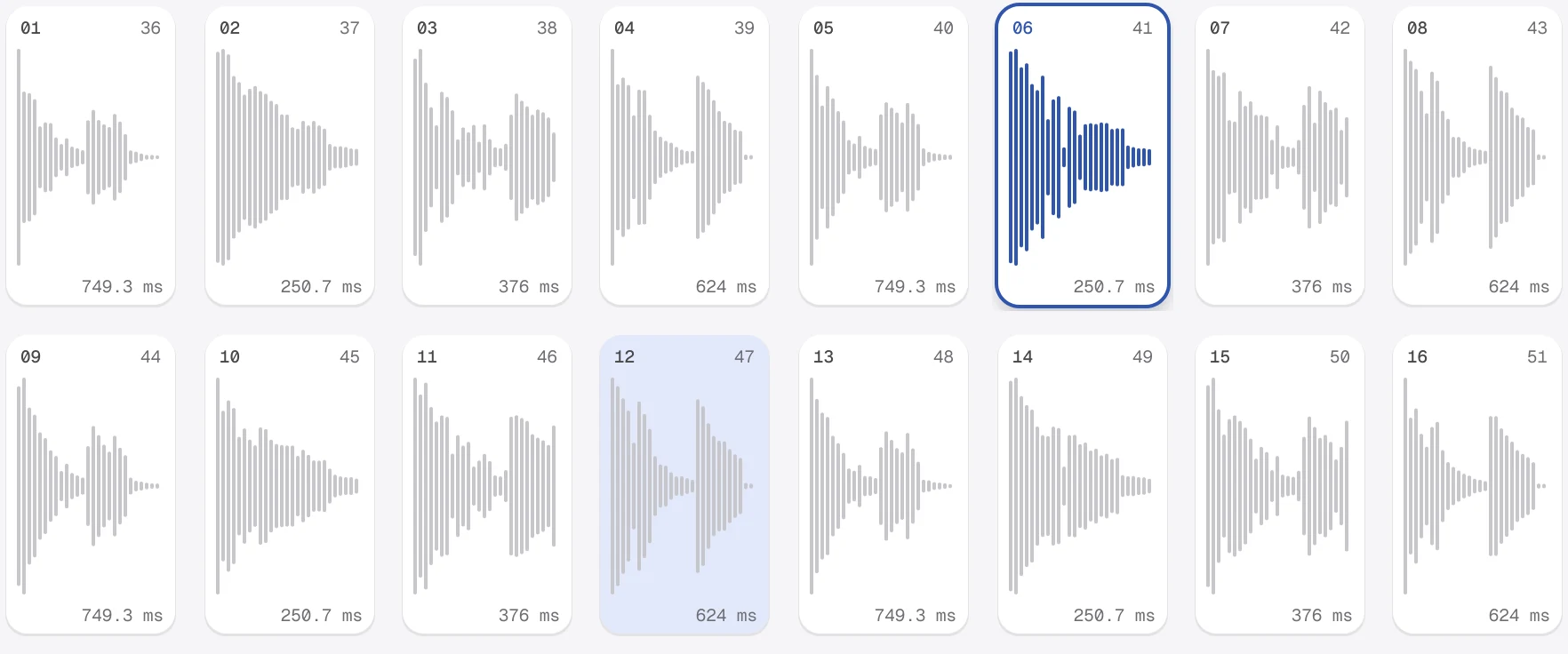
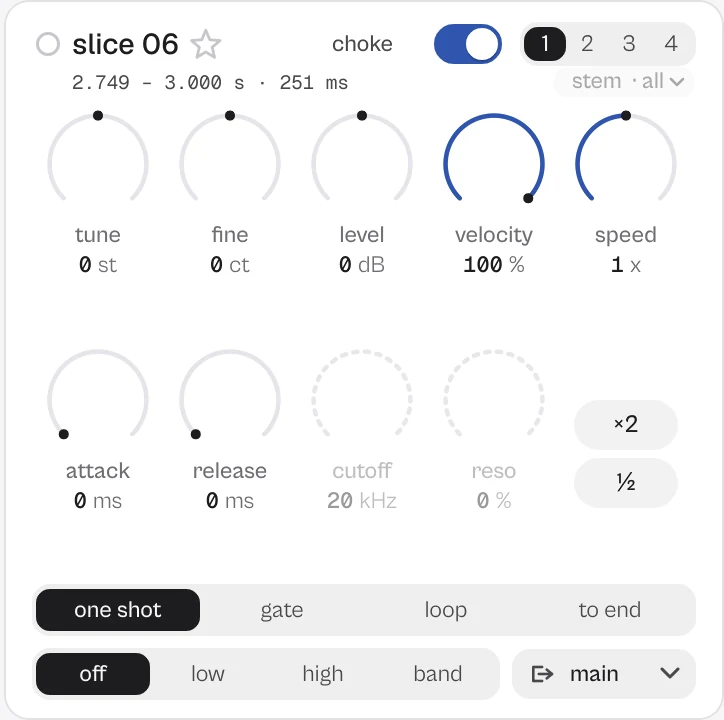

Every picture on this page is a capture of the real interface, from the current build.
Controls
The names are the ones your DAW shows for automation, read from the plugin itself; ranges and defaults are the plugin's own. Every knob: drag (Shift for fine), wheel for small steps, double-click for the default, Enter or a click on the value to type it with units (6k3, 250ms, -3 dB).
Main controls
| Control | Range | Default | What it does |
|---|---|---|---|
| Pad 1–32 Tune ×32 | −24.00 st to 24.00 st | 0.00 st | Semitones of the cue. |
| Pad 1–32 Fine tune ×32 | −100 ct to 100 ct | 0 ct | Cents of the cue. |
| Pad 1–32 Gain ×32 | −24.00 dB to 24.00 dB | 0.00 dB | Level of the cue. |
| Pad 1–32 Velocity ×32 | 0 % to 100 % | 100 % | How much note velocity changes the level (0 % = always full). |
| Pad 1–32 Attack ×32 | 0.00 ms to 2000.00 ms | 0.00 ms | Envelope attack; 200 ms at mid travel. |
| Pad 1–32 Release ×32 | 0.00 ms to 2000.00 ms | 0.00 ms | Envelope release. |
| Pad 1–32 Filter ×32 | Off · Low pass · High pass · Band pass | Off | Off, low-pass, high-pass or band-pass. |
| Pad 1–32 Cutoff ×32 | 20 Hz to 20000 Hz | 20000 Hz | Filter cutoff; 1 kHz at mid travel. |
| Pad 1–32 Resonance ×32 | 0.00 % to 100.00 % | 0.00 % | Filter resonance. |
| Pad 1–32 Play mode ×32 | One shot · Gate · Loop · To end | One shot | One shot, Gate (while held), Loop or To end. |
| Pad 1–32 Reverse ×32 | Off · On | Off | Plays the slice backwards. |
| Pad 1–32 Choke ×32 | Off · On | On | Switches the choke group on. |
| Pad 1–32 Choke group ×32 | 1 · 2 · 3 · 4 | 1 | A cue stops the others in its group (1 to 4). |
| Pad 1–32 Output ×32 | Main · Out 1 · Out 2 · Out 3 · Out 4 · Out 5 · Out 6 · Out 7 · Out 8 · Out 9 · Out 10 · Out 11 · Out 12 · Out 13 · Out 14 · Out 15 · Out 16 | Main | Main or one of 16 separate stereo outs. |
| Pad 1–32 Speed ×32 | x0.25 to x4.00 | x1.00 | 0.25x to 4x; with pitch'n time the pitch stays. |
| Pad 1–32 Stem ×32 | All · Vocals · Drums · Bass · Other | All | All, Vocals, Drums, Bass or Other (stem separation is not installed in this version: the cue plays the whole sample). |
| Key | −24 st to 24 st | 0 st | Moves everything by semitones. |
| Detune | −50 ct to 50 ct | 0 ct | Fine tuning of everything. |
| Pitch mode | Varispeed · Pitch'n Time | Pitch'n Time | Varispeed or Pitch'n Time (pitch without changing length). |
| Sync to host tempo | Off · On | Off | Fits the sample to the project tempo. |
| Sample tempo | 40.00 BPM to 240.00 BPM | 96.00 BPM | Detected tempo of the sample; ×2, ½ and tap fix it. |
| Voice mode | Poly · Mono · Legato | Poly | Poly, Mono or Legato. |
| Glide | 0 ms to 2000 ms | 80 ms | Glide time in Mono and Legato. |
| Keys mode | Off · On | Off | Plays the selected cue chromatically from the root note. |
| Swing | 0.00 % to 60.00 % | 28.00 % | Sequencer swing. |
| Groove pattern | Forward · Pocket · Shuffle chops · Broken | Forward | Forward, Pocket, Shuffle chops or Broken. |
| Cues | 16 · 32 | 16 | 16 or 32 cues. |
| Output | −24.00 dB to 6.00 dB | −6.00 dB | Main level. |
Every parameter (668)
Numbered parameters are grouped in one row (for example Band 1–8), with the number of copies.
| Parameter | Range | Default |
|---|---|---|
| Output | −24.00 dB to 6.00 dB | −6.00 dB |
| Slice attack | 0.20 ms to 30.00 ms | 3.00 ms |
| Slice release | 2.00 ms to 300.00 ms | 12.00 ms |
| Internal tempo | 40.00 BPM to 240.00 BPM | 96.00 BPM |
| Swing | 0.00 % to 60.00 % | 28.00 % |
| Groove audition | Off · On | Off |
| Groove pattern | Forward · Pocket · Shuffle chops · Broken | Forward |
| Sync host transport | Off · On | On |
| Pad 1–32 Start ×32 | 0 to 1 | varies |
| Pad 1–32 End ×32 | 0 to 1 | varies |
| Pad 1–32 Tune ×32 | −24.00 st to 24.00 st | 0.00 st |
| Pad 1–32 Gain ×32 | −24.00 dB to 24.00 dB | 0.00 dB |
| Pad 1–32 Reverse ×32 | Off · On | Off |
| Pad 1–32 Choke ×32 | Off · On | On |
| Key shift | −12 st to 12 st | 0 st |
| Pitch mode | Varispeed · Pitch'n Time | Pitch'n Time |
| Sync to host tempo | Off · On | Off |
| Sample tempo | 40.00 BPM to 240.00 BPM | 96.00 BPM |
| Voice mode | Poly · Mono · Legato | Poly |
| Glide | 0 ms to 2000 ms | 80 ms |
| Keys mode | Off · On | Off |
| Keys root note | 24 to 96 | 60 |
| Pad 1–32 Play mode ×32 | One shot · Gate · Loop · To end | One shot |
| Pad 1–32 Attack ×32 | 0.00 ms to 2000.00 ms | 0.00 ms |
| Pad 1–32 Release ×32 | 0.00 ms to 2000.00 ms | 0.00 ms |
| Pad 1–32 Filter ×32 | Off · Low pass · High pass · Band pass | Off |
| Pad 1–32 Cutoff ×32 | 20 Hz to 20000 Hz | 20000 Hz |
| Pad 1–32 Resonance ×32 | 0.00 % to 100.00 % | 0.00 % |
| Chop step 1–16 ×16 | 0 to 16 | varies |
| Pad 1–32 Fine tune ×32 | −100 ct to 100 ct | 0 ct |
| Pad 1–32 Velocity ×32 | 0 % to 100 % | 100 % |
| Pad 1–32 Choke group ×32 | 1 · 2 · 3 · 4 | 1 |
| Cues | 16 · 32 | 16 |
| Pad 1–32 Output ×32 | Main · Out 1 · Out 2 · Out 3 · Out 4 · Out 5 · Out 6 · Out 7 · Out 8 · Out 9 · Out 10 · Out 11 · Out 12 · Out 13 · Out 14 · Out 15 · Out 16 | Main |
| Chop step 1 cues 17-32 … Chop step 16 cues 17-32 ×16 | Off · On | Off |
| Output guard | 0.4.3 (before Output) · After Output | After Output |
| Cue envelope | 0.4.3 (cue time x2) · As set | As set |
| Glide curve | 0.4.3 (exponential) · Linear | Linear |
| Pitch'n Time engine | 0.4.3 · Transients | Transients |
| Glide in Mono | Off · On | Off |
| Release as decay | Off · On | Off |
| Detune | −50 ct to 50 ct | 0 ct |
| Key | −24 st to 24 st | 0 st |
| Pad 1–32 Speed ×32 | x0.25 to x4.00 | x1.00 |
| Pad 1 Output 9-16 … Pad 32 Output 9-16 ×32 | - · Out 9 · Out 10 · Out 11 · Out 12 · Out 13 · Out 14 · Out 15 · Out 16 | - |
| Pad 1–32 Stem ×32 | All · Vocals · Drums · Bass · Other | All |
| Source play | Off · On | Off |
| Source position | 0 to 1 | 0 |
| Bypass | Off · On | Off |
Presets
48 presets in 9 categories. A preset never changes your sample: it decides how to cut it and play it.
- Basics 1Clean Chop 16
- Soul & Vocals 6Crate Chop 8, Soul Flip 16
- Drums 6Break Slicer 16, Jungle Chop 32
- Keys 6808 Glide, Chord Keys
- Live 6Stutter 16ths, Beat Juggle
- Lo-fi 6Dusty Low Pass, Half Speed
- One-shots 5Trimmed Kit 16, 16 Levels Tune
- Trap & Drill 6Trap Flip 140, Drill Slide 808
- Textures 6Loop Cloud 32, Slow Bloom
Click the preset capsule in the top bar to open the preset sheet: search (every word must appear in the name, category or description), categories with their counts, ★ Favourites, tags on every row, and in B, which loads a preset into the slot that is not playing so you can compare. A click loads a preset and leaves the sheet open; ↑ ↓ move, Enter loads and closes, Esc closes. The arrows ‹ › beside the capsule step through the list; a dot says the sound was changed.
All 55 programs, as the DAW lists them
- Dust Circuit / 96
- Night Garage / 132
- Glass Break / 154
- House / Copper Alley / 124 Dm
- Garage / Bent Keys / 132 Fm
- Halftime / Jaw Circuit / 140 Fm
- Ambient / Glass Canopy / 96 Cm
- Basics / Clean Chop 16
- Soul & Vocals / Crate Chop 8
- Soul & Vocals / Soul Flip 16
- Soul & Vocals / Chipmunk Soul
- Soul & Vocals / Vocal Gate Chop
- Soul & Vocals / Bar Flip 8
- Soul & Vocals / Stab Hunter 32
- Drums / Break Slicer 16
- Drums / Swing Grid 16
- Drums / Tight Kit
- Drums / Ghost Notes
- Drums / Slow Jam Break
- Drums / Jungle Chop 32
- Keys / 808 Glide
- Keys / Bass Mono
- Keys / Chord Keys
- Keys / Pad Keys
- Keys / Lead Glide
- Keys / Vox Synth
- Live / Stutter 16ths
- Live / Roll 32
- Live / Gate Perform
- Live / Reverse Throws
- Live / Scene Launcher
- Live / Beat Juggle
- Lo-fi / Dusty Low Pass
- Lo-fi / Slowed Tape
- Lo-fi / Half Speed
- Lo-fi / Muffled Walls
- Lo-fi / AM Radio
- Lo-fi / Pitch Ladder 8
- One-shots / Trimmed Kit 16
- One-shots / 16 Levels Tune
- One-shots / 16 Levels Filter
- One-shots / 16 Levels Decay
- One-shots / Multi-Out Kit
- Trap & Drill / Trap Flip 140
- Trap & Drill / Dark Octave
- Trap & Drill / Drill Melody
- Trap & Drill / Drill Slide 808
- Trap & Drill / Vox Chop Trap
- Trap & Drill / Reverse Riser
- Textures / Loop Cloud 32
- Textures / Frozen Moment
- Textures / Reverse Drift
- Textures / Shimmer Air
- Textures / Slow Bloom
- Textures / Sub Drone
A/B and undo
A and B hold two complete settings. equal vol. plays B at the loudness of A, so louder never fools you. in B in the preset sheet loads a preset straight into the other slot. Undo and redo (the curved arrows, Ctrl+Z and Ctrl+Shift+Z) are kept separately for A and B; switching slot is not a step.
Listen modes
kizami has no delta mode. The source player on the display plays the whole sample as it is (without the plugin's key or tempo), to find a spot before you set a cue.
Simple, advanced and sizes
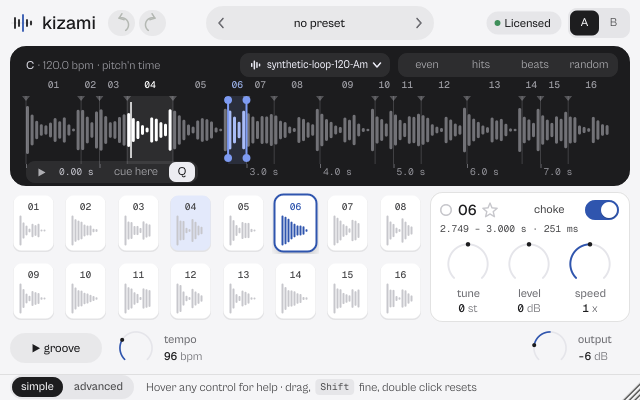
simple shows pads, the pad panel, the chop sequence, groove, tempo, key, pitch'n time, sync and output. advanced opens a drawer over the pads (the display stays visible) with groove (swing, patterns, sync transport, export MIDI and slices), voice (poly/mono/legato, keys mode, glide, root, detune), sample (tempo ×2, ½, tap, 16/32 cues, import, engine) and, at S, pad.
Pick a size with S, M and L in the top bar, or drag the window corner. A click on the status line zooms the contents from 75 to 200 %. The help strip in the footer describes the control under the pointer.
More features
Long files
Up to 10 minutes at 48 kHz, held in memory (about 230 MB for 10 minutes stereo). Up to 60 s the sample is saved inside the project; longer files are linked by path and SHA-256 and must stay where they are. If one is missing, find file… relinks it.
Separate outputs and export
Each cue can go to one of 16 stereo outs (enable them in the DAW). Drag a pad out of the window to get that slice as a WAV; drag the MIDI chip to a track to get the sequence as a clip.
Tips by genre
- Boom bap and soul
- Crate Chop 8, Soul Flip 16: cut on beats, then Keys mode for a melody.
- Drum breaks
- Break Slicer 16, Jungle Chop 32, swing from the groove tab.
- Trap and drill
- Trap Flip 140, Drill Slide 808: synced to the host, 808 glide in Mono.
- MPC style
- 16 Levels Tune, 16 Levels Filter: one hit across sixteen pads.
- Textures
- Loop Cloud 32, Frozen Moment: loop mode and long releases.
CPU and latency
- Latency
- 0 samples.
- Quality
- Engine 0.5 for new instances; sessions saved with 0.4.3 keep that engine. Pitch'n time versions are prepared in the background, up to 512 MB.
- CPU
- About 1.1 % of one core playing the test loop.
- MIDI
- Notes 36 to 51 play the cues (36 to 67 with 32 cues). MIDI learn from the status line.
CPU: one stereo instance at 48 kHz, 512-sample blocks, on a test signal, as a percent of one core of a recent desktop CPU. Indicative only: your system will differ.
Version and changes
This manual describes kizami 0.8.4. Updates never change how a saved session sounds: when the sound changes, it arrives as a new option or only in new instances.
Latest builds
- 0.8.4 2026-10-24 ["Its own product now: its licence, the Beat Kit's (KIZAMI, KITTO, TATAKIT, FUZZO, ASCENT) or ZOKKU All's unlocks it; old beta trials keep working. Sound and saved sessions unchanged."]
- 0.8.3 2026-10-24 ['Activate online and Activate offline in the licence sheet activate ZOKKU All; a saved session stays byte for byte the same after it is reopened.']
- 0.8.2 2026-10-24 ['A ZOKKU All licence unlocks it too; the free trial is the ZOKKU All one: 7 days, one trial for all eleven.']
Before
- 0.8 Revisited interface: the playing slice lights up on waveform, pad and step; preset capsule in the top bar.
- 0.7 New name, kizami (before: CUTLINE).
Common to every plugin: windows, presets, keyboard and typed values.