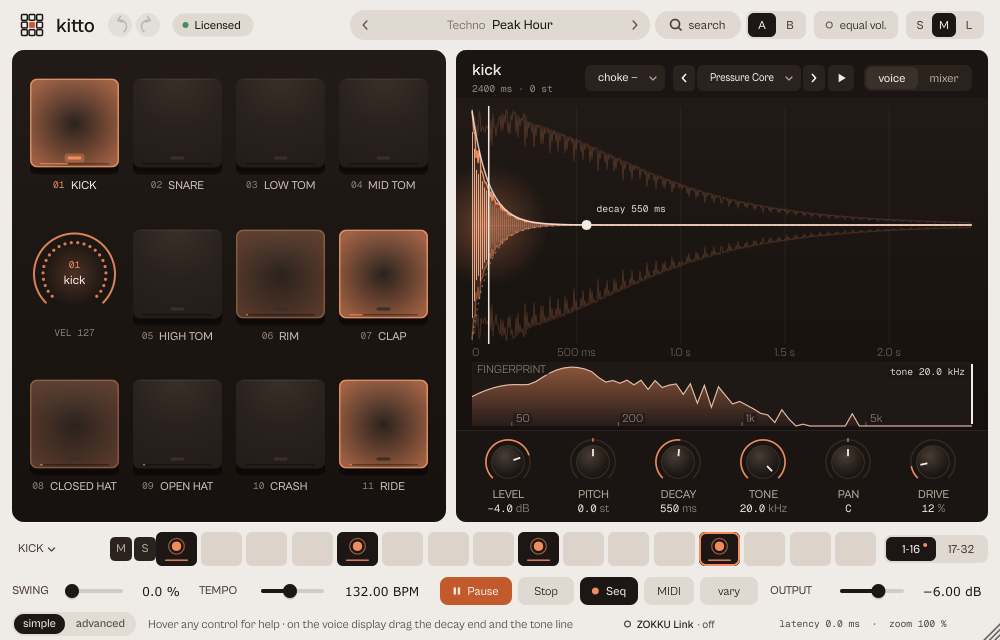
What it does
kitto is a sample drum machine with 11 lanes (kick, snare, three toms, rim, clap, closed and open hat, crash, ride), a 16 or 32-step sequencer and 75 library sounds with documented licences. Every lane can also play your own one-shot.
Eleven lanes (kick, snare, three toms, rim, clap, closed and open hat, crash, ride), a 16 or 32 step sequencer, 75 library sounds with documented licences, and your own samples. Before 19 October 2026 it was called NINE; sessions and presets made with the old name open as before.
- Rubber pads that light up on every hit.
- 16 or 32 steps with accents and ghost notes.
- Your own one-shots, choke groups, eleven separate outputs.
Quick start
- Pick a kit from the capsule (the kit sheet, by genre) and press Play or Space, or start the DAW: kitto follows it.
- Click the cells of the grid to switch hits on and off; drag up and down on a cell for velocity.
- Change a lane's sound with the ‹ › arrows in the voice panel.
The display
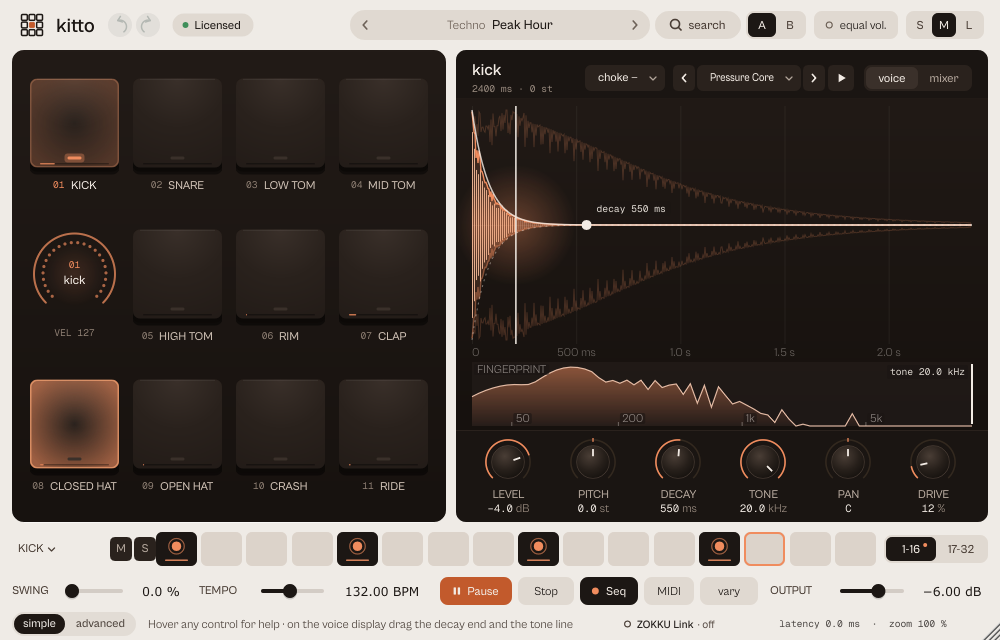
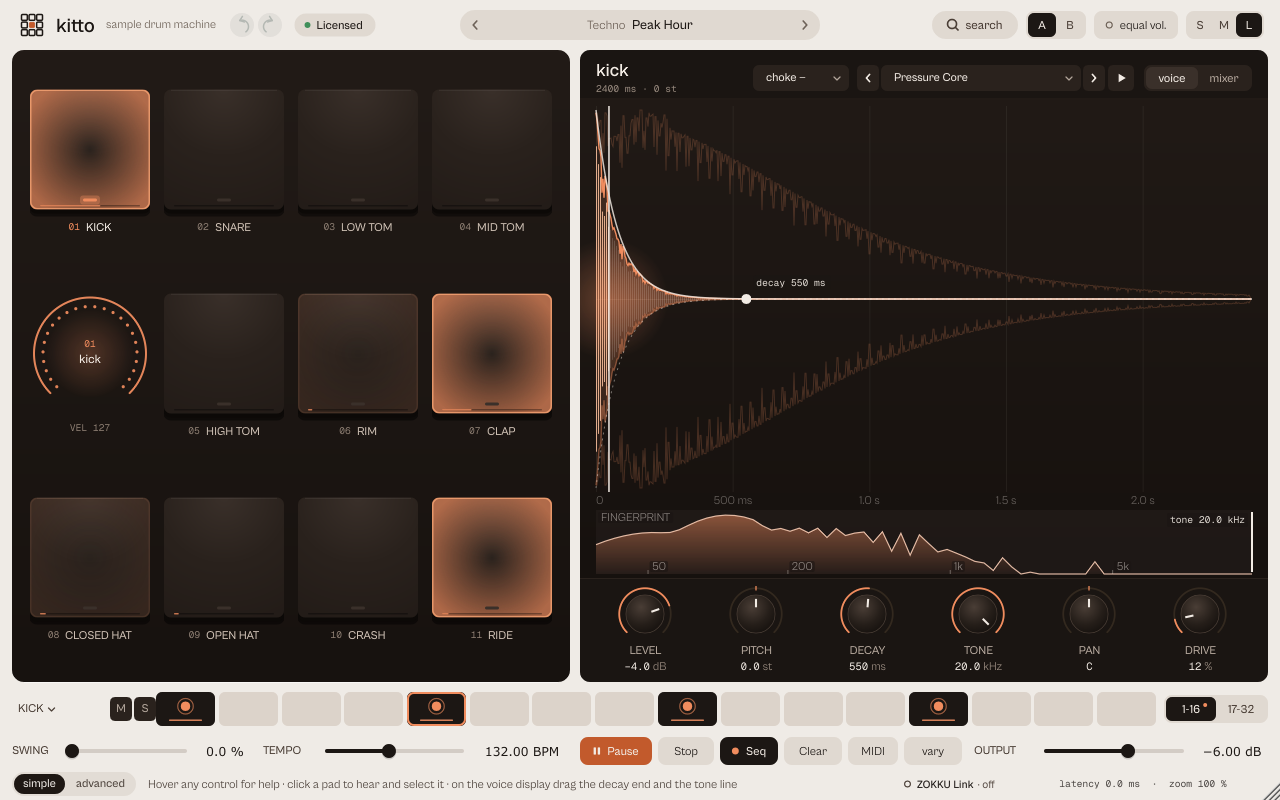
The voice display reacts to the knobs: Decay shows the envelope (with a handle you can drag, decay 550 ms), Tone the cut on the sound's fingerprint, Drive the level lines, Pitch the shifted peak in Hz. VEL shows the real velocity of the last hit. The mixer page shows the eleven lanes with level, mute and solo and the real output spectrum.
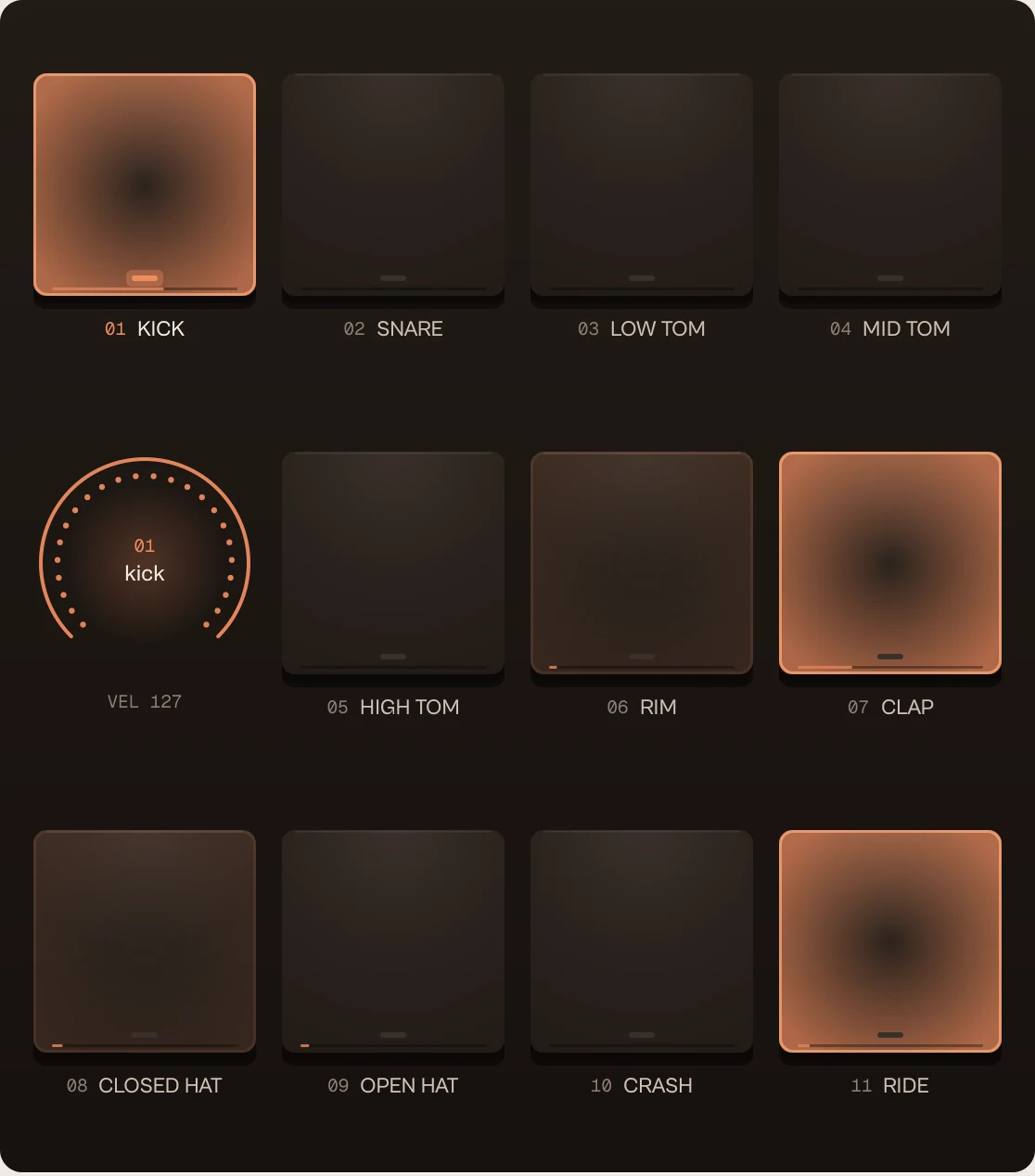
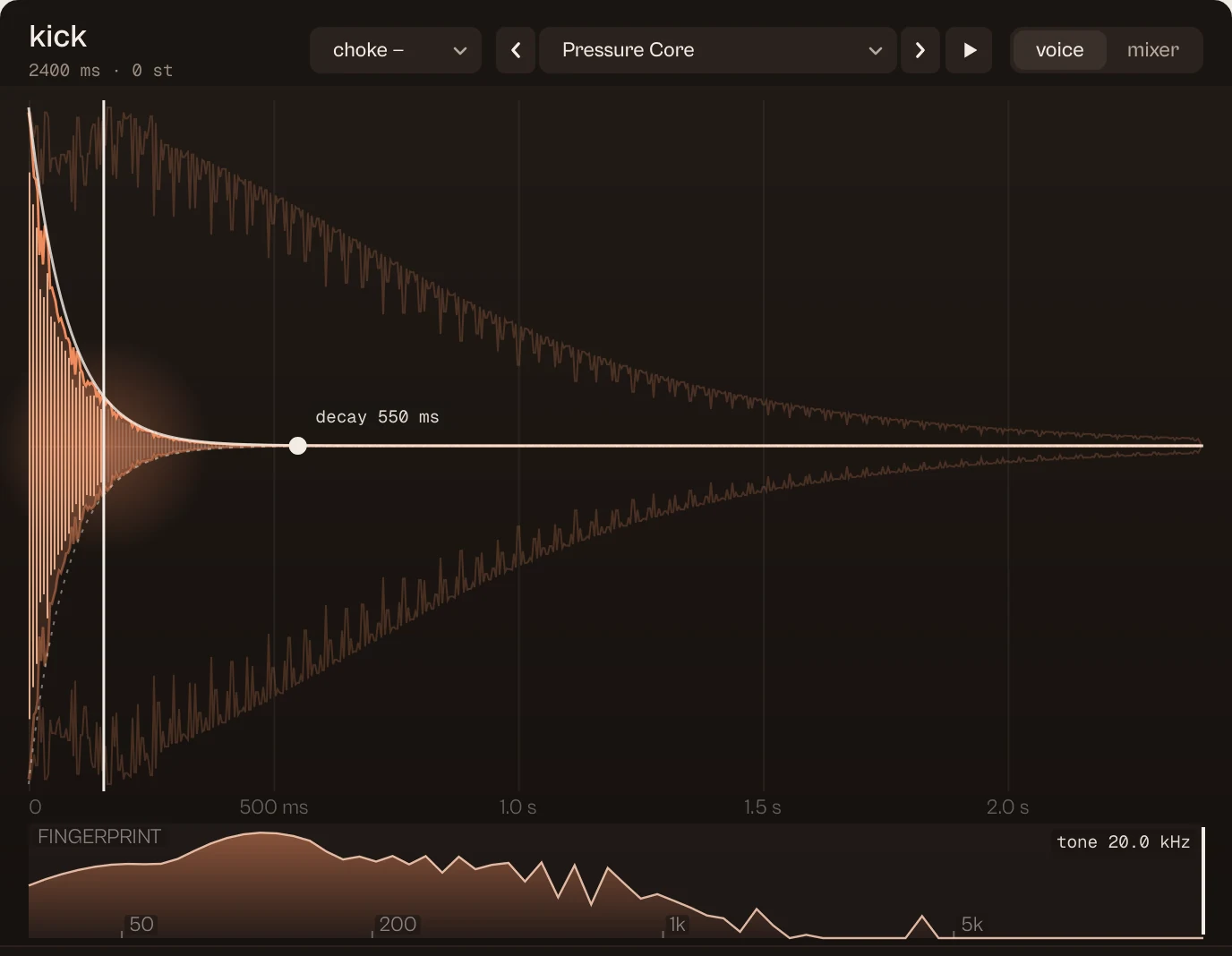



Every picture on this page is a capture of the real interface, from the current build.
Controls
The names are the ones your DAW shows for automation, read from the plugin itself; ranges and defaults are the plugin's own. Every knob: drag (Shift for fine), wheel for small steps, double-click for the default, Enter or a click on the value to type it with units (6k3, 250ms, -3 dB).
Rows marked [lane] exist once for each of the eleven lanes: Kick, Snare, Low tom, Mid tom, High tom, Rim, Clap, Closed hat, Open hat, Crash, Ride.
Main controls
| Control | Range | Default | What it does |
|---|---|---|---|
| [lane] level | −36.00 dB to 6.00 dB | Kick 0.00 dB, Snare 0.00 dB, Low tom 0.00 dB, Mid tom 0.00 dB, High tom 0.00 dB, Rim 0.00 dB, Clap 0.00 dB, Closed hat 0.00 dB, Open hat 0.00 dB, Crash −5.00 dB, Ride −3.00 dB | Level of each lane (Kick, Snare, Low tom, Mid tom, High tom, Rim, Clap, Closed hat, Open hat, Crash, Ride). |
| [lane] pitch | −12.00 st to 12.00 st | 0.00 st | Pitch of the lane in semitones. |
| [lane] decay | 20 ms to 4000 ms | Kick 950 ms, Snare 500 ms, Low tom 800 ms, Mid tom 650 ms, High tom 500 ms, Rim 180 ms, Clap 450 ms, Closed hat 180 ms, Open hat 900 ms, Crash 3000 ms, Ride 2600 ms | Length of the hit. |
| [lane] tone | 800 Hz to 20000 Hz | 20000 Hz | Low-pass on the lane. |
| [lane] pan | −100.0 % to 100.0 % | Kick 0.0 %, Snare 0.0 %, Low tom −20.0 %, Mid tom 0.0 %, High tom 20.0 %, Rim 0.0 %, Clap 0.0 %, Closed hat 0.0 %, Open hat 0.0 %, Crash 0.0 %, Ride 0.0 % | Pan of the lane. |
| [lane] drive | 0.0 % to 100.0 % | 0.0 % | Saturation of the lane. |
| [lane] Sound | per lane, below
| KITTO original | The library sound of the lane, or your sample. |
| [lane] Choke group | - · 1 · 2 · 3 · 4 | Kick -, Snare -, Low tom -, Mid tom -, High tom -, Rim -, Clap -, Closed hat 1, Open hat 1, Crash -, Ride - | Lanes in the same group cut each other (closed and open hat by default). |
| Swing | 0 % to 60 % | 0 % | Sequencer swing. |
| Internal tempo | 40 BPM to 240 BPM | 124 BPM | Tempo when the DAW is stopped; while it plays kitto follows the DAW. |
| Pattern length | 16 steps · 32 steps | 16 steps | 16 or 32 steps. |
| Accent depth | 0 % to 100 % | 0 % | How much louder accented steps play (velocity 115 and up). |
| ZOKKU Link | off · 1 · 2 · 3 · 4 · 5 · 6 · 7 · 8 · 9 · 10 · 11 · 12 · 13 · 14 · 15 · 16 | off | Sends every kick, with its velocity, on a channel (off, 1 to 16). |
| Sequencer enabled | Off · On | On | Switches the internal sequencer on. |
| Output | −24 dB to 6 dB | −6 dB | Main level. |
Every parameter (118)
Numbered parameters are grouped in one row (for example Band 1–8), with the number of copies.
| Parameter | Range | Default |
|---|---|---|
| [lane] level | −36.00 dB to 6.00 dB | Kick 0.00 dB, Snare 0.00 dB, Low tom 0.00 dB, Mid tom 0.00 dB, High tom 0.00 dB, Rim 0.00 dB, Clap 0.00 dB, Closed hat 0.00 dB, Open hat 0.00 dB, Crash −5.00 dB, Ride −3.00 dB |
| [lane] pitch | −12.00 st to 12.00 st | 0.00 st |
| [lane] decay | 20 ms to 4000 ms | Kick 950 ms, Snare 500 ms, Low tom 800 ms, Mid tom 650 ms, High tom 500 ms, Rim 180 ms, Clap 450 ms, Closed hat 180 ms, Open hat 900 ms, Crash 3000 ms, Ride 2600 ms |
| [lane] tone | 800 Hz to 20000 Hz | 20000 Hz |
| [lane] pan | −100.0 % to 100.0 % | Kick 0.0 %, Snare 0.0 %, Low tom −20.0 %, Mid tom 0.0 %, High tom 20.0 %, Rim 0.0 %, Clap 0.0 %, Closed hat 0.0 %, Open hat 0.0 %, Crash 0.0 %, Ride 0.0 % |
| [lane] drive | 0.0 % to 100.0 % | 0.0 % |
| [lane] mute | Off · On | Off |
| [lane] solo | Off · On | Off |
| Output | −24 dB to 6 dB | −6 dB |
| Swing | 0 % to 60 % | 0 % |
| Internal tempo | 40 BPM to 240 BPM | 124 BPM |
| Sequencer enabled | Off · On | On |
| [lane] Sound | per lane, below
| KITTO original |
| [lane] Choke group | - · 1 · 2 · 3 · 4 | Kick -, Snare -, Low tom -, Mid tom -, High tom -, Rim -, Clap -, Closed hat 1, Open hat 1, Crash -, Ride - |
| Pattern length | 16 steps · 32 steps | 16 steps |
| Accent depth | 0 % to 100 % | 0 % |
| ZOKKU Link | off · 1 · 2 · 3 · 4 · 5 · 6 · 7 · 8 · 9 · 10 · 11 · 12 · 13 · 14 · 15 · 16 | off |
| Bypass | Off · On | Off |
Presets
65 kits in 9 genres. A kit sets every lane, the length, accent, swing and a typical tempo.
- House & Garage 9Warehouse 909, Garage Shuffle
- Techno 10Concrete Grid, Peak Hour
- Afro & Latin 8Log Drum Bounce, Dembow Classic
- Trap & Drill 6Atlanta 808, Night Slide
- Hip Hop & Lo-fi 7Dusty Crate, Golden Era
- DnB & Bass 8Two Step Roller, Liquid Drift
- Breaks & Funk 6Tight Pocket, Miami Boom
- Pop 5Radio Four, Synth Wave 84
- Fills & Transitions 6Snare Build, Tom Cascade
Click the preset capsule in the top bar to open the preset sheet: search (every word must appear in the name, category or description), categories with their counts, ★ Favourites, tags on every row, and in B, which loads a preset into the slot that is not playing so you can compare. A click loads a preset and leaves the sheet open; ↑ ↓ move, Enter loads and closes, Esc closes. The arrows ‹ › beside the capsule step through the list; a dot says the sound was changed.
All 65 programs, as the DAW lists them
- House / Warehouse 909
- House / Garage Shuffle
- House / Open Air
- Techno / Concrete Grid
- Techno / Rim Circuit
- Techno / Offbeat Pressure
- Acid / Acid Relay
- Acid / Broken Voltage
- Dubstep / Half Time Iron
- Dubstep / Rolling Snare
- Riddim / Sparse Stomp
- Riddim / Metallic Reply
- Ambient / Slow Machines
- Ambient / Percussion Dust
- Breaks / Bent Amen
- Breaks / Electro Switch
- Disco / Silver Ride
- Trap / Tripwire
- Minimal / Negative Space
- Industrial / Foundry
- House / Jackin Shuffle
- Deep House / Late Night
- Deep House / Sunday Shaker
- Tech House / Rolling Groove
- UK Garage / Two Step Skip
- Techno / Peak Hour
- Dub Techno / Fog Station
- Hard Techno / Schranz Drive
- Afro House / Sunset Ritual
- Afro House / Tribal Lift
- Amapiano / Log Drum Bounce
- Amapiano / Private Keys
- Afrobeats / Lagos Bounce
- Reggaeton / Dembow Classic
- Reggaeton / Perreo Nocturno
- Dembow / Calle Rapida
- Trap / Atlanta 808
- Trap / Dark Rolls
- Trap / Cloud Bounce
- Drill / Road Bounce
- Drill / Night Slide
- Boom Bap / Dusty Crate
- Boom Bap / Golden Era
- Lo-fi / Tape Study
- Lo-fi / Rain on Glass
- Hip Hop / West Coast Bounce
- DnB / Two Step Roller
- Jungle / Rinse Chop
- DnB / Liquid Drift
- Halftime / Heavy Step
- Funk / Tight Pocket
- Funk / Half-Time Shuffle
- Breakbeat / Big Beat Stomp
- Electro / Miami Boom
- Pop / Radio Four
- Pop / Slow Ballad
- Pop / Synth Wave 84
- Pop Rock / Arena Drive
- Pop / Bedroom Bounce
- Fill / Snare Build
- Fill / Tom Cascade
- Fill / Trap Roll Out
- Fill / Funk Break
- Transition / Drop Gap
- Transition / Halftime Switch
A/B and undo
A and B hold two complete settings. equal vol. plays B at the loudness of A, so louder never fools you. in B in the preset sheet loads a preset straight into the other slot. Undo and redo (the curved arrows, Ctrl+Z and Ctrl+Shift+Z) are kept separately for A and B; switching slot is not a step.
Listen modes
kitto has no delta mode. Mute and Solo per lane; muted or excluded lanes are dimmed in steps, pads and names.
Simple, advanced and sizes
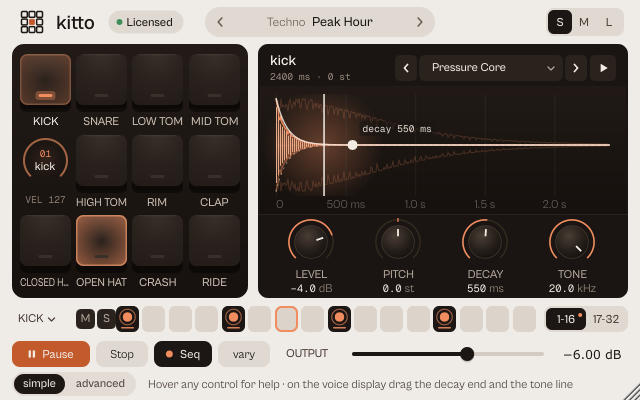
simple shows pads, the voice panel, the grid and the transport. advanced opens a drawer with three tabs: kit (sound and choke group of the 11 lanes), pattern (16/32 steps, sequencer, accent, swing, tempo) and link (ZOKKU Link channel and the separate outputs). The voice and mixer segments choose the page.
Pick a size with S, M and L in the top bar, or drag the window corner. A click on the status line zooms the contents from 75 to 200 %. The help strip in the footer describes the control under the pointer.
More features
The grid
Click: hit on or off. Shift+click: accent (100 %). Ctrl+click: ghost (35 %). Drag up and down or wheel: velocity. From 90 % the step shows the accent ring. Tab gives the whole grid one stop; arrows move, Space toggles.
Your own samples
In a lane's sound menu choose Load your own sample…, or drag a file (WAV, AIFF, FLAC, MP3, OGG, up to 8 s) onto the window. It is saved inside the project.
Outputs, MIDI and notes
11 separate stereo outs, one per lane (enable them in the DAW). Drag the MIDI chip to a track to paste the pattern as a clip. Notes: kick 36, rim 37, snare 38, clap 39, low tom 41, closed hat 42, mid tom 45, open hat 46, high tom 48, crash 49, ride 51.
Shortcuts
Space: play/pause. Esc: stop and panic. Numpad 0 to 9: select and play a lane.
Tips by genre
- House and garage
- Warehouse 909, Garage Shuffle: open hat on the off-beat, swing.
- Techno
- Concrete Grid, Peak Hour; Fog Station leaves room for chords.
- Trap and drill
- Atlanta 808, Road Bounce: the 808 kick in its own choke group, like a mono 808.
- Afro and Latin
- Log Drum Bounce, Dembow Classic.
- Variations
- vary: vary the pattern, new pattern, vary the sounds; lock lanes you want to keep.
CPU and latency
- Latency
- 0 samples.
- Quality
- 75 library sounds with documented licences, stored losslessly and shared between instances. Your one-shots up to 8 s, saved in the project.
- CPU
- About 0.75 % of one core playing; about 0.11 % at rest.
- MIDI
- Notes 36 to 51 play the lanes. MIDI learn from the status line. The pattern drags out as a MIDI clip.
- ZOKKU Link
- Sends every kick, with its velocity, on one of 16 channels, to ikipump and vela.
CPU: one stereo instance at 48 kHz, 512-sample blocks, on a test signal, as a percent of one core of a recent desktop CPU. Indicative only: your system will differ.
Version and changes
This manual describes kitto 0.7.4. Updates never change how a saved session sounds: when the sound changes, it arrives as a new option or only in new instances.
Latest builds
- 0.7.4 2026-10-24 ["Its own product now: its licence, the Beat Kit's (KIZAMI, KITTO, TATAKIT, FUZZO, ASCENT) or ZOKKU All's unlocks it; old beta trials keep working. Sound and saved sessions unchanged."]
- 0.7.3 2026-10-24 ['Activate online and Activate offline in the licence sheet activate ZOKKU All; a saved session stays byte for byte the same after it is reopened.']
- 0.7.2 2026-10-24 ['A ZOKKU All licence unlocks it too; the free trial is the ZOKKU All one: 7 days, one trial for all eleven.']
Before
- 0.7 Revisited interface: decay handle on the voice display, advanced drawer with kit, pattern and link.
- 0.6 New name, kitto (before: NINE).
Common to every plugin: windows, presets, keyboard and typed values.