What it does
ikipump turns the volume down (or closes a filter, or moves the pan) with a shape that repeats in time or starts from a kick: the sidechain pump, without routing anything in the mixer. It can also duck only the lows, three bands or only the frequencies of the kick. ikipump is free.
ikipump lowers the volume (or closes a filter, or moves the pan) with a shape that repeats in time or starts from a kick. Before 19 October 2026 it was called PULSE; sessions and presets made with the old name open as before.
- Five ready shapes, a shape drawn with points, or one captured from the kick.
- Triggers from host tempo, a kick in the track, ZOKKU Link or MIDI notes.
- Volume, filter, pan, three bands or spectral. A 3 ms low-latency mode.
Quick start
- Put ikipump on the bass, the pads or the bus you want to pump.
- Choose the trigger: tempo (follows the song) or kick in the track (listens for the kick).
- Pick a shape (soft, classic, hard, pump, gate) and set Depth. Or start from a preset such as Bass, Trap 808 tuck.
The display
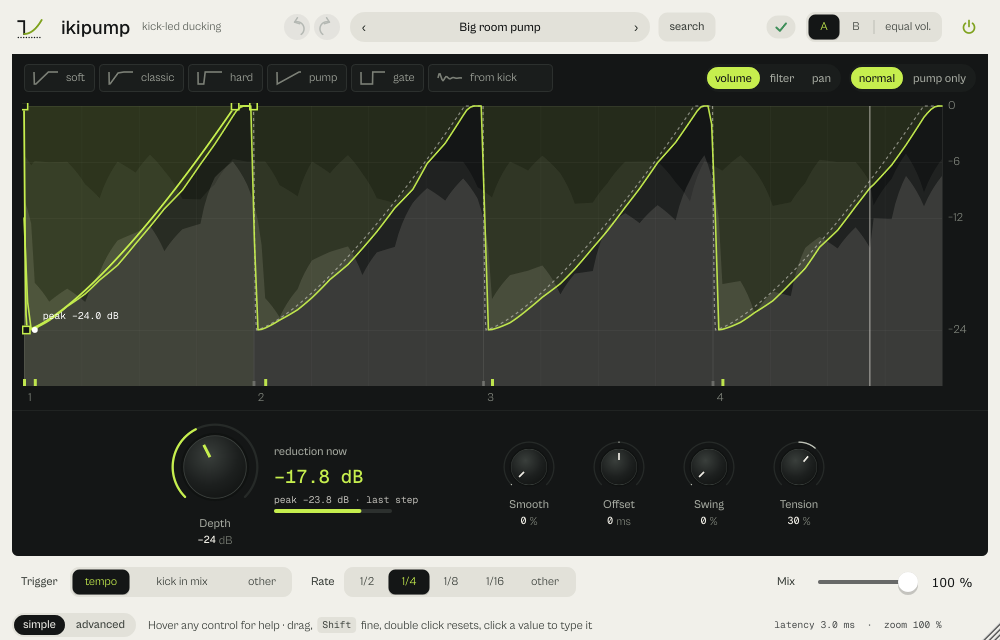
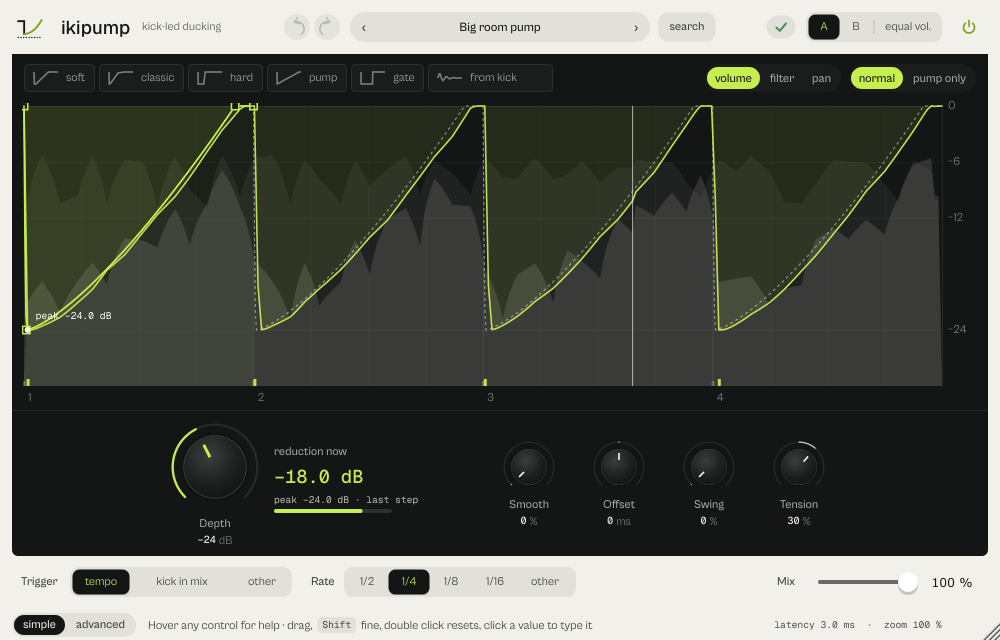
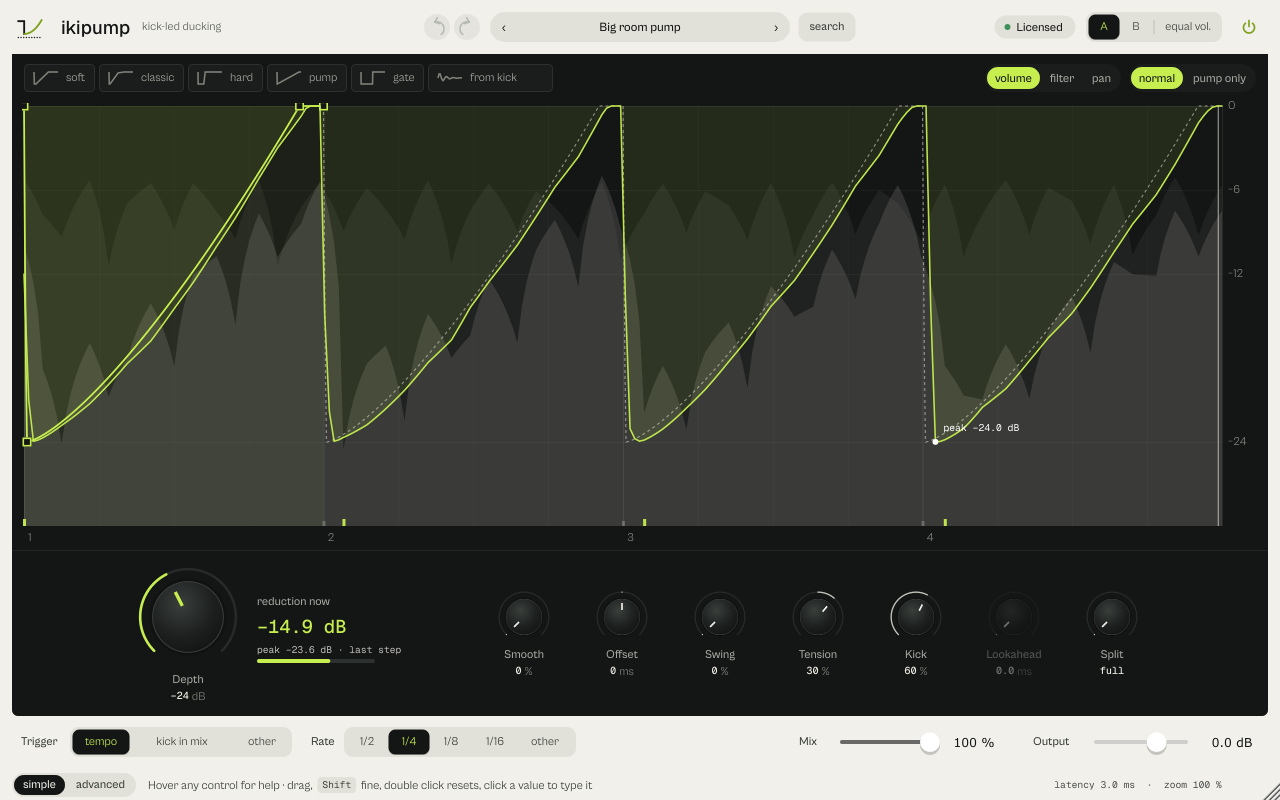
The lime line is the reduction ikipump really applies, over input and output in grey; the label marks its deepest point (peak −24.0 dB). Ticks at the bottom are the triggers. The shape is solid on the first step: drag a point, double-click to add one, right-click to remove it. With kick in the track or Send a faint kick lane shows the threshold and the detected hits. reduction now next to Depth reads the current reduction against Depth. The chip from kick listens for 3 seconds and builds the duck shape from the kick itself.
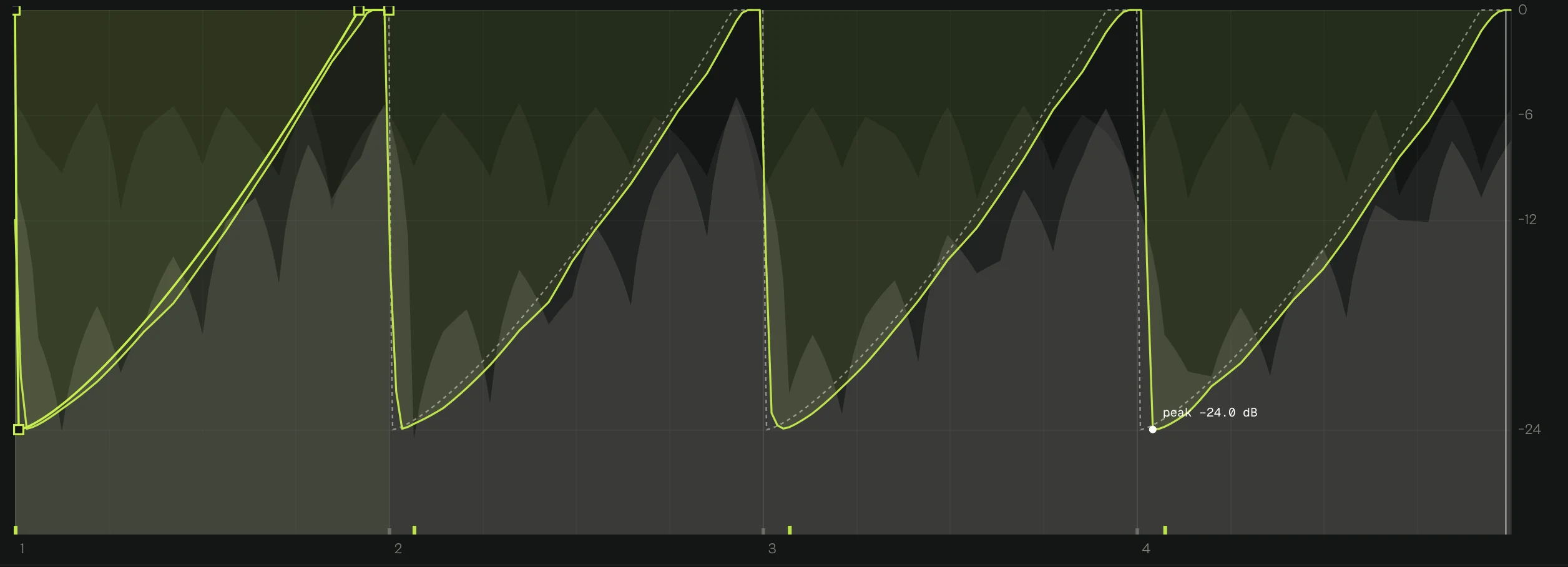




Every picture on this page is a capture of the real interface, from the current build.
Controls
The names are the ones your DAW shows for automation, read from the plugin itself; ranges and defaults are the plugin's own. Every knob: drag (Shift for fine), wheel for small steps, double-click for the default, Enter or a click on the value to type it with units (6k3, 250ms, -3 dB).
Rows marked [lane] exist once for each of the eleven lanes: Kick, Snare, Low tom, Mid tom, High tom, Rim, Clap, Closed hat, Open hat, Crash, Ride.
Main controls
| Control | Range | Default | What it does |
|---|---|---|---|
| Depth | 0 dB to 60 dB | 36 dB | How far the sound drops, in dB. |
| Trigger source | Tempo · Detect input · Link · MIDI | Tempo | Tempo, Detect input (kick in the track), Link or MIDI. |
| Tempo rate | 1/2 · 1/4 · 1/8 · 1/16 · 1/32 · 1 bar · 2 bars · 4 bars · 1/4T · 1/8T · 1/16T · 1/4D · 1/8D · 1/16D | 1/4 | The step in Tempo mode: 1/2 to 1/32, 1 to 4 bars, triplets and dotted. |
| Envelope | Curve · Shape | Shape | Shape (drawn on the display) or Curve (Attack, Hold, Release, Curve). |
| Attack | 0.1 ms to 30 ms | 0.25 ms | Curve engine: time to reach the full duck. |
| Hold | 0 ms to 200 ms | 35 ms | Curve engine: time held at the bottom. |
| Release | 5 ms to 1000 ms | 160 ms | Curve engine: time to come back. |
| Curve | 0.25 to 4 | 1.5 | Curve engine: the bend of the release. |
| Tension | −100 % to 100 % | 0 % | Bends the shape. |
| Impact | 0 % to 100 % | 70 % | How hard the start of the duck hits. |
| Smooth release | 0 % to 100 % | 0 % | Rounds the return. |
| Trigger offset | −30 ms to 30 ms | 0 ms | Moves the duck earlier or later (in Tempo also ahead of the beat). |
| Swing | 0 % to 75 % | 0 % | Delays every second hit (Tempo mode). |
| Target | Volume · Filter · Pan | Volume | Volume, Filter (a low-pass that closes on each hit) or Pan. |
| Duck below | 0 Hz to 400 Hz | 0 Hz | Ducks only the lows under this frequency (0 = off): the sub-only duck for 808 and bass. |
| Spectral | 0 % to 100 % | 0 % | At 100 % only the frequencies of the kick drop, the rest passes. |
| Three bands | Off · On | Off | Lows, mids and highs each drop by their own share. |
| Threshold | −60 dB to 0 dB | −24 dB | Kick detection threshold. |
| [lane] focus | 40 Hz to 350 Hz | 150 Hz | Centre frequency the detector listens to. |
| Retrigger | 30 ms to 500 ms | 120 ms | Shortest time between two detected kicks. |
| Detect from | Auto · Main input · Sidechain | Auto | Auto (sidechain when it carries signal, otherwise the input), Main input or Sidechain. |
| Lookahead | 0 ms to 10 ms | 0 ms | Detection lookahead. |
| Low latency | Off · On | On | On (default): about 3 ms. Off: 100 ms of lookahead, so the duck starts exactly on the detected kick. |
| Instance role | Receive / Duck · Send / Kick | Receive / Duck | Receive / Duck or Send / Kick (ZOKKU Link). |
| Link channel | 1 to 16 | 1 | ZOKKU Link channel, 1 to 16. |
| Link fallback | Off · On | On | With no sender on the channel, listen to the DAW's sidechain instead. |
| Velocity | 0 % to 100 % | 100 % | MIDI mode: how much note velocity changes the depth (0 % = always full). |
| Mix | 0 % to 100 % | 100 % | Dry and processed balance. |
Every parameter (38)
Numbered parameters are grouped in one row (for example Band 1–8), with the number of copies.
| Parameter | Range | Default |
|---|---|---|
| Trigger source | Tempo · Detect input · Link · MIDI | Tempo |
| Depth | 0 dB to 60 dB | 36 dB |
| Attack | 0.1 ms to 30 ms | 0.25 ms |
| Hold | 0 ms to 200 ms | 35 ms |
| Release | 5 ms to 1000 ms | 160 ms |
| Curve | 0.25 to 4 | 1.5 |
| Mix | 0 % to 100 % | 100 % |
| Threshold | −60 dB to 0 dB | −24 dB |
| [lane] focus | 40 Hz to 350 Hz | 150 Hz |
| Retrigger | 30 ms to 500 ms | 120 ms |
| Fallback tempo | 40 BPM to 240 BPM | 128 BPM |
| Tempo rate | 1/2 · 1/4 · 1/8 · 1/16 · 1/32 · 1 bar · 2 bars · 4 bars · 1/4T · 1/8T · 1/16T · 1/4D · 1/8D · 1/16D | 1/4 |
| Link channel | 1 to 16 | 1 |
| Instance role | Receive / Duck · Send / Kick | Receive / Duck |
| Impact | 0 % to 100 % | 70 % |
| Smooth release | 0 % to 100 % | 0 % |
| Trigger offset | −30 ms to 30 ms | 0 ms |
| Lookahead | 0 ms to 10 ms | 0 ms |
| Timing | Milliseconds · Tempo | Milliseconds |
| Envelope | Curve · Shape | Shape |
| Output | −12 dB to 6 dB | 0 dB |
| Bypass ×2 | Off · On | Off |
| Swing | 0 % to 75 % | 0 % |
| Duck below | 0 Hz to 400 Hz | 0 Hz |
| Tension | −100 % to 100 % | 0 % |
| Target | Volume · Filter · Pan | Volume |
| Low latency | Off · On | On |
| Detect from | Auto · Main input · Sidechain | Auto |
| Velocity | 0 % to 100 % | 100 % |
| Three bands | Off · On | Off |
| Low band depth | 0 % to 100 % | 100 % |
| Mid band depth | 0 % to 100 % | 100 % |
| High band depth | 0 % to 100 % | 100 % |
| Low / mid crossover | 40 Hz to 1 kHz | 200 Hz |
| Mid / high crossover | 1 kHz to 12 kHz | 3 kHz |
| Spectral | 0 % to 100 % | 0 % |
| Link fallback | Off · On | On |
Presets
64 presets in 9 categories. The new ones set the trigger too.
- Bass 10Trap 808 tuck, Drill sub dodge
- Pump 14Big room pump, French filter pump
- Pads 9Breathing pad, Reverb tuck
- Afro 5Amapiano swing, Log drum bounce
- Vocals 4Vocal tuck, Voice-over duck
- Gate 8Trance gate 1/16, Tresillo gate
- Multiband 5Air keeper, Spectral kick
- Live 5Live kick duck, Live MIDI pump
- Link 4Link kick sender, Link pump
Click the preset capsule in the top bar to open the preset sheet: search (every word must appear in the name, category or description), categories with their counts, ★ Favourites, tags on every row, and in B, which loads a preset into the slot that is not playing so you can compare. A click loads a preset and leaves the sheet open; ↑ ↓ move, Enter loads and closes, Esc closes. The arrows ‹ › beside the capsule step through the list; a dot says the sound was changed.
All 64 programs, as the DAW lists them
- Transparent
- Pump
- Hard kick
- Riddim clamp
- Long hold
- Bass space
- Kick / Soft pump
- Kick / Light pump
- Kick / Full duck
- Kick / Long breath
- Kick / Deep swell
- Kick / Hold and drop
- Kick / Tight pump
- Kick / Short snap
- Bass / Trap 808 tuck
- Bass / Drill sub dodge
- Bass / House low end
- Bass / DnB reese duck
- Bass / Techno rumble
- Pump / Gentle groove
- Pump / House glue
- Pump / Classic pump
- Pump / Big room pump
- Pump / Half-time pump
- Pump / Eighth pulse
- Pump / French filter pump
- Pads / Breathing pad
- Pads / Slow swell
- Pads / Lo-fi tape breath
- Pads / Lo-fi muffle
- Pads / Stereo breath
- Pads / Reverb tuck
- Pads / Ambient tide
- Afro / Afro house pump
- Afro / Afro shuffle
- Afro / Log drum pocket
- Afro / Amapiano swing
- Afro / Log drum bounce
- Vocals / Vocal tuck
- Vocals / Vocal chop pump
- Vocals / Voice-over duck
- Vocals / Beat under voice
- Gate / Trance gate 1/16
- Gate / Trance gate 1/8
- Gate / Tresillo gate
- Gate / Stutter 1/32
- Gate / Triplet chop
- Gate / Dotted gate
- Gate / Pattern gate
- Gate / Ping-pong gate
- Multiband / Air keeper
- Multiband / Spectral blend
- Multiband / Click space
- Live / Live kick duck
- Live / Live sub duck
- Live / Live MIDI pump
- Live / Live MIDI stutter
- Live / Live tempo pump
- Link / Link kick sender
- Link / Link bass duck
- Link / Link pump
- Link / Link pad breath
- Multiband / Spectral kick
- Multiband / Bus low pump
A/B and undo
A and B hold two complete settings. equal vol. plays B at the loudness of A, so louder never fools you. in B in the preset sheet loads a preset straight into the other slot. Undo and redo (the curved arrows, Ctrl+Z and Ctrl+Shift+Z) are kept separately for A and B; switching slot is not a step.
Listen modes
normal / pump only sits in the display. pump only plays what the duck takes away (with Filter, the highs that are removed), and a pill on the display says so. It is never saved in the session.
Simple, advanced and sizes
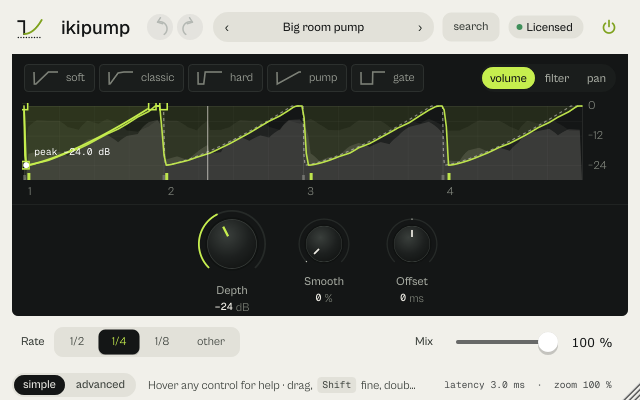
simple keeps the shapes, the display, Depth with its knobs and the Trigger/Rate/Mix bar. advanced opens a drawer with three tabs: envelope (curve or shape, ms or tempo, curve times, save and open), trigger (auto/main/sidechain, low latency, the detector, ZOKKU Link and the tempo without a host) and bands (duck below, spectral, three bands with their shares and crossovers, output). Controls that do not apply in the chosen mode are dimmed but still editable.
Pick a size with S, M and L in the top bar, or drag the window corner. A click on the status line zooms the contents from 75 to 200 %. The help strip in the footer describes the control under the pointer.
More features
ZOKKU Link
On the kick track set an ikipump to Send / Kick and a channel (1 to 16). Every ikipump in Link mode on that channel, and every vela with duck from IKIPUMP, reacts to that kick from any track. kitto and tatakit can send too. The display says the state in words: sending on channel 2 · heard by VELA, no sender on channel 2, the sender is not in this process: the host isolates plugins (FL Studio Make bridged, Bitwig sandbox, Reaper dedicated process: remove the isolation or use the sidechain).
MIDI
In MIDI mode every note starts the shape; Velocity sets how much the note's force matters. MIDI learn: right-click the status line.
Tips by genre
- House and techno
- House glue or Classic pump in Tempo at 1/4.
- Trap and drill
- Trap 808 tuck or Drill sub dodge: Duck below keeps the 808 out of the kick's way and leaves the rest alone.
- Afro house and amapiano
- Afro shuffle, Amapiano swing, Log drum pocket: swing and triplets.
- Voice-over
- Voice-over duck or Beat under voice with the voice in the sidechain.
- Live
- The Live presets use Low latency (3 ms) with the sidechain, MIDI or tempo.
CPU and latency
- Latency
- Low latency (default): about 3 ms. Off: 100 ms of lookahead, so the duck starts exactly on the detected kick. Link always uses 100 ms.
- Quality
- Splits use Linkwitz-Riley crossovers that sum back without loss.
- CPU
- About 0.35 % of one core.
- MIDI
- MIDI notes can trigger the shape, with velocity. MIDI learn from the status line.
- ZOKKU Link
- Sends the detected kick (Send / Kick) and receives in Link mode, on 16 channels.
CPU: one stereo instance at 48 kHz, 512-sample blocks, on a test signal, as a percent of one core of a recent desktop CPU. Indicative only: your system will differ.
Version and changes
This manual describes ikipump 0.12.4. Updates never change how a saved session sounds: when the sound changes, it arrives as a new option or only in new instances.
Latest builds
- 0.12.4 2026-10-24 ["Its own product now: its licence, the Beat Kit's (KIZAMI, KITTO, TATAKIT, FUZZO, ASCENT) or ZOKKU All's unlocks it; old beta trials keep working. Sound and saved sessions unchanged."]
- 0.12.3 2026-10-24 ['Activate online and Activate offline in the licence sheet activate ZOKKU All; a saved session stays byte for byte the same after it is reopened.']
- 0.12.2 2026-10-24 ['A ZOKKU All licence unlocks it too; the free trial is the ZOKKU All one: 7 days, one trial for all eleven.']
Before
- 0.12 Revisited interface: the real reduction on the display, pump only, simple/advanced drawer.
- 0.11 New name, ikipump (before: PULSE).
Common to every plugin: windows, presets, keyboard and typed values.