What it does
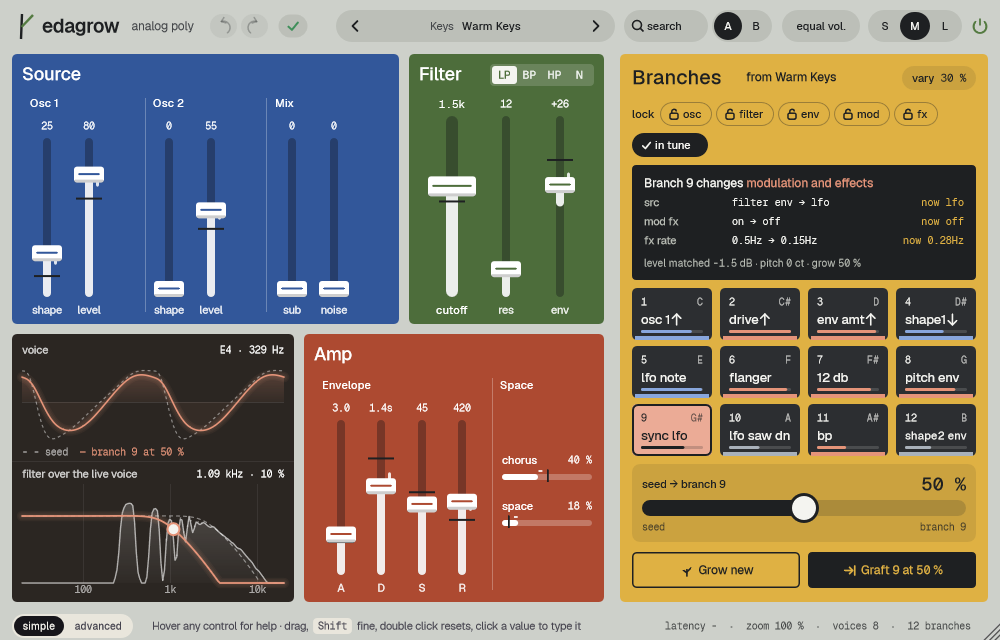
edagrow is an analog-style polysynth: two oscillators, sub and noise, a ladder filter with four modes, two envelopes, an LFO, an arpeggiator and two effects. Its own trick is branches: from every sound grow 12 variants, one per key of an octave, all at the same loudness. Listen, pick one, move toward it with Grow and graft it into the sound with Graft.
From every sound grow twelve variations at the same volume, one per key. Listen, bring the one you like closer with Grow, and graft it into the sound with Graft. Before 19 October 2026 it was called GRAFT; sessions and presets made with the old name open as before.
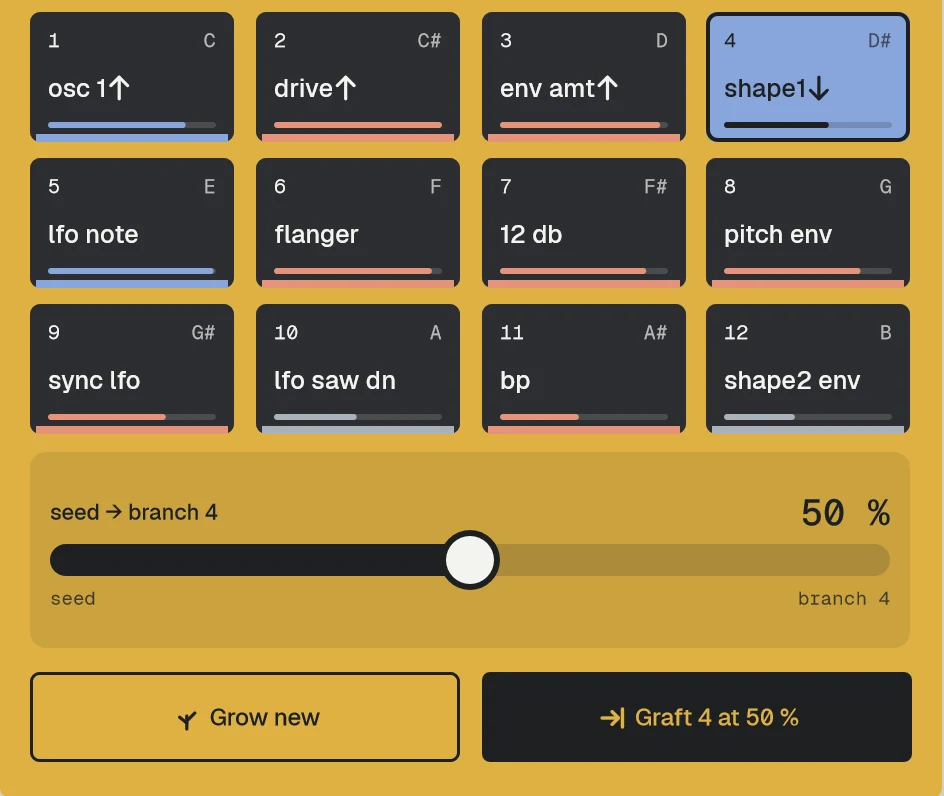
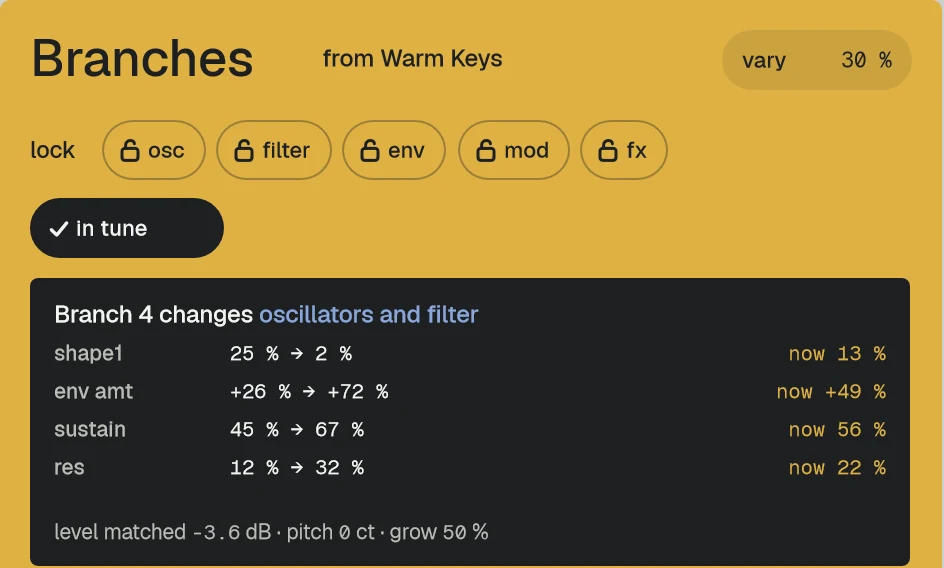
- Click a pad to hear its branch; the biggest change is written on it.
- Grow moves the sound from the seed towards the branch while you play.
- Two oscillators, sub and noise, a ladder filter with four modes, an arpeggiator.
Quick start
- Pick a preset from the capsule at the top.
- Click a pad in the yellow Branches field: you hear a short phrase with that branch.
- Drag Grow (seed → branch) to the right, then press Graft: what you hear becomes the sound and 12 new branches grow.
The display
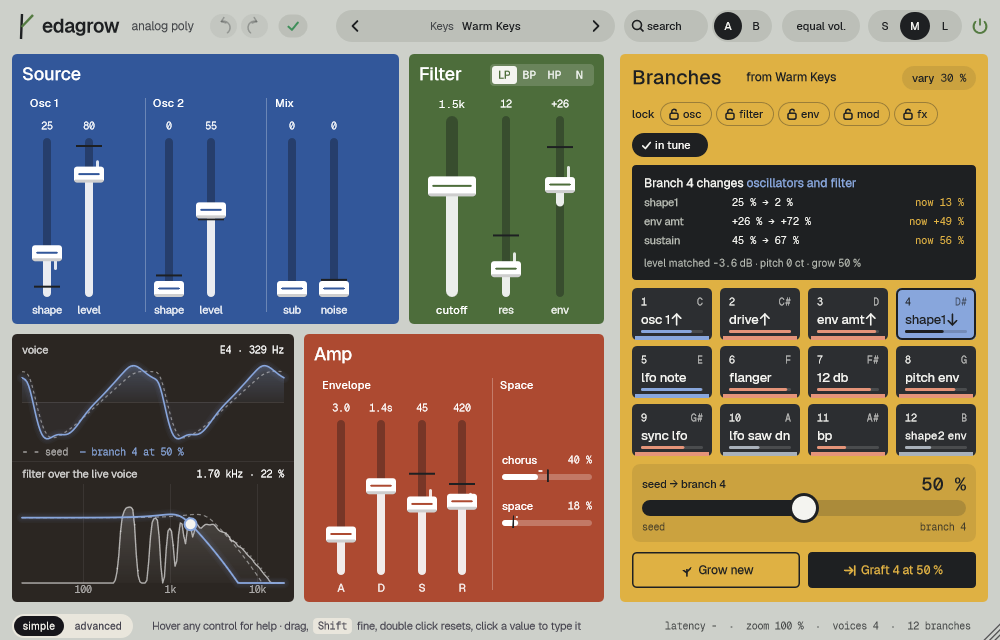
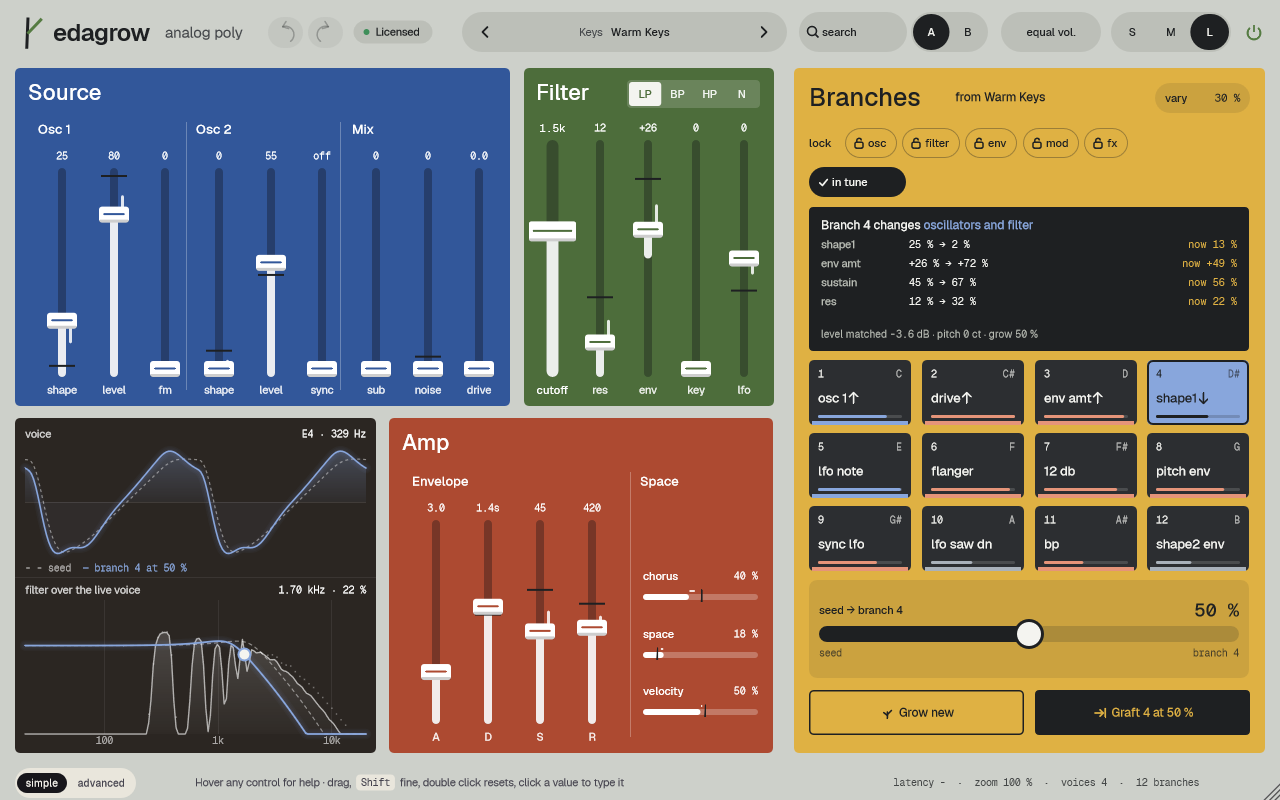
The warm glass box has two layers. voice: two periods of the voice, the seed dashed and the sound at the current Grow in the branch colour; it moves while you drag Grow, even silent. filter over the live voice: the spectrum of the latest voice with the filter response on top and, dashed, where the envelope takes the cutoff now. Drag the handle sideways for cutoff, up and down for resonance.
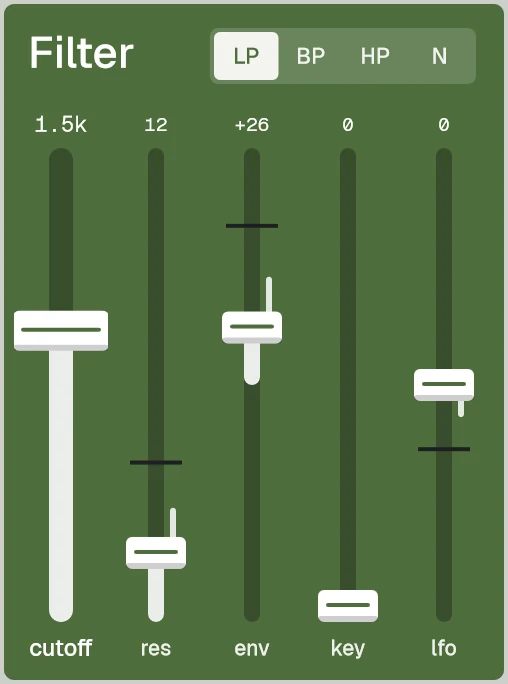
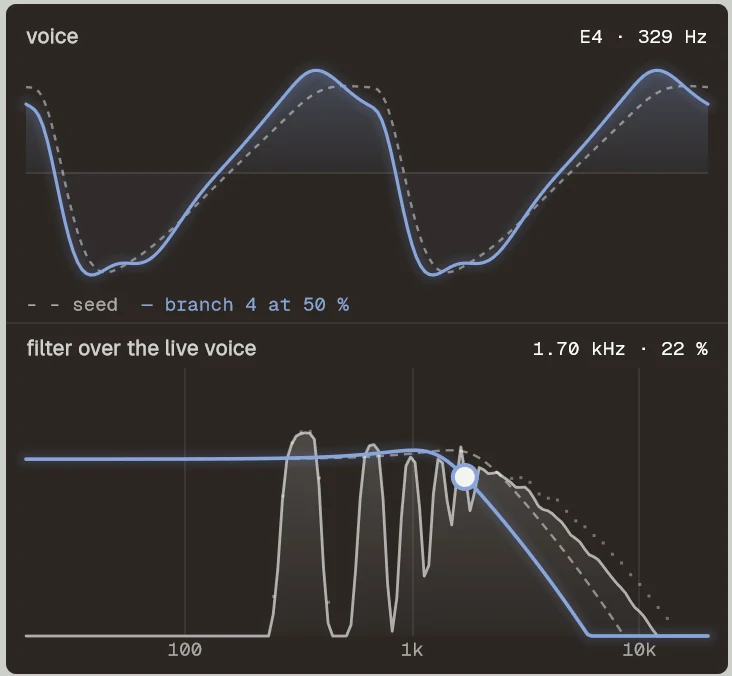
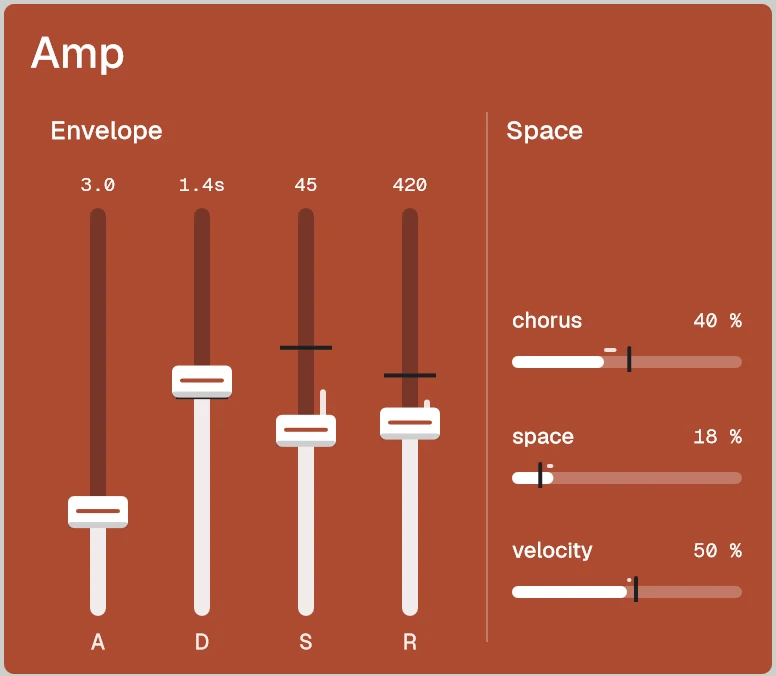
Every picture on this page is a capture of the real interface, from the current build.
Controls
The names are the ones your DAW shows for automation, read from the plugin itself; ranges and defaults are the plugin's own. Every knob: drag (Shift for fine), wheel for small steps, double-click for the default, Enter or a click on the value to type it with units (6k3, 250ms, -3 dB).
Main controls
| Control | Range | Default | What it does |
|---|---|---|---|
| Grow | 0.0 % to 100.0 % | 0.0 % | How far the sound moves from the seed toward the chosen branch. |
| Branch | 1 to 12 | 1 | The chosen branch, 1 to 12. |
| Vary | 0.0 % to 100.0 % | 30.0 % | How far the next branches grow. |
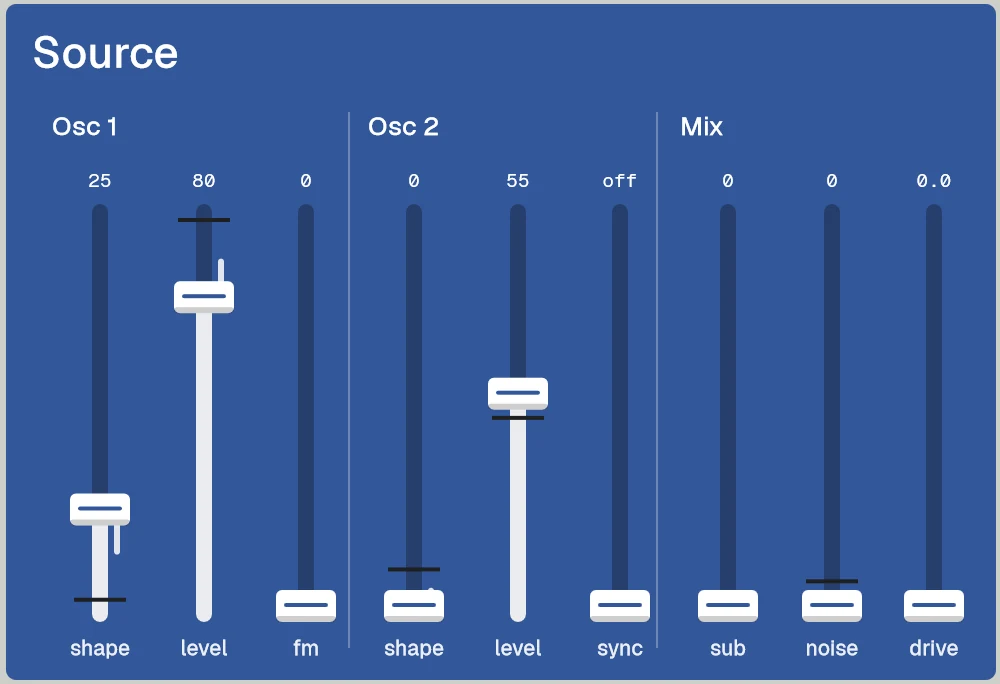
| Osc 1–2 Shape ×2 | 0.0 % to 100.0 % | 25.0 % | Triangle (0) to saw (25) to square (50) to a narrow pulse (100). Osc 1 and Osc 2. |
| Osc 1–2 Level ×2 | 0.0 % to 100.0 % | Osc 1: 80.0 %, Osc 2: 0.0 % | Oscillator level. |
| Osc 1 FM | 0.0 % to 100.0 % | 0.0 % | Osc 2 modulates the phase of Osc 1. |
| Osc 2 Sync | off to +36.0 st | off | Osc 2 synced, up to +36 semitones. |
| Sub Level | 0.0 % to 100.0 % | 0.0 % | Sub one octave below Osc 1, sine or square. |
| Noise Level | 0.0 % to 100.0 % | 0.0 % | Noise, white or pink. |
| Drive | 0.0 dB to 24.0 dB | 0.0 dB | Saturation before the filter. |
| Filter Mode | LP · BP · HP · Notch | LP | LP, BP, HP or Notch. |
| Filter Cutoff | 20.0 Hz to 20.0 kHz | 20.0 kHz | Cutoff frequency. |
| Filter Resonance | 0.0 % to 100.0 % | 0.0 % | Above 95 % the filter self-oscillates. |
| Filter Env | −100.0 % to 100.0 % | 0.0 % | How much the filter envelope moves the cutoff, also inverted. |
| Amp Attack | 0.00 ms to 20.00 s | 1.00 ms | Amplitude envelope (A, D, S, R). |
| Analog | 0.0 % to 100.0 % | 25.0 % | Small per-voice differences and a slow drift, identical on every transport start. |
| Unison | Off · 2 · 4 · 8 | Off | Off, 2, 4 or 8. |
| Arp On | Off · On | Off | Arpeggiator: up, down, up-down, random, as played; 1 to 4 octaves. |
| Mod FX Type | Chorus · Phaser · Flanger | Chorus | Chorus, Phaser or Flanger. |
| Space Type | Delay · Delay Sync · Room · Hall | Hall | Delay, Delay Sync, Room or Hall. |
| Quality | Eco · High · Studio | High | Eco (1x), High (2x) or Studio (4x). Latency 0 at every quality. |
| Wheel Target | Vibrato · Cutoff · Grow | Vibrato | Mod wheel: vibrato, cutoff or grow. |
| Master Volume | -inf dB to 6.0 dB | −6.0 dB | Final level. |
Every parameter (85)
Numbered parameters are grouped in one row (for example Band 1–8), with the number of copies.
| Parameter | Range | Default |
|---|---|---|
| Master Volume | -inf dB to 6.0 dB | −6.0 dB |
| Polyphony | 1 to 16 | 8 |
| Voice Mode | Poly · Mono · Legato | Poly |
| Glide | off to 5.00 s | off |
| Bend Range | 1 st to 24 st | 2 st |
| Quality | Eco · High · Studio | High |
| Tune | −100.0 cent to +100.0 cent | 0.0 cent |
| Analog | 0.0 % to 100.0 % | 25.0 % |
| Phase Reset | Off · On | Off |
| Unison | Off · 2 · 4 · 8 | Off |
| Unison Detune | 0.0 cent to +50.0 cent | +12.0 cent |
| Voice Spread | 0.0 % to 100.0 % | 30.0 % |
| Wheel Target | Vibrato · Cutoff · Grow | Vibrato |
| Wheel Amount | 0.0 % to 100.0 % | 30.0 % |
| Bypass | Off · On | Off |
| Osc 1–2 Shape ×2 | 0.0 % to 100.0 % | 25.0 % |
| Osc 1–2 Coarse ×2 | −24 st to +24 st | 0 st |
| Osc 1–2 Fine ×2 | −100.0 cent to +100.0 cent | 0.0 cent |
| Osc 1–2 Level ×2 | 0.0 % to 100.0 % | Osc 1: 80.0 %, Osc 2: 0.0 % |
| Osc 1 FM | 0.0 % to 100.0 % | 0.0 % |
| Osc 2 Sync | off to +36.0 st | off |
| Sub Level | 0.0 % to 100.0 % | 0.0 % |
| Sub Shape | Sine · Square | Sine |
| Noise Level | 0.0 % to 100.0 % | 0.0 % |
| Noise Color | White · Pink | White |
| Drive | 0.0 dB to 24.0 dB | 0.0 dB |
| Filter Mode | LP · BP · HP · Notch | LP |
| Filter Slope | 12 dB · 24 dB | 24 dB |
| Filter Cutoff | 20.0 Hz to 20.0 kHz | 20.0 kHz |
| Filter Resonance | 0.0 % to 100.0 % | 0.0 % |
| Filter Env | −100.0 % to 100.0 % | 0.0 % |
| Filter Keytrack | 0.0 % to 100.0 % | 0.0 % |
| Filter Velocity | 0.0 % to 100.0 % | 0.0 % |
| Filter LFO | −100.0 % to 100.0 % | 0.0 % |
| Filter Attack | 0.00 ms to 20.00 s | 1.00 ms |
| Filter Decay | 1.00 ms to 30.00 s | 300 ms |
| Filter Sustain | 0.0 % to 100.0 % | 0.0 % |
| Filter Release | 1.00 ms to 30.00 s | 300 ms |
| Amp Attack | 0.00 ms to 20.00 s | 1.00 ms |
| Amp Decay | 1.00 ms to 30.00 s | 300 ms |
| Amp Sustain | 0.0 % to 100.0 % | 100.0 % |
| Amp Release | 1.00 ms to 30.00 s | 50.0 ms |
| Amp Velocity | 0.0 % to 100.0 % | 50.0 % |
| LFO Shape | Triangle · Saw Down · Saw Up · Square · Sample & Hold · Smooth Random | Triangle |
| LFO Rate | 0.05 Hz to 50.0 Hz | 5.00 Hz |
| LFO Sync | Off · On | Off |
| LFO Division | 4/1 · 2/1 · 1/1 · 1/2 · 1/4 D · 1/2 T · 1/4 · 1/8 D · 1/4 T · 1/8 · 1/16 D · 1/8 T · 1/16 · 1/16 T · 1/32 | 1/8 |
| LFO Retrigger | Free · Note | Free |
| Pitch Mod | −48.00 st to +48.00 st | 0.00 st |
| Pitch Mod Source | LFO · Filter Env | LFO |
| Shape 1–2 Mod ×2 | −100.0 % to 100.0 % | 0.0 % |
| Shape 1–2 Mod Source ×2 | LFO · Filter Env | LFO |
| FM Mod | 0.0 % to 100.0 % | 0.0 % |
| FM Mod Source | LFO · Filter Env | Filter Env |
| Sync Mod | 0.0 st to +36.0 st | 0.0 st |
| Sync Mod Source | LFO · Filter Env | Filter Env |
| Arp On | Off · On | Off |
| Arp Mode | Up · Down · Up-Down · Random · As Played | Up |
| Arp Octaves | 1 to 4 | 1 |
| Arp Division | 1/4 · 1/8 D · 1/4 T · 1/8 · 1/16 D · 1/8 T · 1/16 · 1/16 T · 1/32 | 1/16 |
| Arp Gate | 10.0 % to 100.0 % | 75.0 % |
| Arp Swing | 0.0 % to 75.0 % | 0.0 % |
| Arp Latch | Off · On | Off |
| Mod FX On | Off · On | Off |
| Mod FX Type | Chorus · Phaser · Flanger | Chorus |
| Mod FX Rate | 0.05 Hz to 10.0 Hz | 0.50 Hz |
| Mod FX Depth | 0.0 % to 100.0 % | 50.0 % |
| Mod FX Mix | 0.0 % to 100.0 % | 50.0 % |
| Space On | Off · On | Off |
| Space Type | Delay · Delay Sync · Room · Hall | Hall |
| Space Mix | 0.0 % to 100.0 % | 20.0 % |
| Delay Time | 20.0 ms to 2.00 s | 375 ms |
| Delay Division | 1/32 · 1/16 T · 1/16 · 1/8 T · 1/16 D · 1/8 · 1/4 T · 1/8 D · 1/4 · 1/4 D · 1/2 · 1 bar | 1/8 D |
| Delay Feedback | 0.0 % to 92.0 % | 35.0 % |
| Reverb Decay | 0.20 s to 20.0 s | 2.50 s |
| Space Tone | 1.00 kHz to 16.0 kHz | 6.00 kHz |
| Vary | 0.0 % to 100.0 % | 30.0 % |
| Grow | 0.0 % to 100.0 % | 0.0 % |
| Branch | 1 to 12 | 1 |
Presets
Init plus 40 presets in 8 categories, each at −16 LUFS with its twelve branches already grown.
- Bass
- KeysWarm Keys
- Pad
- Pluck
- Lead
- Brass
- Arp
- FX
Click the preset capsule in the top bar to open the preset sheet: search (every word must appear in the name, category or description), categories with their counts, ★ Favourites, tags on every row, and in B, which loads a preset into the slot that is not playing so you can compare. A click loads a preset and leaves the sheet open; ↑ ↓ move, Enter loads and closes, Esc closes. The arrows ‹ › beside the capsule step through the list; a dot says the sound was changed.
All 41 programs, as the DAW lists them
- Init
- Bass / 808 Glide
- Bass / Lo-Fi Sub
- Bass / Boom Bap Bass
- Bass / House Organ Bass
- Bass / Acid Tape
- Bass / Reese Drift
- Keys / Warm Keys
- Keys / Tine Keys
- Keys / Lo-Fi EP
- Keys / R&B Clav
- Keys / Square Keys
- Keys / Gospel Organ
- Pad / Night Strings
- Pad / Lo-Fi Haze
- Pad / Glass Pad
- Pad / Warm Analog Pad
- Pad / Choir Air
- Pad / Sync Sweep Pad
- Pluck / Trap Bell
- Pluck / House Pluck
- Pluck / Boom Bap Pizz
- Pluck / Kalimba Drop
- Pluck / Muted Guitar
- Lead / Sync Lead
- Lead / Soft Whistle
- Lead / House Saw Lead
- Lead / G-Funk Lead
- Lead / FM Grit Lead
- Brass / Poly Brass
- Brass / Soft Horns
- Brass / Brass Stab
- Brass / Synth Trumpet
- Arp / Trap Arp Bells
- Arp / House Arp
- Arp / Lo-Fi Arp
- Arp / Random Glass
- FX / Noise Riser
- FX / Laser Zap
- FX / Wind Sweep
- FX / Space Drone
A/B and undo
A and B hold two complete settings. equal vol. plays B at the loudness of A, so louder never fools you. in B in the preset sheet loads a preset straight into the other slot. Undo and redo (the curved arrows, Ctrl+Z and Ctrl+Shift+Z) are kept separately for A and B; switching slot is not a step.
Listen modes
edagrow has no delta mode. Click the word seed under Grow to hear the same phrase with the seed, and a pad to hear its branch.
Simple, advanced and sizes
simple keeps the panel (Source, Filter, Amp), the voice and filter box and the branches. advanced opens a drawer with detail (coarse, fine, fm, sync, drive, keytrack, sub shape, noise colour, slope, filter envelope), lfo and mod, voices (voices, glide, bend, unison, analog, tune, quality, volume), arp, effects and, at S, sound. edagrow remembers the view and the tab in its editor settings, never in the project.
Pick a size with S, M and L in the top bar, or drag the window corner. A click on the status line zooms the contents from 75 to 200 %. The help strip in the footer describes the control under the pointer.
More features
Branches
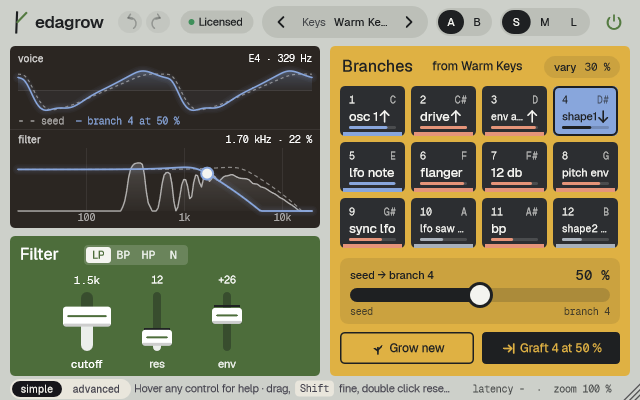
Each pad shows the biggest change (cutoff↑, flanger), a bar for the distance from the seed and the colour of the chapter it changes most. Shift+click pins a branch (it does not regrow); right-click for Listen, Pin, Regrow and Graft this. Grow new makes the current sound the seed and regrows the unpinned branches, usually in under a second. lock osc, filter, env, mod, fx keeps groups as in the seed; in tune keeps branches tuned. Every action is one undo step.
Repeatable
The same sound with the same seed always gives the same 12 branches, and analog drift restarts identically: two bounces of the same project are identical.
Tips by genre
- Bass
- Mono or Legato with a little Glide; lock env so branches keep the punch.
- Pads
- Grow slowly while a chord holds; the voice display shows where it is heading.
- Arps
- Arp presets with Space Sync for tempo echoes.
- Finding a sound
- Lower vary for close variants, raise it for surprises; pin the good ones before Grow new.
- CPU
- Quality Eco about halves the CPU.
CPU and latency
- Latency
- 0 samples, at every quality.
- Quality
- Eco (1x), High (2x, default) or Studio (4x). Band-limited oscillators; drive with second-order anti-aliasing.
- MIDI
- Pitch bend, mod wheel (vibrato, cutoff or grow), sustain pedal. MIDI learn from the status line.
No CPU figure is published for this plugin yet.
Version and changes
This manual describes edagrow 0.3.6. Updates never change how a saved session sounds: when the sound changes, it arrives as a new option or only in new instances.
Latest builds
- 0.3.6 2026-10-24 ["Its own product now: its licence, the Beat Kit's (KIZAMI, KITTO, TATAKIT, FUZZO, ASCENT) or ZOKKU All's unlocks it; old beta trials keep working. Sound and saved sessions unchanged."]
- 0.3.5 2026-10-24 ['Activate online and Activate offline in the licence sheet activate ZOKKU All; a saved session stays byte for byte the same after it is reopened.']
- 0.3.4 2026-10-24 ['A ZOKKU All licence unlocks it too; the free trial is the ZOKKU All one: 7 days, one trial for all eleven.']
Before
- 0.3 Revisited interface: Grow hero bar, voice and filter box, seed / branch / now comparison.
- 0.2 New name, edagrow (before: GRAFT).
Common to every plugin: windows, presets, keyboard and typed values.