What it does
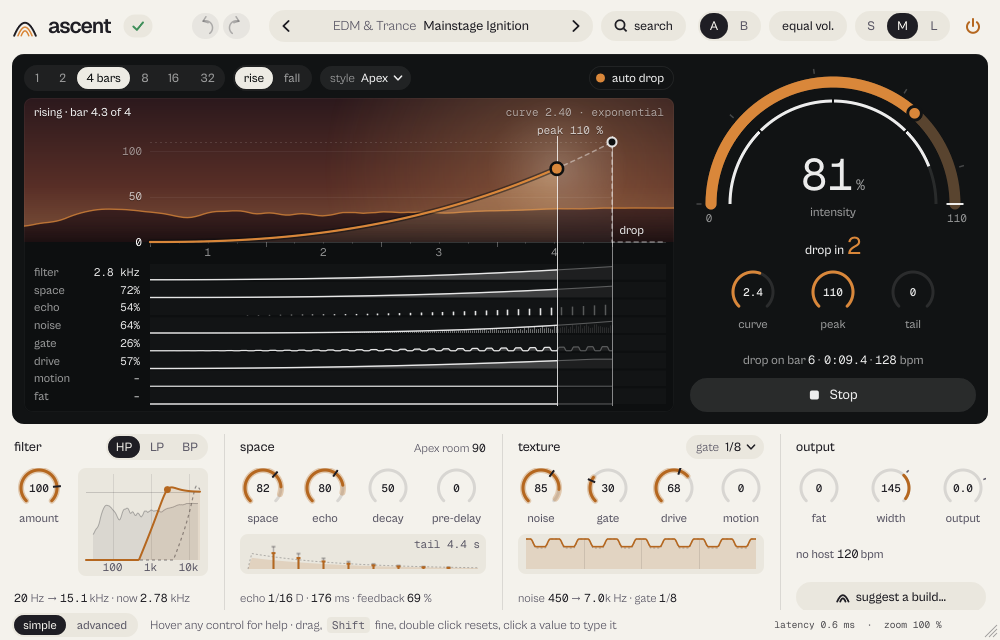
ascent builds tempo-synced risers and falls with one control: filter, reverb, echo, noise, gate, drive, motion and fat grow together up to the drop, and with auto drop the track comes back full on the bar.
ascent builds rises and falls in time: filter, reverb, echo, noise, gate and drive grow together until the drop.
- Rise starts on the next bar and lasts from 1 to 32 bars.
- Auto drop: the track comes back full on the drop bar.
- Seven styles, from Air to Apex. A MIDI note starts it on the exact sample.
Quick start
- Pick a preset (it also sets the bars), or choose how many bars the build lasts, 1 to 32, above the map.
- Press Rise: ascent starts on the next bar and climbs by itself. With auto drop the track is back, full, on the drop bar. A MIDI note starts it at once.
- Or drag the arc by hand, or automate Intensity.
The display
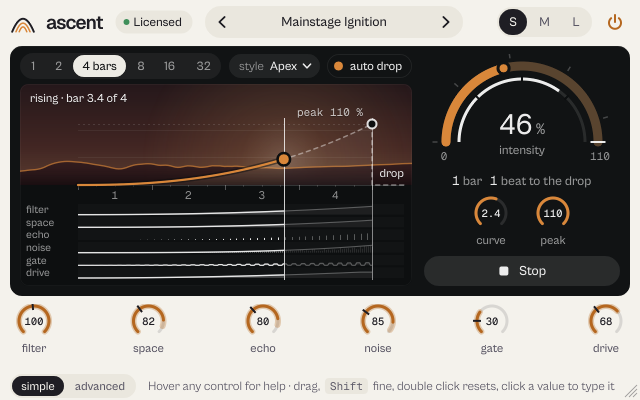
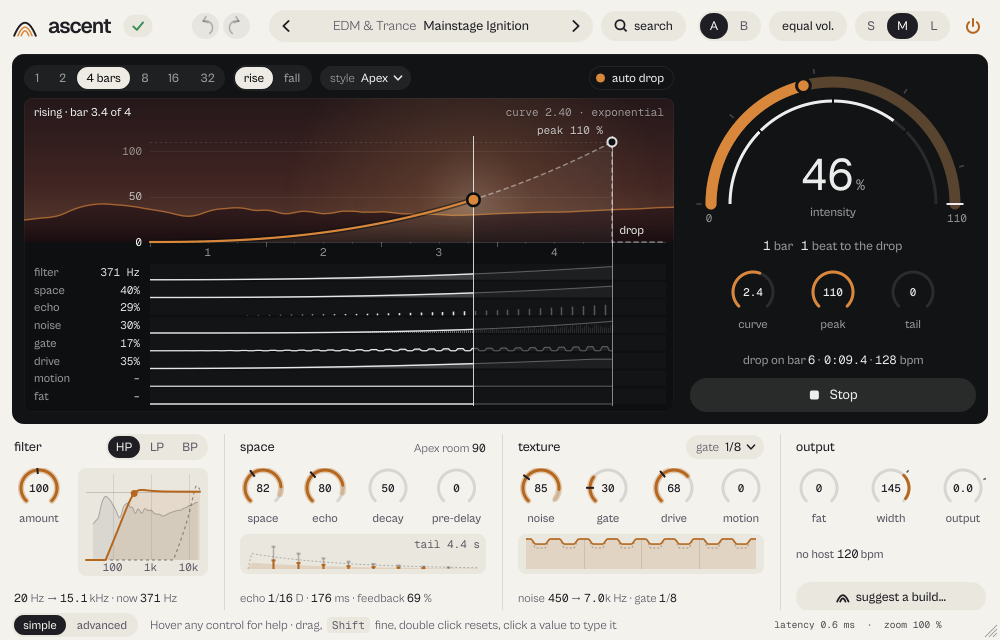
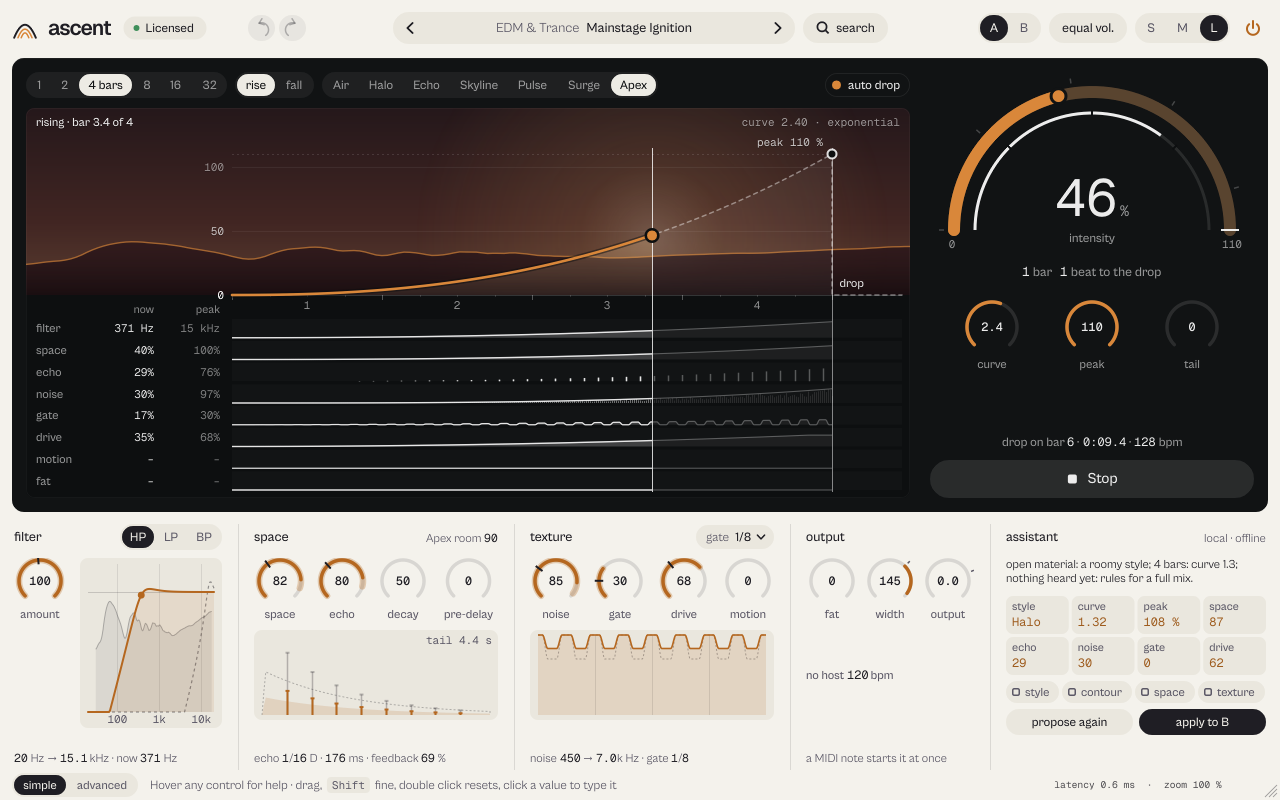
The map shows the build: top left what is happening (armed · starts in 2 beats, rising · bar 3.4 of 4, drop · the track is back, full), top right the curve. Drag the curve up or down, drag its end point to change the peak. Hover a point to read bar and intensity there. The lanes (filter, space, echo, noise, gate, drive, motion, fat) light up from the left as the build goes; hovering a knob lights its lane and back. The arc on the right is the intensity: drag it, or press Enter to type a value; during a build it shows the applied intensity and counts down to the drop.
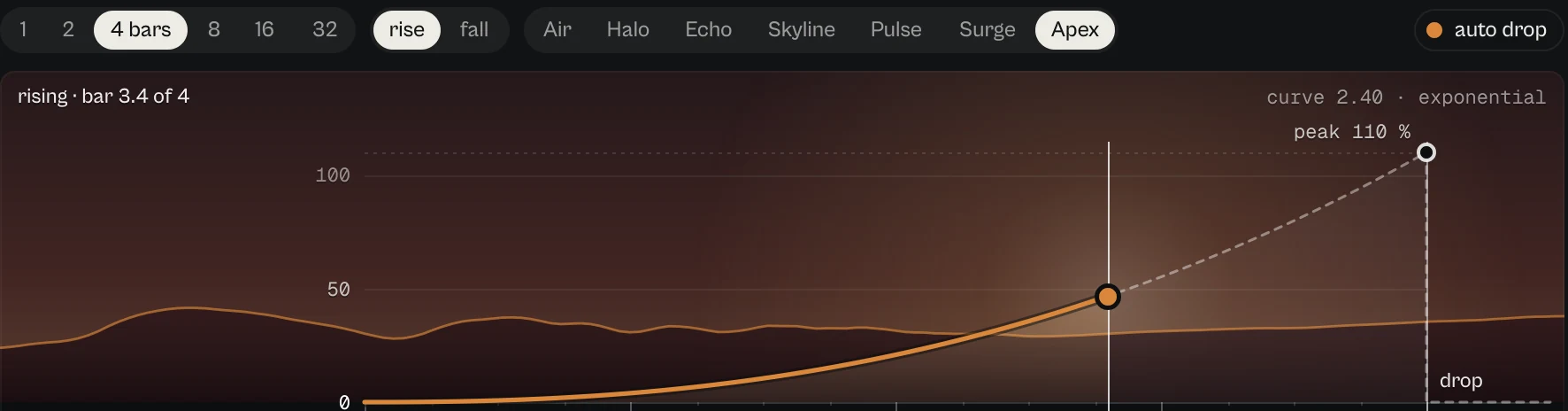
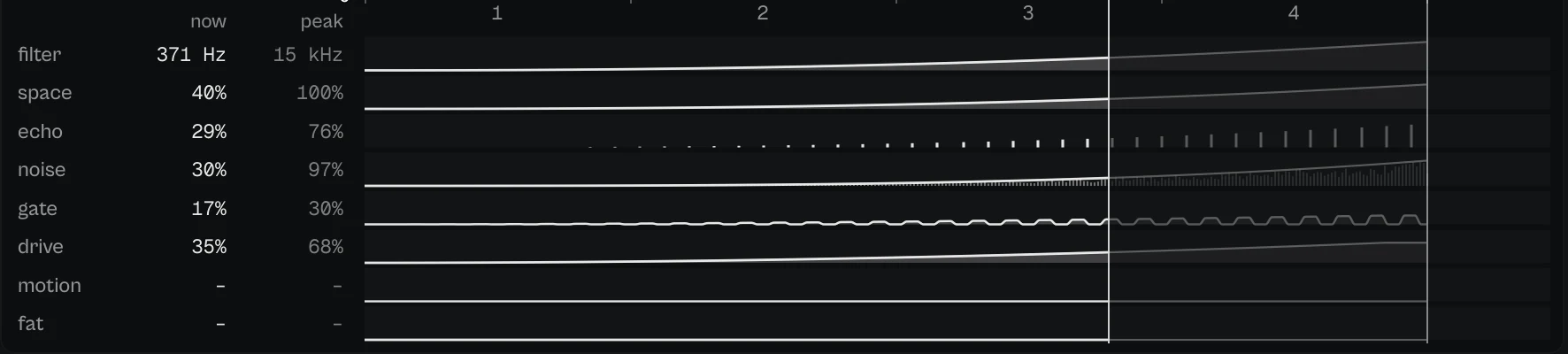
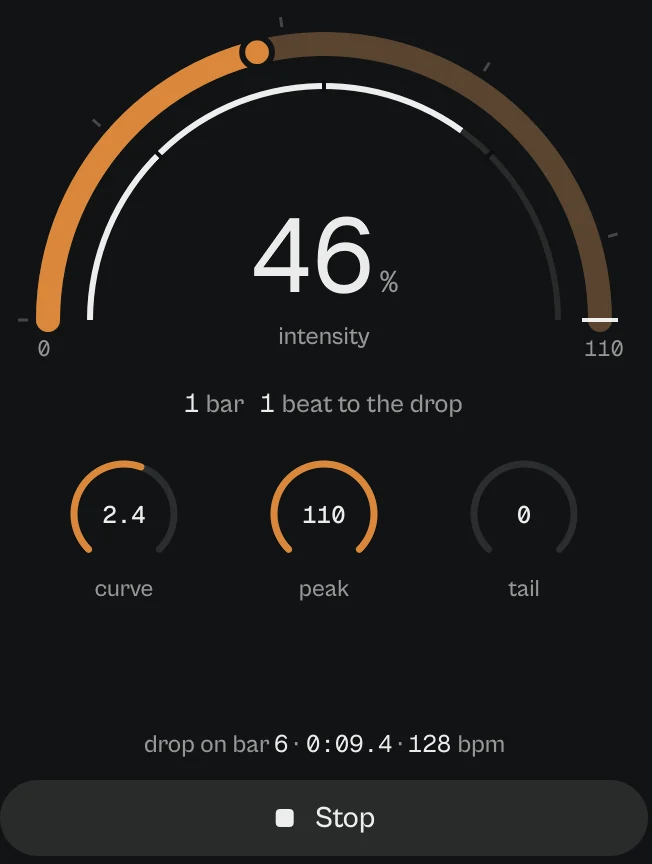
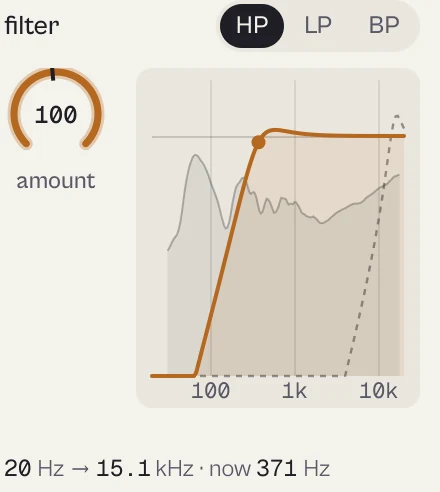
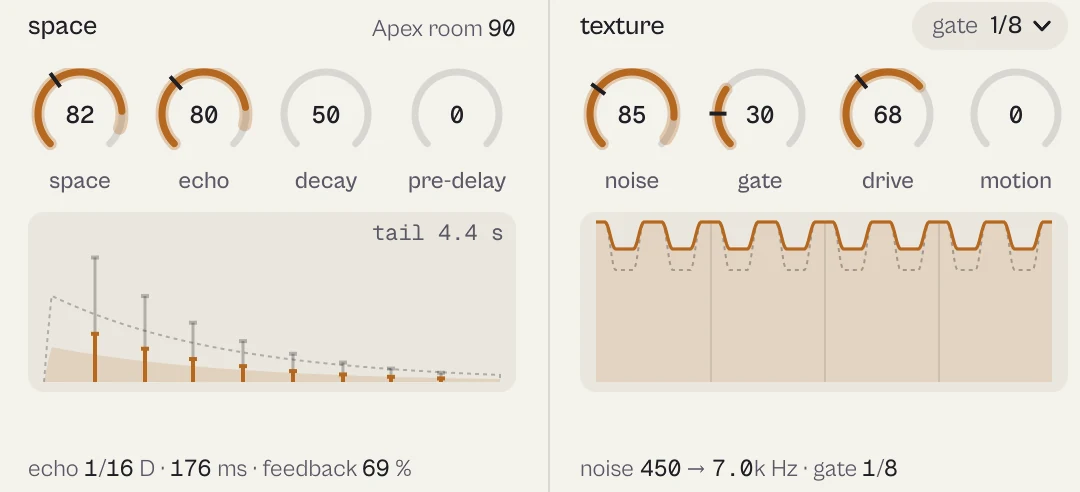
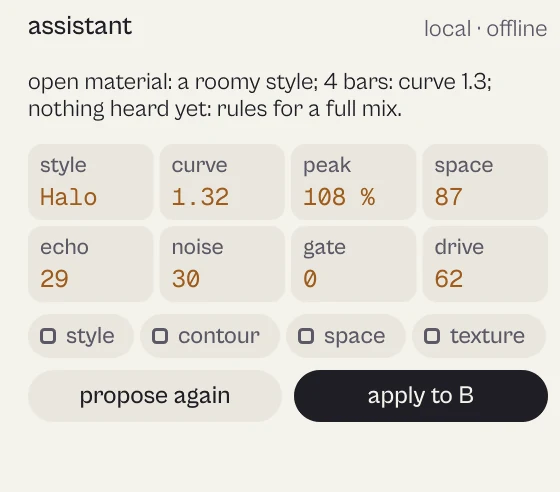
Every picture on this page is a capture of the real interface, from the current build.
Controls
The names are the ones your DAW shows for automation, read from the plugin itself; ranges and defaults are the plugin's own. Every knob: drag (Shift for fine), wheel for small steps, double-click for the default, Enter or a click on the value to type it with units (6k3, 250ms, -3 dB).
Main controls
| Control | Range | Default | What it does |
|---|---|---|---|
| Intensity | 0 % to 110 % | 0 % | Where the build is, 0 to 110 %. Drag the arc or automate it. |
| Bars | 1 · 2 · 4 · 8 · 16 · 32 | 4 | Length of the build: 1, 2, 4, 8, 16 or 32 bars. |
| Direction | Rise · Fall | Rise | Rise (up to the drop) or Fall (from the peak back to the dry track). |
| Style | 01 Air / Soft · 02 Halo / Soft · 03 Echo lift / Soft · 04 Skyline / Medium · 05 Pulse / Medium · 06 Surge / Hard · 07 Apex / Hard | 02 Halo / Soft | Seven characters, from Air (soft) to Apex (hardest). |
| Curve | 0.25 to 4 | 1.8 | The shape of the climb: early, linear, progressive, exponential or last-second. |
| Peak intensity | 20 % to 110 % | 100 % | How far the build goes. |
| Auto drop | Off · On | On | Back to zero exactly on the drop. Off: the build holds the peak. |
| Filter | 0 % to 100 % | 100 % | How far the filter moves. |
| Filter type | High-pass · Low-pass · Band-pass | High-pass | High-pass, Low-pass or Band-pass. |
| Space | 0 % to 100 % | 100 % | Reverb amount. |
| Echo | 0 % to 100 % | 100 % | Echo amount, at the division of the style. |
| Decay | 0 % to 100 % | 50 % | Reverb decay (50 = the style's room). |
| Pre-delay | 0 ms to 200 ms | 0 ms | Reverb pre-delay. |
| Noise | 0 % to 100 % | 0 % | Rising noise. |
| Gate | 0 % to 100 % | 0 % | Rhythmic gate depth. |
| Gate rate | 1/4 · 1/8 · 1/16 · 1/32 · 1/8T · 1/16T · Roll | 1/8 | 1/4 to 1/32, triplets, or Roll (accelerates to 1/32). |
| Drive | 0 % to 100 % | 0 % | Saturation (8x oversampled). |
| Motion | 0 % to 100 % | 0 % | A barber-pole phaser that rises with the build and speeds up toward the drop. |
| Fat | 0 % to 100 % | 0 % | Keeps the riser full while the filter removes the lows. |
| Drop tail | 0 % to 100 % | 0 % | Reverb and echo keep ringing after the drop instead of being cut. |
| Width | 0 % to 150 % | 100 % | Stereo width. |
| Output | −18 dB to 6 dB | 0 dB | Final level. |
| Fallback BPM | 60 BPM to 200 BPM | 120 BPM | The tempo when the host gives none. |
| Rate-true sound | Off · On | On | Keeps the sound the same at every sample rate. |
Every parameter (25)
Numbered parameters are grouped in one row (for example Band 1–8), with the number of copies.
| Parameter | Range | Default |
|---|---|---|
| Intensity | 0 % to 110 % | 0 % |
| Style | 01 Air / Soft · 02 Halo / Soft · 03 Echo lift / Soft · 04 Skyline / Medium · 05 Pulse / Medium · 06 Surge / Hard · 07 Apex / Hard | 02 Halo / Soft |
| Filter | 0 % to 100 % | 100 % |
| Space | 0 % to 100 % | 100 % |
| Echo | 0 % to 100 % | 100 % |
| Width | 0 % to 150 % | 100 % |
| Output | −18 dB to 6 dB | 0 dB |
| Bars | 1 · 2 · 4 · 8 · 16 · 32 | 4 |
| Curve | 0.25 to 4 | 1.8 |
| Peak intensity | 20 % to 110 % | 100 % |
| Auto drop | Off · On | On |
| Bypass | Off · On | Off |
| Fallback BPM | 60 BPM to 200 BPM | 120 BPM |
| Noise | 0 % to 100 % | 0 % |
| Gate | 0 % to 100 % | 0 % |
| Drive | 0 % to 100 % | 0 % |
| Gate rate | 1/4 · 1/8 · 1/16 · 1/32 · 1/8T · 1/16T · Roll | 1/8 |
| Filter type | High-pass · Low-pass · Band-pass | High-pass |
| Direction | Rise · Fall | Rise |
| Decay | 0 % to 100 % | 50 % |
| Pre-delay | 0 ms to 200 ms | 0 ms |
| Fat | 0 % to 100 % | 0 % |
| Motion | 0 % to 100 % | 0 % |
| Drop tail | 0 % to 100 % | 0 % |
| Rate-true sound | Off · On | On |
Presets
74 presets in 9 categories. Each one sets its length in bars.
- House & Techno 12Strobe Runner, Acid Climb
- EDM & Trance 14Mainstage Ignition, Snare Roll Rise
- Trap & Drill 9Bass Escape, 808 Drop-Out
- DJ Sweeps 5DJ High-Pass, Open The Mix
- Uplifters 7White Noise Uplift, Jet Uplift
- Downlifters 8After The Drop, Cathedral Fall
- Cinematic 9Ghost Cathedral, Trailer Hit
- Lo-fi & Tape 5Tape Rewind, Cassette Swell
- Fills & Breaks 5Stutter Fill, Reverse Suck
Click the preset capsule in the top bar to open the preset sheet: search (every word must appear in the name, category or description), categories with their counts, ★ Favourites, tags on every row, and in B, which loads a preset into the slot that is not playing so you can compare. A click loads a preset and leaves the sheet open; ↑ ↓ move, Enter loads and closes, Esc closes. The arrows ‹ › beside the capsule step through the list; a dot says the sound was changed.
All 74 programs, as the DAW lists them
- White Horizon
- Mainstage Ignition
- Strobe Runner
- Velvet Vacuum
- Broken Satellites
- Electric Pressure
- Ghost Cathedral
- Bass Escape
- Glitter Avalanche
- Dry Tension
- Echo Panic
- Slow Orbit
- Neon Tunnel
- Last Second
- Snare Roll Rise
- Underwater Close
- Telephone Climb
- After The Drop
- Sixteenth Shutter
- Triplet Lift
- Cathedral Fall
- Dark Swell
- Laser Band
- Thirty-Second Rush
- Soft Exhale
- Big Room Roll
- Tape Rewind
- Stadium Breath
- Quarter Pump
- Fog Bank
- Siren Sweep
- Gentle Outro
- Hard Stop Tension
- Spaceship Landing
- House Lift
- Techno Tension
- Warehouse Roll
- Acid Climb
- Trance Gate Lift
- Trance Breakdown
- Festival Lift
- Progressive Bloom
- Trap Build
- Drill Slide
- 808 Drop-Out
- DJ High-Pass
- DJ High-Pass Long
- DJ Low-Pass
- Open The Mix
- Bass Return
- White Noise Uplift
- Airy Uplifter
- Gated Noise
- Quick Uplift
- Noise Downlifter
- Impact Tail
- Breakdown Fall
- Cinematic Swell
- Tension Drone
- Trailer Hit
- Lo-Fi Lift
- Tape Stop Filter
- Cassette Swell
- Stutter Fill
- Triplet Fill
- Roll Fill
- Echo Throw
- Reverse Suck
- Barber Rise
- Fat Festival
- Ring-Out Drop
- Jet Uplift
- Phase Cathedral
- Fat Trap Build
A/B and undo
A and B hold two complete settings. equal vol. plays B at the loudness of A, so louder never fools you. in B in the preset sheet loads a preset straight into the other slot. Undo and redo (the curved arrows, Ctrl+Z and Ctrl+Shift+Z) are kept separately for A and B; switching slot is not a step.
Listen modes
ascent has no delta mode. bypass veils the glass and the map says bypass · original sound. Use A/B with equal vol. to compare two builds.
Simple, advanced and sizes
simple keeps the map, the arc and the bridge with its four columns (filter, space, texture, output; at L also the assistant); at S the six lane knobs. advanced opens a drawer with build (curve, peak, drop tail, auto drop, the seven styles, every gate rate) and engine (tempo without a host, rate-true sound, suggest a build); at S also filter and space and texture and output.
Pick a size with S, M and L in the top bar, or drag the window corner. A click on the status line zooms the contents from 75 to 200 %. The help strip in the footer describes the control under the pointer.
More features
Suggest a build
ascent listens to the track and proposes style, curve, peak, space, echo, noise, gate and drive with its own rules, locally and offline, and says why. keep locks groups, propose again gives a variant, apply to B puts it in slot B. The optional online AI uses your own API key and sends only sound statistics.
MIDI start
Any MIDI note starts the build at once, on the exact sample of the note: put it in the piano roll where the build should begin and the drop falls exactly after the chosen bars.
Tips by genre
- EDM and trance
- Mainstage Ignition, Festival Lift, 8 to 16 bars with Roll on the gate.
- House and techno
- House Lift, Techno Tension: gate at 1/8 and a high-pass.
- Trap and drill
- 808 Drop-Out, Triplet Lift: the 808 leaves, triplet gate, dry stop.
- DJ transitions
- DJ High-Pass and DJ Low-Pass: filters only, no volume rise.
- After the drop
- Direction Fall: After The Drop, Cathedral Fall.
CPU and latency
- Latency
- 31 samples, 0.65 ms at 48 kHz.
- Quality
- Drive oversampled 8x. New instances sound the same at 44.1, 48, 96 and 192 kHz and in mono.
- CPU
- About 2.2 % of one core; under 0.2 % at rest.
- MIDI
- Any MIDI note starts the build on its exact sample. MIDI learn from the status line.
CPU: one stereo instance at 48 kHz, 512-sample blocks, on a test signal, as a percent of one core of a recent desktop CPU. Indicative only: your system will differ.
Version and changes
This manual describes ascent 0.9.5. Updates never change how a saved session sounds: when the sound changes, it arrives as a new option or only in new instances.
Latest builds
- 0.9.5 2026-10-24 ["Its own product now: its licence, the Beat Kit's (KIZAMI, KITTO, TATAKIT, FUZZO, ASCENT) or ZOKKU All's unlocks it; old beta trials keep working. Sound and saved sessions unchanged."]
- 0.9.4 2026-10-24 ['Activate online and Activate offline in the licence sheet activate ZOKKU All; a saved session stays byte for byte the same after it is reopened.']
- 0.9.3 2026-10-24 ['A ZOKKU All licence unlocks it too; the free trial is the ZOKKU All one: 7 days, one trial for all eleven.']
Before
- 0.9 Revisited interface: now/peak marks on the bridge knobs, simple/advanced, preset sheet with in B.
- 0.6 Motion, Fat and Drop tail.
Common to every plugin: windows, presets, keyboard and typed values.